If you treat every webinar lead the same, you slow down good leads and flood sales with weak ones.
I’d boil the article down to this: webinar follow-up works better when I sort leads by attendance, engagement, and ICP fit before I score, route, or email them. A person who watched 75%+, asked a question, and clicked a pricing CTA should not get the same path as a no-show. When teams skip that logic, reply rates stay low, MQL counts get bloated, SDR time gets wasted, and reported pipeline gets harder to trust.
Here’s the short version:
- Attendance is not enough - “attended” vs. “did not attend” is too thin for MQL decisions
- Behavior matters - watch time, Q&A, polls, and CTA clicks show buying intent
- Fit matters too - an engaged non-ICP lead is still not the same as an engaged target account
- Routing should be rule-based - high-fit, high-intent leads should go to sales fast
- Nurture should change by segment - no-shows need replay-first follow-up, not the same email as live attendees
- Reporting gets cleaner - segment-level views make webinar pipeline easier to defend in forecast reviews
A few numbers stand out in the piece:
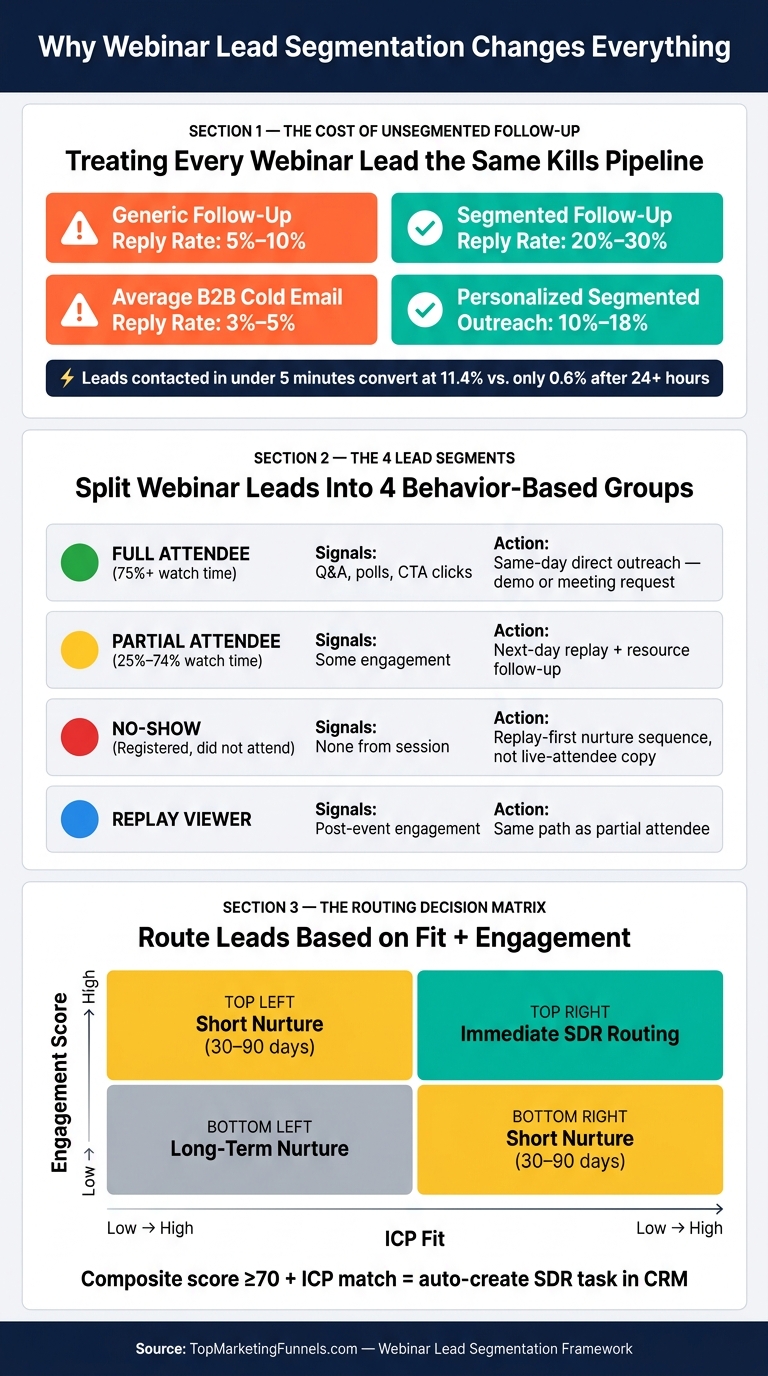
- Segmented follow-up can push reply rates into the 20% to 30% range in some cases, while generic follow-up often sits around 5% to 10%
- Personalized outreach can land around 10% to 18% reply rates, versus 3% to 5% for average B2B cold email
- Leads contacted in under 5 minutes can convert at 11.4%, versus 0.6% after 24+ hours
My take: the article is not saying “send more follow-up.” It’s saying build simple rules inside marketing funnel software like your CRM and MAP so each lead gets the right message, score, and handoff based on what they did and who they are.
That’s the core idea the rest of the article expands on.
Webinar Lead Segmentation: Reply Rates, Routing & Conversion by Segment
Where non-segmented webinar follow-up fails
Why no-shows and engaged attendees should not get the same message
A person who stayed for 45+ minutes, answered polls, and asked an implementation question is not the same lead as someone who registered and never showed up. But without segmentation, both people often get the exact same follow-up.
That’s where things start to break. The engaged attendee gets copy that feels off-topic. The no-show gets an email written as if they were in the room. Fewer replies follow. Same-day follow-up fits high-intent attendees. No-shows need a next-day, replay-first sequence instead. When both groups get the same message on the same timeline, the CTA misses in both directions.
The damage doesn’t stop at email performance. It also weakens qualification.
Why treating attendance as a yes-or-no signal keeps qualification weak
Attendance is a signal. It is not qualification.
A registrant who left after 10 minutes is not the same as a VP at a target mid-market account who watched the full session, answered polls, and clicked a pricing CTA. If both get treated as MQLs, the list gets bloated and SDR time gets burned on weak leads.
Stronger qualification adds more than a simple attended-or-did-not-attend flag. It looks at:
- Watch time
- Q&A activity
- CTA clicks
- Firmographic fit
Those layers matter.
From there, a simple scoring model can sort high-intent attendees from everyone else. Longer watch time, active Q&A, and high-intent clicks should carry more weight than a basic registration or partial view. Only leads that pass a behavior-and-fit threshold should move to MQL status. Without that filter, MQL counts go up while conversion rates slide down.
That’s why attendance alone should never trigger MQL status.
How bad routing and reporting follow from unsegmented leads
When routing checks attendance only, it creates two problems at once.
First, high-intent leads can get buried. A VP from a target account who stayed, engaged, and clicked pricing may end up in a generic nurture track because the system does not recognize how much buying intent they showed. Second, a non-ICP contact who merely attended can get sent straight to an SDR, who now spends time on a lead that was unlikely to turn into pipeline in the first place.
That slows speed-to-lead for the buyers who matter most. In U.S. B2B, many teams aim to respond to high-intent webinar leads in under one business day. If those leads sit in nurture too long, that window gets small fast. And reporting can go sideways too. If leadership only sees top-line numbers like registrants, attendees, and MQLs, without segmented views, they can’t tell which audience slice is driving revenue. At that point, boards and finance teams start asking a hard question: is webinar-reported pipeline real, or is it just inflated volume?
That’s the gap segmentation logic is meant to fix.
sbb-itb-a84ebc4
Segmentation logic that fixes webinar lead flow
Start by segmenting on attendance and engagement
The fix is simple: turn webinar behavior into routing rules.
Start with what each lead did during the event. Split webinar leads into full attendees, partial attendees, no-shows, and replay viewers. Then give each group its own follow-up path. Replay viewers should move through the same path as partial attendees.
Attendance tells part of the story. Engagement fills in the rest.
Watch duration, Q&A questions, poll responses, and in-session CTA clicks show intent in a way attendance alone can't. If someone asks a question or clicks a pricing link during the session, that lead should be flagged right away for faster, more personal outreach. Research shows that attendees who engage through Q&A, polls, or chat are roughly 30% more likely to convert than passive viewers.
Add firmographic fit and intent scoring
Not all attendees deserve the same next step.
A VP of RevOps at a mid-market SaaS company who watched 80% of the session is not the same as a junior analyst at a small, non-ICP company who also watched 80%. When you combine engagement data with ICP fields, SDR routing gets much cleaner. Weight factors like watch time, Q&A activity, CTA clicks, and ICP fit. Then route leads above your sales threshold to SDRs.
For most teams, three buckets do the job:
- Immediate sales follow-up: strong fit and high engagement
- Short nurture (30-90 days): moderate fit or moderate engagement
- Long-term nurture: weak fit, even if engagement looks decent
This keeps SDR time aimed at leads that are more likely to convert and keeps weak leads out of SDR queues.
Build the logic into CRM and automation rules
The key is to put these rules inside your CRM or all-in-one marketing platform so routing happens on its own. The table below shows how each input ties to a data source and an action.
| Segmentation Dimension | Data Source | Downstream Action |
|---|---|---|
| Attendance status (Full / Partial / No-show / Replay) | Webinar platform integration | Segment-specific email |
| Watch duration bucket (<25%, 25-50%, 50-75%, 75%+) | Webinar platform or CRM field | Sales routing |
| Engagement actions (Q&A, polls, CTA clicks) | Webinar platform event data | Priority task |
| Firmographic fit (size, industry, revenue, role) | CRM enrichment / registration form | Routing decision |
| Composite lead score (≥70 = sales-ready) | CRM automation rule | Auto-create SDR task |
Use dropdown fields for attendance status and engagement tier - not free text. Free text wrecks reporting and automation.
Set rules so that when a lead hits a score of 70 or above and matches ICP criteria, the CRM auto-creates a task and routes it to the right SDR based on territory or account assignment. No manual picking.
RevOps should own field definitions and scoring thresholds. Marketing Ops and RevOps should review them every quarter and adjust based on conversion data. Once the rules are live, track what happens to reply rates and routing speed.
After that, the effect tends to show up fast in reply rates, meeting quality, and reporting.
What improves after segmentation is in place
Better reply rates and stronger meeting quality
Segmented follow-up lifts reply rates because the CTA lines up with buyer intent. Personalized outreach can hit 10% to 18% reply rates, compared with the 3% to 5% average B2B cold email reply rate.
That changes how teams should follow up. High-intent attendees - people who stayed for the full session, clicked a pricing link, or asked a question - should get a direct ask, like a demo, a consultation, or a meeting request. No-shows and partial viewers tend to do better with a lighter next step: the replay, a related resource, and an easier path forward.
Cleaner qualification, faster routing, and pipeline reporting you can trust
The upside doesn't stop at replies. Segmentation also sharpens qualification and routing.
MQL and SQL definitions get tighter. MQLs can be set by live attendance, ICP fit, and one high-intent action. SQLs can be reserved for target-account leads with a demo request or a top webinar score.
Speed-to-lead improves at the same time. Research shows that leads contacted in under 5 minutes convert at 11.4%, while those reached after more than 24 hours convert at just 0.6%
With routing rules already in place, high-scoring, ICP-matched attendees move to the SDR queue on their own. That also leads to cleaner attribution - the kind RevOps and leadership teams can stand behind in forecast reviews.
Where to find funnel and RevOps tools
Once segmentation is live, teams can pick tools that support routing and RevOps work. Marketing Funnels Directory lists funnel tools and RevOps vendors that support segmentation and routing.
Advanced HubSpot Lead Segmentation Strategies for B2B Tech Companies
Conclusion: Segmentation turns webinar volume into usable pipeline
Once the routing rules are live, the real test is simple: does segmentation improve revenue quality?
Without it, webinar volume tends to create low-response, weakly qualified leads. Reply rates fall, qualification gets shaky, leads end up in the wrong place, and sales starts to lose trust in webinar-sourced pipeline.
That changes only when the funnel treats each lead segment as a different buying signal. The answer is not more follow-up. It is rule-based routing that matches the message - and the speed of response - to lead quality. High-fit, high-intent leads should move fast. Weak-fit leads should stay in nurture.
Key takeaways for marketers and RevOps teams
The main lesson is straightforward: segmentation is not just a reporting layer. It is the operating system for webinar follow-up. Track replies, meetings, SALs, and opportunities by segment. That makes webinar reporting useful for decisions, not just a record of what happened.
Use a small set of actionable segments - usually 4 to 6 - based on attendance, engagement, fit, and intent.
Then standardize handoff rules, automate routing in your CRM and MAP, and get sales and RevOps aligned on segment definitions. Keep the model simple enough to run and strict enough to trust. When marketing, sales, and RevOps work from the same segment rules, webinar performance becomes more consistent, measurable, and easier to forecast. Segmentation turns webinar results into pipeline that sales and finance can trust.
FAQs
What webinar segments should I create first?
Start with segments based on engagement, intent, and firmographic data.
A simple place to begin:
- High-engagement attendees vs. silent leads or people who left early
- Pricing questions vs. general or intro-level questions
- Industry, company size, and job role
Add geographic segments only if pricing or service options change by region.
This makes follow-up more tailored, helps with qualification, and routes leads with better accuracy.
How should I score engagement and ICP fit?
Use a rule-based or predictive scoring system that blends ICP fit with engagement.
Give points for firmographic and role-based traits like:
- Job title
- Company size
- Revenue
- Industry
Then layer in behavior signals like:
- Pricing page visits
- Demo requests
- Webinar attendance
You can also subtract points for poor-fit leads, such as competitors.
Tie those scores back to your CRM so score thresholds trigger sales alerts or send leads into nurture sequences. Then review and adjust point values every quarter based on sales feedback and conversion results.
How fast should sales follow up with webinar leads?
Sales should follow up with webinar leads as fast as possible. A 24-hour window is a common benchmark, but top-performing teams try to respond in under five minutes because it can improve qualification rates.
For high-intent leads - or anyone who hits a set lead-scoring threshold - immediate routing to sales matters. If that handoff drags, the lead can go cold fast.