Most webinar teams do not need more features - they need better routing. From this list, ON24, Zoom, Demio, Livestorm, and Zapier help during the live or live-to-post stage, while CodeWords and OpenClaw focus on follow-up after the event. If I were picking fast, I’d start with the bottleneck: low engagement, weak routing, or generic follow-up.
Here’s the short version:
- ON24 - best when I want attendee actions tied to pipeline steps
- Zoom - best if I already run webinars in Zoom and want AI add-ons
- Demio - best for SMB teams that want simple engagement-based follow-up
- Livestorm - best for automated delivery and multilingual webinar programs
- Zapier - best for sending webinar actions into CRM and email workflows
- CodeWords - best for lead scoring and drafted outreach after the event
- OpenClaw - best for follow-up sequences based on session behavior
A few pricing points stand out right away: Zoom starts at $15.99/user/month, Zapier starts at $19.99/month, Demio starts at $59/month, and Livestorm starts at $99/month. ON24, CodeWords, and OpenClaw use custom or undisclosed pricing.
How to Use AI for Webinars? From Start to Finish #aimarketing #webinars
sbb-itb-a84ebc4
Quick Comparison
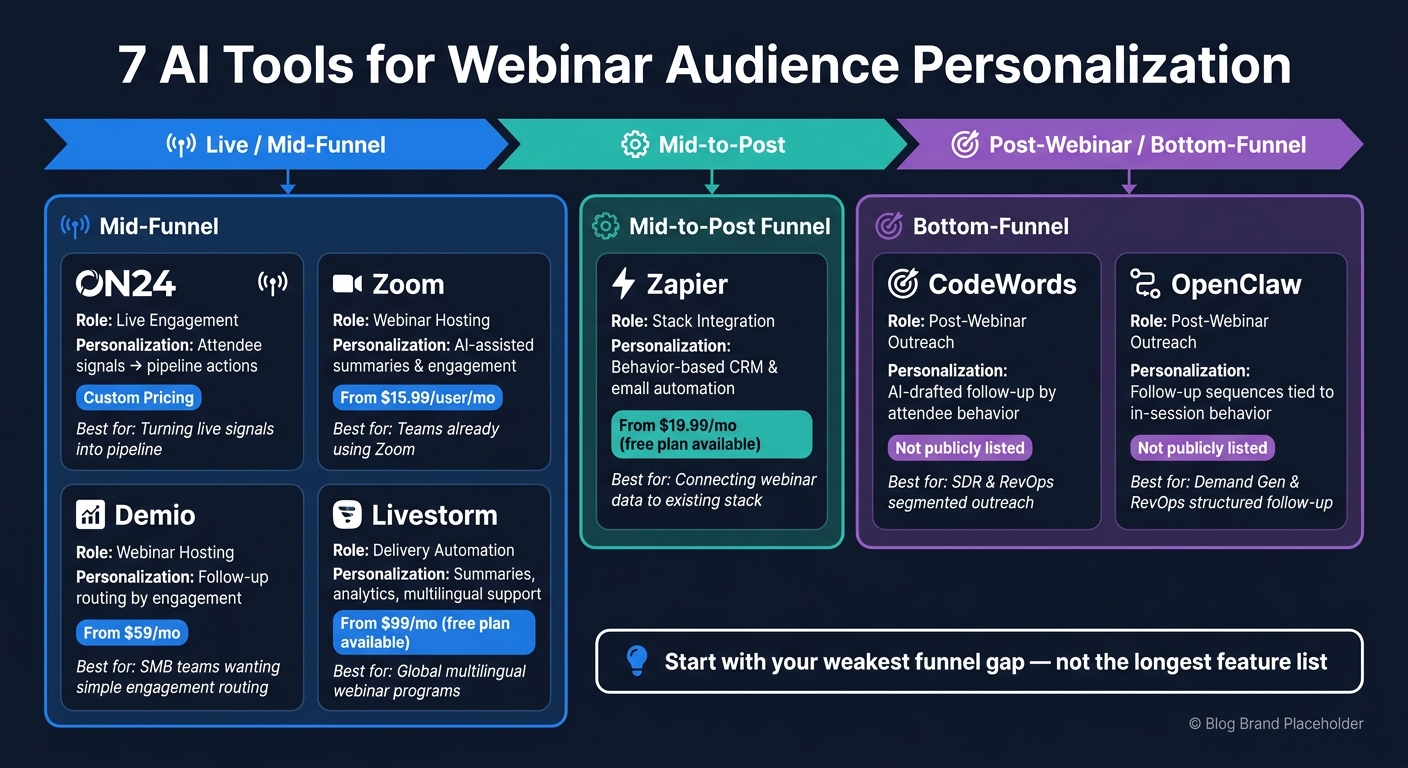
7 AI Webinar Personalization Tools Compared by Funnel Stage & Price
| Tool | Best Use | Funnel Stage | Starting Price |
|---|---|---|---|
| ON24 | Turn live attendee signals into pipeline actions | Mid-funnel | Custom |
| Zoom | Add AI features inside an existing webinar setup | Mid-funnel | $15.99/user/month |
| Demio | Route follow-up by attendee engagement | Mid-funnel | $59/month |
| Livestorm | Automate delivery and support multilingual webinars | Mid-funnel | $99/month |
| Zapier | Connect webinar actions to marketing funnel tools and email software | Mid-to-post | $19.99/month |
| CodeWords | Score leads and draft segmented outreach | Bottom-funnel | Not listed |
| OpenClaw | Build follow-up based on in-session behavior | Bottom-funnel | Not listed |
My takeaway: pick the tool that fixes one weak point first. Live engagement, workflow routing, and post-webinar follow-up are different problems, and this list splits that out in a clean way.
The 7 AI tools for webinar personalization
ON24, Zoom, and Demio
These tools fit at different points in the funnel, and each one covers a different personalization gap.
ON24 is built for the live engagement stage. It helps teams turn webinar signals into pipeline, which matters when attendance data alone doesn't tell you much. Use it when you need more than a list of who showed up. Pricing is custom and requires a sales call.
Zoom is the practical middle ground for teams that want basic AI features inside their current webinar stack. If you're already using Zoom, this can be the simplest path. Pricing for AI add-ons is not publicly listed. Base plans start at $15.99/user/month.
Demio is aimed at SMB and growth teams. It's browser-based and built for marketers who want to run engaging live and automated webinars. Its best use case is follow-up routing based on attendee engagement. For example, someone who answers a poll one way can go into a different follow-up sequence than someone who doesn't engage at all. Pricing starts at $59/month.
Livestorm and Zapier
If your main problem is delivery automation - not segmentation - these tools make more sense.
Livestorm handles webinar hosting and delivery. Its AI-assisted features include automated session summaries, engagement analytics, and localization for multilingual webinars. It's a good fit for teams scaling webinar programs across global audiences. Pricing includes a free plan, with paid plans starting at $99/month.
Zapier is not a webinar platform. It's the connector between your webinar tool and the rest of your stack. If an attendee answers a certain poll, Zapier can trigger a CRM tag, enroll that person in an email sequence, or alert sales. For many teams, it's the fastest way to get behavior-based routing live without custom development. Pricing includes a free plan, with paid plans starting at $19.99/month.
CodeWords and OpenClaw
After the webinar, personalization moves from live interaction to follow-up.
CodeWords works after the webinar ends. It takes in attendee reports, scores leads, and generates AI-drafted outreach for each segment. Use it to turn attendee behavior into segmented follow-up. It's usually best owned by SDR or RevOps teams. Pricing is not publicly listed.
OpenClaw also focuses on post-webinar outreach. It scores leads from attendee data and drafts personalized follow-up sequences based on in-session behavior. Use it when your team needs a more structured follow-up path tied to what each attendee actually did during the session. It's usually best owned by Demand Gen or RevOps teams. Pricing is not publicly listed.
Comparison table: Matching tools to your webinar funnel
Features, funnel stage, and pricing at a glance
This table gives you a fast way to line up each tool with the part of the webinar funnel it helps most.
| Tool | Primary Role | What It Personalizes | Funnel Stage | Starting Price (USD) |
|---|---|---|---|---|
| ON24 | Live engagement | Attendee signals turned into pipeline actions | Mid funnel | Custom pricing |
| Zoom | Webinar hosting | AI-assisted summaries and engagement features | Mid funnel | From $15.99/user/mo |
| Demio | Webinar hosting | Follow-up routing based on attendee engagement | Mid funnel | From $59/mo |
| Livestorm | Delivery automation | Session summaries, engagement analytics, multilingual support | Mid funnel | From $99/mo; free plan available |
| Zapier | Stack integration | Behavior-based automation between webinar and CRM tools | Mid-to-post funnel | From $19.99/mo; free plan available |
| CodeWords | Post-webinar outreach | AI-drafted follow-up segmented by attendee behavior | Bottom funnel | Not publicly listed |
| OpenClaw | Post-webinar outreach | Personalized follow-up sequences tied to in-session behavior | Bottom funnel | Not publicly listed |
If you already know where things are slowing down, skip the table and jump to the scenario that fits.
Which tool fits your buying scenario
Start with the funnel gap, not the biggest brand.
If live engagement is the issue, look at ON24 or Zoom. ON24 turns attendee signals into pipeline actions. Zoom adds AI features to a platform your team may already use.
If the problem is delivery or automation, Livestorm and Zapier make more sense. Livestorm works well for multilingual webinar programs at scale. Zapier connects your webinar platform with your CRM and email tools without custom development.
If your weak spot is post-webinar follow-up, that’s where CodeWords and OpenClaw come in. CodeWords scores leads and drafts segmented outreach. OpenClaw builds follow-up sequences based on what each attendee did during the session.
If you want a simpler setup for live and automated webinars, Demio is the better fit. It routes attendees into different follow-up paths based on in-session engagement.
How to choose the right setup for your team
Start with your weakest funnel gap, not the longest feature list
Use the table above to trim your options, then check each one against the biggest gap in your funnel.
Start with the problem - then look at features. If registrants aren't showing up, that's one issue. If people attend but barely interact, that's another. And if your best leads get the same generic follow-up as everyone else, you're dealing with a post-webinar problem.
Each gap points to a different type of tool. If you want fewer moving parts, pick one tool that closes the biggest gap without forcing changes across the rest of your stack. If your stack is already set, add only the layer that fixes the weak spot: ON24 or Zoom for live engagement, Livestorm for delivery, Zapier for routing, and CodeWords or OpenClaw for follow-up.
| Funnel Gap | Funnel Stage | Tools |
|---|---|---|
| Low attendance | Pre-webinar | Demio, Livestorm |
| Weak in-session engagement | Live | ON24, Zoom, Demio |
| Poor lead qualification | Live-to-post | ON24, Zapier |
| Generic follow-up | Post-webinar | CodeWords, OpenClaw |
Check integrations, reporting, and team ownership
Once you've nailed down the gap, make sure the tool connects to your CRM and that one team owns it from start to finish.
Check for native HubSpot, Salesforce, or Marketo connectors. Reporting should go past raw attendance numbers and support attribution. Team roles should also be clear: Marketing owns content and engagement, RevOps owns routing and data, and Sales owns follow-up. Set that ownership before you buy.
Conclusion: Pick AI webinar tools based on where personalization moves pipeline
After looking at the seven tools side by side, the split is pretty clear. ON24, Zoom, Demio, Livestorm, and Zapier shape the live or live-to-post part of the webinar process. CodeWords and OpenClaw sit on the post-webinar outreach side. So start with the point where your pipeline slows down.
Then, before rollout, make ownership clear. All-in-one platforms tend to fit smaller teams better. Modular stacks make more sense when Marketing, RevOps, and Sales each own a separate part of the workflow.
The best AI webinar tool is the one that fixes the pipeline gap your webinars create.
FAQs
Which tool should I start with first?
Start with GetResponse if you want an all-in-one starting point for webinar personalization and lead nurturing.
It brings webinars, segmentation, behavior-based automation, landing pages, and funnel reporting into one place. That means you can tailor chats and follow-up paths without stitching together a stack of separate tools.
Do I need an all-in-one platform or a modular stack?
It comes down to your business goals, your team’s comfort with personalization, and how much scale you need.
An all-in-one platform like GetResponse puts webinar hosting, email marketing, and landing pages in one place. That can cut down on tool sprawl and make day-to-day work simpler.
A modular stack, on the other hand, links specialized tools through APIs. That gives you a more tailored setup and more flexibility when you want to swap parts in or fine-tune the funnel.
If you’re weighing options, resources like the Marketing Funnels Directory can help you compare vendors and pick the funnel infrastructure that fits.
How do I connect webinar behavior to my CRM?
Use your webinar platform’s built-in integrations - or your marketing automation tool - to send engagement data into your CRM. That includes signals like attendance, poll responses, chat activity, and CTA clicks.
Then map those signals to each lead record. This lets you trigger automated follow-ups or adjust lead scores in real time.
If your setup is more involved, connect systems through APIs with platforms like Salesforce or HubSpot.