Most blog posts fail for one simple reason: they don’t tell the reader what to do next.
If I want a blog post to help drive leads, I give it one funnel stage, one matching offer, and one clear CTA. Then I connect that CTA to the right path - like an email signup, a download form, or a demo booking page. That’s how I turn traffic into leads instead of letting readers leave.
Here’s the article in plain terms:
- I sort each post into awareness, consideration, decision, or conversion
- I look for posts with high buying intent, not just high traffic
- I match each post with one next-step offer
- I add a CTA that fits the reader’s stage
- I route leads into the right follow-up flow using marketing funnel software
- I track demo bookings, form fills, SQLs, and pipeline value in $USD
A few numbers make the case:
- Bottom-of-funnel “alternative” pages can convert to demos at 14.3%
- Top-of-funnel educational posts may convert at only 0.06%
- Instant scheduling can lift booked meetings to 66.7% of qualified form fills, vs. 30% when follow-up is slow
- Gating pricing or integration pages can block 60% to 80% of high-intent visitors
The core idea is simple: don’t ask every reader to do the same thing. Match the ask to intent, keep friction low, and track revenue impact - not just pageviews.
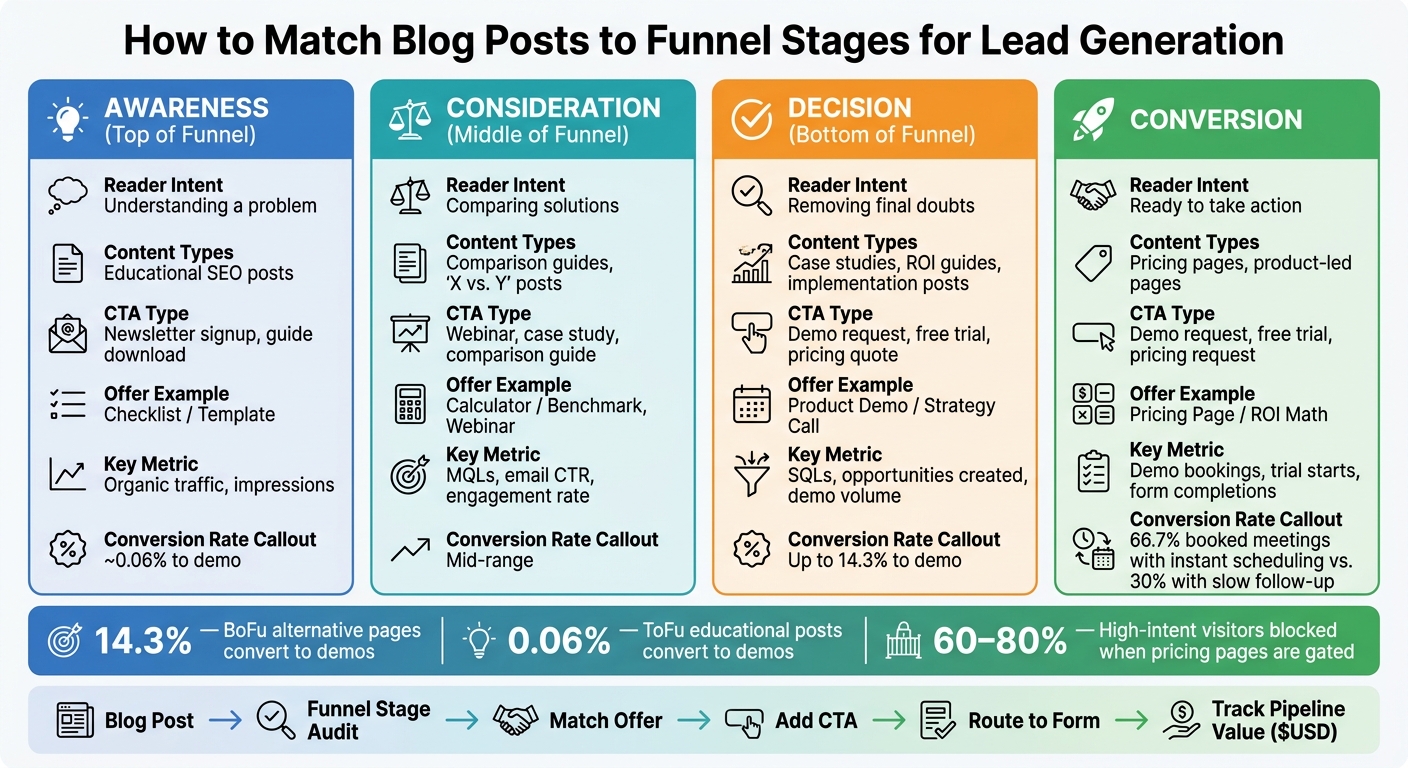
Blog Post Funnel Stage Mapping: CTAs, Offers & Conversion Rates
Define Funnel Stages and Audit Your Existing Posts
Map each post to one buyer stage: awareness (the reader has a problem), consideration (the reader is weighing options), decision (the reader wants proof), or conversion (the reader is ready to act).
This matters more than it may seem. A stage mismatch leaks pipeline. Top-of-funnel posts often bring in most of the traffic but only a small number of demo requests. Bottom-of-funnel posts usually get fewer visits, but they drive far more bookings.
Assign One Clear Stage to Each Post
Use your audit to sort posts by reader intent, not just topic. Ask:
- What is the reader searching for?
- How close is the topic to your product?
From there, the sort gets pretty simple. Educational SEO posts fit awareness. Comparison guides and "X vs. Y" posts fit consideration. Case studies, implementation guides, and ROI-focused content fit decision. Pricing pages and product-led pages fit conversion.
Each post should serve one primary stage. When a post tries to do too much, the CTA usually misses the mark. For example, asking for a demo from someone who has only just realized they have a problem is a common mistake. That kind of mismatch can cause leads to drop off or unsubscribe. If a post seems to fit two stages, split it into two separate pieces.
Build a Simple Content Audit Sheet
You don't need a huge system to start. A spreadsheet with seven fields is enough. For each post, track the:
- URL
- Title
- Target keyword
- Business problem the post addresses
- Current CTA
- Traffic volume
- Current conversion actions such as leads generated or CTA clicks
| Funnel Stage | Reader Intent | CTA Type | Primary Success Metric |
|---|---|---|---|
| Awareness | Understanding a problem | Newsletter signup, guide download | Organic traffic, impressions |
| Consideration | Comparing solutions | Webinar, case study, comparison guide | MQLs, email CTR, engagement rate |
| Decision | Removing final doubts | Demo request, free trial, pricing quote | SQLs, opportunities created, demo volume |
| Conversion | Ready to take action | Demo request, free trial, pricing request | Demo bookings, trial starts, form completions |
Once the sheet is in place, track the numbers that show business impact: conversion rate, opportunity creation, pipeline value in USD, and demo volume. Traffic by itself won't tell you if a post is moving people through the funnel. Pipeline value will.
Use the audit to spot posts with the strongest lead intent, then pair each one with a single offer.
sbb-itb-a84ebc4
Choose High-Intent Posts and Match Them to Offers
Spot Lead Intent in Your Blog Library
Use your audit sheet to rank posts by buyer intent. Traffic alone doesn't make a post worth turning into a lead page. What matters is how close the reader is to making a choice.
Start with posts where the reader is already in decision mode - looking for a fix, comparing vendors, or building the case for a purchase inside their company. These are the posts closest to revenue, so they should go first.
Your audit sheet already gives you the clearest signals: keyword, current CTA, and conversion actions. Put extra weight on posts built around comparison terms like "HubSpot vs. Salesforce", alternative searches, pricing topics, and use cases tied to a specific industry. These are usually your best bets.
The conversion gap makes the point. Bottom-of-funnel "alternative" pages convert to demos at 14.3%, while top-of-funnel educational posts convert at about 0.06%. That's why BoFu content should get your first pass.
It also helps to review sales call recordings. Listen for the objections buyers bring up, the competitors they mention, and the phrases they repeat. Then use that same wording in your top-priority posts. If prospects keep saying it on calls, it belongs on the page.
Assign One Next-Step Offer Per Post
After you've picked your high-intent posts, give each one one clear next step. Generic CTAs like "Contact Us" are vague. They don't tell readers what happens next. A specific offer sets expectations and cuts friction.
Match the offer to the reader's stage in the buying process. Here's the simple way to map it:
| Offer Type | Best Funnel Stage | Next Step |
|---|---|---|
| Checklist / Template | Awareness (ToFu) | Newsletter signup or guide download |
| Calculator / Benchmark | Consideration (MoFu) | Email capture or follow-up sequence |
| Webinar / Comparison Guide | Consideration (MoFu) | Registration form or nurture flow |
| Product Demo / Strategy Call | Decision (BoFu) | Demo booking form |
| Free Trial / Paid Pilot | Decision (BoFu) | Trial signup or sales handoff |
| Pricing Page / ROI Math | Decision (BoFu) | Pricing request or direct sales contact |
Stick to one offer per post. Then place it inside the article and send clicks to the right form, demo, or email flow.
Next, put that offer on the page and route readers into the right CTA, form, or nurture flow.
Add Stage-Specific CTAs and Route Readers Into the Right Flow
Place Low-Friction or High-Intent CTAs Based on Stage
Once the offer is set, put it where the reader is most likely to act.
Awareness posts should point to low-friction offers, like a guide download or an email mini-course. Decision-stage posts should use direct asks, like "Book a Demo" or a pricing page.
Placement matters too. Inline links work well for softer offers. Mid-post callouts fit longer posts. End-of-post blocks reach warmer readers. And behavior-triggered overlays can work for repeat, high-intent visits.
Don’t gate bottom-of-funnel pages like pricing or integration pages. That move can stop 60% to 80% of high-intent visitors from converting. Let people read the page first. Then send them to a form when they’re ready to submit.
Once someone clicks, the form should move that lead into the right follow-up path.
Connect Forms, Email Nurtures, and Demo Routing
The form is where routing starts, often built using tools like ClickFunnels. Keep it short.
- For newsletter sign-ups, ask for an email address only.
- For content downloads, ask for a name and business email.
- For demo requests, add a "How did you hear about us?" field to capture attribution data that analytics tools often miss, including AI search recommendations or dark social. To capture these leads initially, many brands use Buffer to grow their audience on social platforms.
After submission, route each lead by stage and intent. A TOFU signup should start a welcome sequence that teaches the problem before it brings in the product. A MOFU offer should go into a nurture track tied to the topic that lead engaged with. A BOFU demo request should go straight to sales, with an immediate scheduling option if possible.
That last part matters a lot. Letting prospects pick a time slot right away lifts booked meetings to 66.7% of qualified form fills, compared to a 30% industry average when follow-up is delayed.
Tag every lead by source post, entry stage (TOFU / MOFU / BOFU), and the exact offer they claimed. That gives your CRM a clean path from blog traffic to pipeline, so you can see which posts are driving revenue instead of just pageviews.
Pick Tools That Support Reporting and RevOps Visibility
Choose tools that keep source, stage, and offer data attached to each lead after submission.
You’ll want:
- Scheduling tools that let people book right away
- Form and CRM tools that auto-tag source, stage, and offer
- Systems that pass this data into your CRM and reporting
HubSpot, Marketo, and ActiveCampaign can handle segmentation and automatic handoff when a lead qualifies.
Measure Results and Repeat the Process Across More Posts
Track the Metrics That Show Funnel Value
Once routing is live, you can see which posts are actually moving leads forward. At this stage, stop staring at pageviews and start looking at pipeline. Traffic tells you how many people showed up. Pipeline tells you whether the post is making money.
Match your metrics to the buyer's stage. For nurture content, watch email engagement. For decision-stage content, track demo bookings, SQLs, opportunity creation, and pipeline value in USD. Use URL-level conversion events in GA4 so each post ties back to bookings and form fills. Then attribute every form fill or booking to the source post. Track pipeline, not traffic.
With attribution in place, the next move is simple: scale the posts that convert.
Conclusion: Start With a Few Posts and Scale What Converts
Start with two or three high-intent posts. Prove the funnel first, then use the same structure across similar content. You can also explore a directory of marketing funnel tools to find software that automates this tracking. Keep the posts that work, retire the ones that don't, and refresh the winners every quarter.
FAQs
How do I know which funnel stage a blog post belongs to?
Look at the search intent behind the post first.
- ToFu: educational topics and broad problem-solving searches
- MoFu: trust-building content, comparisons, and solution-focused topics
- BoFu: high-intent searches like brand terms, pricing, comparisons, or use-case “best” lists
If the intent isn’t clear, talk to sales or customer success. They can tell you the exact words buyers use and the pain points that come up right before a purchase.
What makes a blog post high intent instead of just high traffic?
High-intent blog posts line up with where someone is in the buyer’s journey and what they want to do next.
High-traffic posts usually go after broad educational keywords. High-intent posts do something different. They focus on terms tied to solution research and buying decisions - things like competitor alternatives, pricing, and specific use cases.
These posts usually come straight from sales calls and internal conversations. That matters because they use the same language readers use, speak to clear pain points, and point people toward the next step that fits - like booking a demo.
What should happen after someone clicks the CTA?
After a visitor clicks a CTA, send them down the path that fits their funnel stage and intent. If they take a high-intent action - like viewing your pricing page or downloading a specific resource - move them to the next step right away.
That next step might be an email nurture sequence, a demo request, or a sales alert. Skip generic follow-up. Send content that matches the problem they care about or the feature they clicked on.