I use fit to decide who belongs in the sales queue and behavior to decide when to follow up. Keep those scores separate, and set rules using 6-12 months of opportunity data rather than guessed point values.
Here’s the difference:
- Behavioral scoring tracks actions such as demo requests, pricing-page visits, and trial use to guide follow-up timing.
- Demographic scoring uses job title, seniority, and buying role to guide contact selection and messaging.
- Firmographic scoring uses industry, company size, location, and tech stack to guide account selection and assignment.
Quick Comparison
| Criteria | Behavioral | Demographic | Firmographic |
|---|---|---|---|
| Measures | Recent engagement | Contact fit | Account fit |
| Data sources | Analytics, email, CRM, product activity | Forms, CRM, enrichment | Account records, company databases |
| Changes when | New activity occurs or old activity loses weight | Contact details change | Company details change |
| Guides | Follow-up timing | Persona-based outreach | Territory and ownership |
| Main risk | Activity mistaken for buying intent | Title mistaken for authority | Company fit mistaken for readiness |
My rule: <u>scores prioritize follow-up; sales confirms qualification.</u> Filter bots and duplicate activity, keep missing data separate from poor fit, and apply exclusions and ownership rules before routing. Then check sales acceptance, opportunities, and revenue - not lead volume alone.
HubSpot Lead Scoring With Explicit (Demographic) and Implicit (Behavior) Custom Score Properties
sbb-itb-a84ebc4
Behavioral, Demographic, and Firmographic Scoring Compared
Each scoring model supports a different routing decision: behavior helps determine when to follow up, demographics guide messaging, and firmographics guide account assignment.
| Comparison area | Behavioral scoring | Demographic scoring | Firmographic scoring |
|---|---|---|---|
| Question answered | What recent behavior suggests interest? | What buying role does this person play? | Does this account fit our ICP? |
| Inputs | Website visits, pricing-page views, demo requests, email clicks, event attendance, trial usage, replies, CRM activity, intent signals | Job title, seniority, department, geography, buying role | Industry, employee count, annual revenue, region, technology stack |
| Sources | Website and product analytics, marketing automation, CRM, email systems, event platforms, and third-party intent providers | Forms, CRM records, enrichment platforms, event registrations, and sales research | Company forms, CRM account records, firmographic databases, enrichment providers, and technology-detection tools |
| Update frequency | Often real time or daily; focus on recent activity | When a contact record changes or is enriched | When account data changes or enrichment is updated |
| Scope | Individual contact or aggregated account activity | Individual contact | Company or account |
| Primary sales use | Follow-up timing | Persona-based messaging | Territory and account assignment |
Behavioral Scoring: Data Sources and Rules
Set weights for pricing-page visits, demo requests, and meaningful trial activity based on actual conversion outcomes. Review 6-12 months of opportunity data rather than copying one-size-fits-all point values. Add repeat-engagement rules and score decay, but first filter out bots, duplicate events, internal traffic, and automated email activity. Without those filters, frequent low-quality actions can outweigh stronger signals.
Treat first-party activity as behavior. Treat third-party intent as a signal, not proof, until other evidence supports it.
Demographic and Firmographic Scoring: Fit Criteria
Standardize job titles and seniority before scoring personas. A title alone does not prove buying authority. Keep company-level criteria - industry, employee count, annual revenue, region, and technology stack - in account fields.
Score ICP matches and confirmed exclusions. Keep “unknown” separate from “poor fit” so missing data prompts research rather than rejection.
Sales Follow-Up and Territory Assignment
| Model | Sales use | Routing role | Qualification limit |
|---|---|---|---|
| Behavioral | Choose follow-up timing and which activity to reference | Trigger alerts, tasks, or nurture changes | Activity does not establish an active purchase |
| Demographic | Match messaging to the person’s responsibilities | Select persona-based outreach and identify stakeholder gaps | A relevant title does not confirm authority, budget, or urgency |
| Firmographic | Prioritize commercially suitable accounts | Assign territory, segment, or named-account owner | Company fit does not establish a buying project |
Routing should retain contact-level detail alongside account-level activity. Combine relevant engagement across stakeholders, but show the sales representative who acted, what they did, and when. Route anonymous activity to account research, not direct outreach.
Clean data and stable thresholds are needed for these routing rules to work.
Scoring Strengths, Limits, and Data Risks
Stale, duplicated, or misattributed data can send leads to the wrong destination. These risks determine when teams should validate fit and engagement before routing.
| Model | Strengths | Limits / common misreads | Data-quality needs |
|---|---|---|---|
| Behavioral | Tracks recent engagement and active research as prospects interact | Research and low-value activity can look like buying intent; duplicate events, anonymous traffic, and shared devices can inflate scores or assign activity to the wrong person | Reliable tracking, identity resolution, bot filtering, consent-aware collection, event weighting, recency rules, and score decay |
| Demographic | Helps assess contact-level fit | Inconsistent titles or missing role data can overstate authority; seniority does not prove budget access or an active project | Current titles, departments, locations, role mappings, and checks against CRM and enrichment data |
| Firmographic | Identifies accounts that match the ideal customer profile | Large or well-known companies may not match the use case; outdated or estimated size and revenue can distort routing | Updated enrichment, consistent industry and size definitions, account deduplication, and rules for missing or conflicting fields |
The next step is to combine fit and engagement in a routing matrix rather than merge them into a single score.
Why Engagement Can Overstate Buying Intent
Low-intent clicks, research activity, and poor-fit accounts can inflate engagement scores. Cap repeated events instead of counting every interaction as separate evidence.
Keep anonymous activity separate from confirmed person-level activity. A corporate network does not prove who took an action. Record match confidence and consent status, respect tracking choices, and let teams correct events assigned to the wrong person. Engagement should trigger qualification, not a claim of purchase intent.
Why Fit Does Not Prove Sales Readiness
Stale enrichment can link a contact to a former employer or route an account based on outdated company details. Inconsistent titles and incomplete buying-role data can also make a contact seem to have more authority than they do. Store each field’s source and last-updated date, keep the original title alongside its normalized role, and send conflicting records for review before routing.
Company size does not prove need, budget, or timing. Do not route on size alone when those factors remain unverified.
Combining Fit and Engagement for Lead Routing
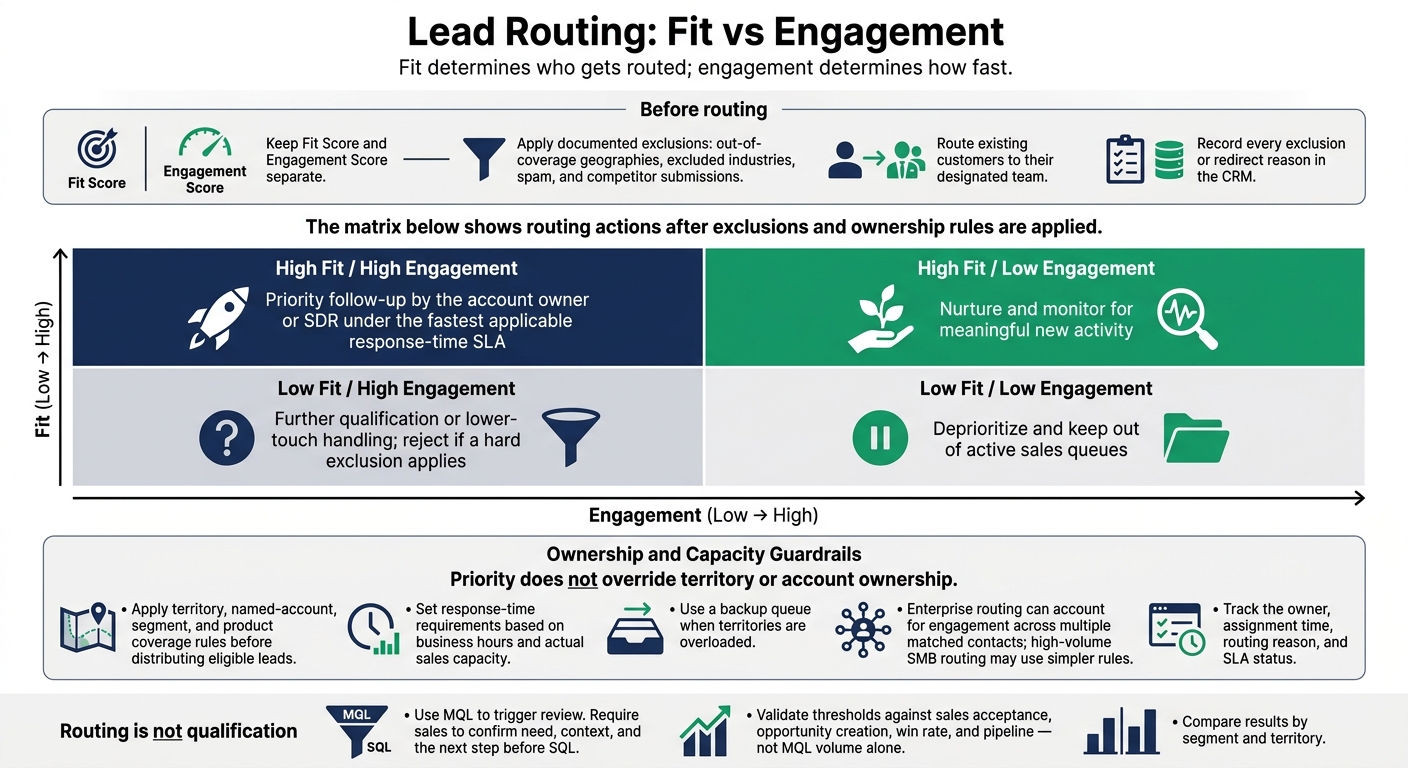
Lead Routing: Fit vs Engagement
Score fit and engagement separately, then combine them for routing, not qualification. Fit identifies eligible accounts; engagement sets follow-up speed. Before routing, apply documented exclusions for out-of-coverage geographies, excluded industries, spam, and competitor submissions. Route existing customers to their designated team, and record every exclusion or redirect reason in the CRM.
Fit and Engagement Routing Matrix
Fit determines who gets routed; engagement determines how fast. Use both scores to prioritize eligible leads, then apply ownership and capacity rules. The matrix below shows routing actions after exclusions and ownership rules are applied.
| Fit | Engagement | Routing action |
|---|---|---|
| High | High | Priority follow-up by the account owner or SDR under the fastest applicable response-time SLA |
| High | Low | Nurture and monitor for meaningful new activity |
| Low | High | Further qualification or lower-touch handling; reject if a hard exclusion applies |
| Low | Low | Deprioritize and keep out of active sales queues |
Priority does not override territory or account ownership. Apply territory, named-account, segment, and product coverage rules before distributing eligible leads. Set response-time requirements based on business hours and actual sales capacity. Use a backup queue when territories are overloaded.
Enterprise routing can account for engagement across multiple matched contacts; high-volume SMB routing may use simpler rules. Track the owner, assignment time, routing reason, and SLA status.
Scoring Thresholds, Validation, and Governance
Before automating handoffs, agree on and document these rules:
- Documented ICP: Define serviceable industries, company-size bands, geography, buying roles, and exclusions.
- Shared lifecycle stages: Agree on MQL, sales-accepted lead (SAL), SQL, recycling, and rejection rules.
- Clean CRM records and account matching: Require valid ownership, resolved duplicates, and correct contact-to-account links before routing.
- Agreed qualification: Use MQL to trigger review. Require sales to confirm need, context, and the next step before SQL.
Validate thresholds against sales acceptance, opportunity creation, win rate, and pipeline - not MQL volume alone. Compare results by segment and territory. Review rejected high-scoring leads and leads that were initially deprioritized but later created opportunities. Record score components and rule versions so sales can explain each decision.
Governance should cover applicable U.S. privacy requirements, tracking preferences, retention, access controls, and cross-system deletion or suppression. Get legal guidance where needed.
Tool Integrations and Pipeline Reporting
Once routing rules are stable, check whether your tools support them. Assess only the integrations you need: CRM, marketing automation, enrichment, analytics, and intent providers where coverage justifies the cost. Check field synchronization, event delivery, account matching, scoring transparency, and routing audit logs. Marketing Funnels Directory is a discovery resource for funnel tools and RevOps vendors, not a scoring system.
Report accepted leads, SQLs, opportunities, pipeline value, and revenue for each quadrant. Include time to first touch and conversion rates by source and segment. Display monetary values consistently in U.S. dollars so reporting shows whether routing produces pipeline, rather than just more scored records.
Conclusion: Use Fit and Engagement Together
Demographic and firmographic scoring measure fit. Behavioral scoring measures current buying activity. Fit determines which accounts qualify for outreach; engagement sets the timing.
Keep Fit Score and Engagement Score separate in the CRM, even if you also display a blended total. Separate fields make routing easier to audit and handoffs clearer. They also keep useful leads from getting buried in a single number.
Check routing against sales acceptance, close rates, false positives, and false negatives. Review misrouted leads and track whether high-scoring leads became closed-won customers.
Use scores to prioritize follow-up, then have sales confirm readiness: need, authority, budget, and timing. Apply fit + engagement + sales confirmation: fit determines eligibility, engagement signals urgency, and sales confirms qualification. Measure the model by pipeline quality, sales acceptance, opportunity creation, and revenue - not lead volume.
FAQs
How do I score leads without enough historical data?
Define your ideal customer profile (ICP) using the industry, company size, and revenue of your highest-value clients. Then build a simple, rule-based scoring model in your CRM. Add points for firmographic attributes that match your ICP and subtract points for prospects that don’t fit.
Use third-party enrichment tools to fill gaps in firmographic data. As new leads come in, adjust scoring weights based on early conversion patterns and feedback from your sales team.
How do I set score decay for my sales cycle?
Reduce scores for inactive leads to prevent score inflation and keep your sales queue aligned with current intent. For most B2B cycles, use a 14- to 30-day half-life:
score = raw_points * 0.5 ^ (days_since_activity / half_life)
If your CRM doesn’t support exponential decay, apply fixed reductions instead: reduce scores by 20% to 25% after 30 days, by 50% after 60 days, and reset them to zero after 90 days.
How often should I recalibrate fit and engagement thresholds?
Review your lead scoring model at least quarterly to keep it aligned with market shifts and sales performance. Many teams also review conversion data monthly and adjust point values.
Recalibrate immediately when conversion rates or lead quality decline, sales reports that more than 20% to 30% of leads are misaligned, or high-score lead performance falls approximately 20% compared with prior periods. Adjust scoring thresholds and weights to reflect those changes.