Most B2B teams do not need more data - they need better rules and marketing funnel software. If buyers finish 60% to 70% of research before talking to sales, you need a way to spot buying motion early, filter weak signals out, and send the right accounts to the right next step.
Here’s the short version:
- I look at behavior first, not just company fit
- I treat patterns across people and time as stronger than one click
- I keep fit, engagement, intent, and account activity separate
- I use behavior to drive pages, email, chat, demo routing, and sales handoff
- I measure success by opportunities, pipeline value, and time to first sales touch - not clicks alone
- I put consent, suppression, and routing rules in place before scaling
A simple rule stands out: do not send sales after one action. Wait for at least two separate signals - like pricing-page activity plus a form fill, chat, or repeat visits from more than one person at the same company.
I’d also keep the setup plain:
- Low intent → nurture
- Mid intent → personalize next touch
- High intent → check fit, stop generic nurture, route to sales
The article also makes one point that many teams miss: account-level activity often tells you more than lead-level activity. If three people from one company hit pricing, product, and buying-guide pages in a short window, that usually means more than one active lead score.
So the goal is simple: turn behavioral signals into pipeline without wasting sales time or using weak data the wrong way.
Build the data model and segmentation rules
Before you get into personalization or automation, your data model needs to do one job well—leveraging the right marketing funnel resources: connect accounts, contacts, activities, campaigns, opportunities, and outcomes - then tie those signals to the next pipeline action.
That starts with stable IDs. Don’t rely only on email addresses. A contact ID ties activity to one person. An account ID rolls up activity from multiple people at the same company. You should also track consent or processing status so segments stay clean and automation doesn’t hit the wrong people at the wrong time.
After that, the key question is simple: which signals can the system trust?
Behavioral data sources that support funnel decisions
Each source should answer a clear funnel question. In practice, that usually means changing routing, personalization, suppression, or sales handoff.
- Website analytics: page views, frequency, source
- CRM: owner, stage, open opportunity
- Marketing automation: enrollment, clicks, submissions
- Chat: questions, objections, follow-up request
- Booking tools: booked, attended, rescheduled, no-show
Prioritize clicks and replies over opens. Opens are less reliable because of privacy filtering and automated scanning. Product or trial usage - activation, key feature use, active-user count, and usage frequency - is often a stronger signal because it shows actual engagement, not passive content consumption.
For each source, document the owner, refresh frequency, identifier used, permitted use, and the action it can trigger. That step keeps data from piling up without a clear job to do.
Once those sources are set, turn them into clear entry, exit, and suppression rules.
Segment rules, recency windows, and exclusions
Each segment should define an entry condition, an exit condition, a recency window, a frequency cap, and suppression criteria. HubSpot supports three practical rule types: field-based criteria such as industry or lifecycle stage, event-based criteria such as page views or email activity, and time-based criteria such as activity within the last 30 days.
A few segments are worth building first:
- High-intent contact: Pricing page viewed twice in 14 days; not customer, competitor, or employee; no open support case.
- ICP education sequence: ICP account; downloaded a product guide in 30 days; visited integration content in 14 days.
- Account-level momentum: At least two contacts from the same account engaged with high-intent content in 30 days.
- Reactivation: Previously engaged contact returns after 60+ days of inactivity and revisits a product or use-case page.
Exclusions matter just as much as entry rules. Suppress current customers from acquisition campaigns, open opportunities from generic nurture emails, disqualified accounts from sales alerts, and contacts already in an active sales sequence from overlapping automation.
When rules compete, active opportunities and booked meetings come first.
Your recency windows should match how buyers act:
- 7-14 days for pricing or demo activity
- 30-60 days for content evaluation sequences
- Longer windows for enterprise cycles, with decay applied so old activity doesn’t keep a contact inflated forever
Scoring fit, engagement, intent, and account activity
Rolling everything into one score sounds neat, but it creates bad ranking. A big company with weak fit can outrank a smaller ICP account. A contact who opens every email can look more sales-ready than someone who hit the pricing page twice.
Keep four scores separate.
| Score | What it measures | Example inputs |
|---|---|---|
| Fit score | How closely the company and person match your ICP | Industry, company size, role, region, tech stack |
| Engagement score | Volume and recency of interactions across owned channels | Page views, email clicks, content downloads, webinar attendance |
| Intent score | Strength of signals suggesting active research or buying | Pricing visits, comparison content, demo requests, ROI calculator use |
| Account score | Combined buying signal across all contacts at one company | Engaged-contact count, coordinated activity, open opportunity status |
Here’s the clean way to think about it: fit decides eligibility, engagement measures interaction, intent points to buying motion, and account score drives handoff.
Keep fit and behavior separate. Then calibrate thresholds against 12-24 months of closed-won, closed-lost, and disqualified records, using the 30-60 days before sales conversations to isolate the behaviors that predicted conversion.
Those separate scores should then drive action. Use lower thresholds for nurture, mid-range thresholds for chat personalization, and the highest threshold for sales review. Recalibrate quarterly, or after any meaningful change to your ICP, product, or sales process.
These scores now decide what landing pages, emails, and chat prompts each account sees next.
sbb-itb-a84ebc4
Activate targeting across landing pages, email, and chat
Use these segments to run one connected journey, not three separate campaigns. That matters because channel consistency cuts down the distance between early interest and a sales conversation. When landing-page changes, email triggers, and chat routing all use the same segment rules, you can track movement from engagement to meeting to opportunity instead of guessing at it.
Landing page personalization by source, persona, and stage
Change the headline, proof points, case study, form length, and CTA - but keep the layout the same. Use source, persona, and stage to swap in the right proof and CTA. For example, a returning pricing-page visitor should see implementation, security, and procurement proof with a "Plan implementation" CTA, not another content download.
Personalized pages tend to convert better than generic ones. The reason is pretty simple: when the page fits the buyer's situation, there's less friction at the moment they need to decide.
Forms should match intent too. Early-stage visitors should get a short form and a low-friction resource CTA. A returning high-fit account that has already shared contact details might see a one-field form to book a technical evaluation, plus one qualifying question like implementation timeline.
Once the page lines up with the visitor, email and chat should carry that same intent into a booked conversation.
Email and chat triggers that reflect buyer behavior
Behavioral email works best when each trigger answers the buyer's next question:
- download → education
- product-page visit → proof
- repeated engagement → objection content
- pricing return → sales invite
If a higher-intent trigger fires, suppress lower-priority workflows. Set a send cap of no more than two or three behavioral emails per contact in seven days. And move current customers out of prospect flows entirely into support, expansion, or product-adoption paths.
Chat routing should follow the same logic, just in real time. A high-fit account returning to pricing during staffed hours should get a sales prompt routed to a sales specialist. A visitor reading integration documentation should reach a solutions engineer, not a generic bot. Low-intent or anonymous visitors should stay in self-service flows. Trigger prompts only after meaningful engagement or a second visit.
Channel reference table for activation choices
Use this table as a working reference when deciding which channel to activate for a given segment and signal.
| Channel | Signal used | Speed | Inputs | Risk | Pipeline objective |
|---|---|---|---|---|---|
| Landing-page personalization | Source, persona, industry, stage, prior page views, integration interest | Immediate | Consent-aware web data plus campaign or CRM context | Medium - excessive changes can feel inaccurate or expose inferred traits | Increase relevant engagement and conversion to the next stage |
| Email automation | Downloads, product or pricing visits, clicks, repeated engagement, lifecycle stage | Minutes to hours, subject to send rules | Known contact identity, permission, event tracking, and suppression logic | High if sends overlap or behavior is stale | Educate, resolve objections, and create qualified conversations |
| Chat routing | Pricing return, high-fit product activity, integration interest, account status | Real time during coverage hours | Visitor or account identification, intent rules, routing ownership, staffing | High if prompts interrupt research or route customers incorrectly | Convert high-intent activity into meetings or sales-assisted qualification |
Next, connect these triggers to demo booking, attendance, and no-show recovery.
Orchestrate demo flows and account handoff to sales
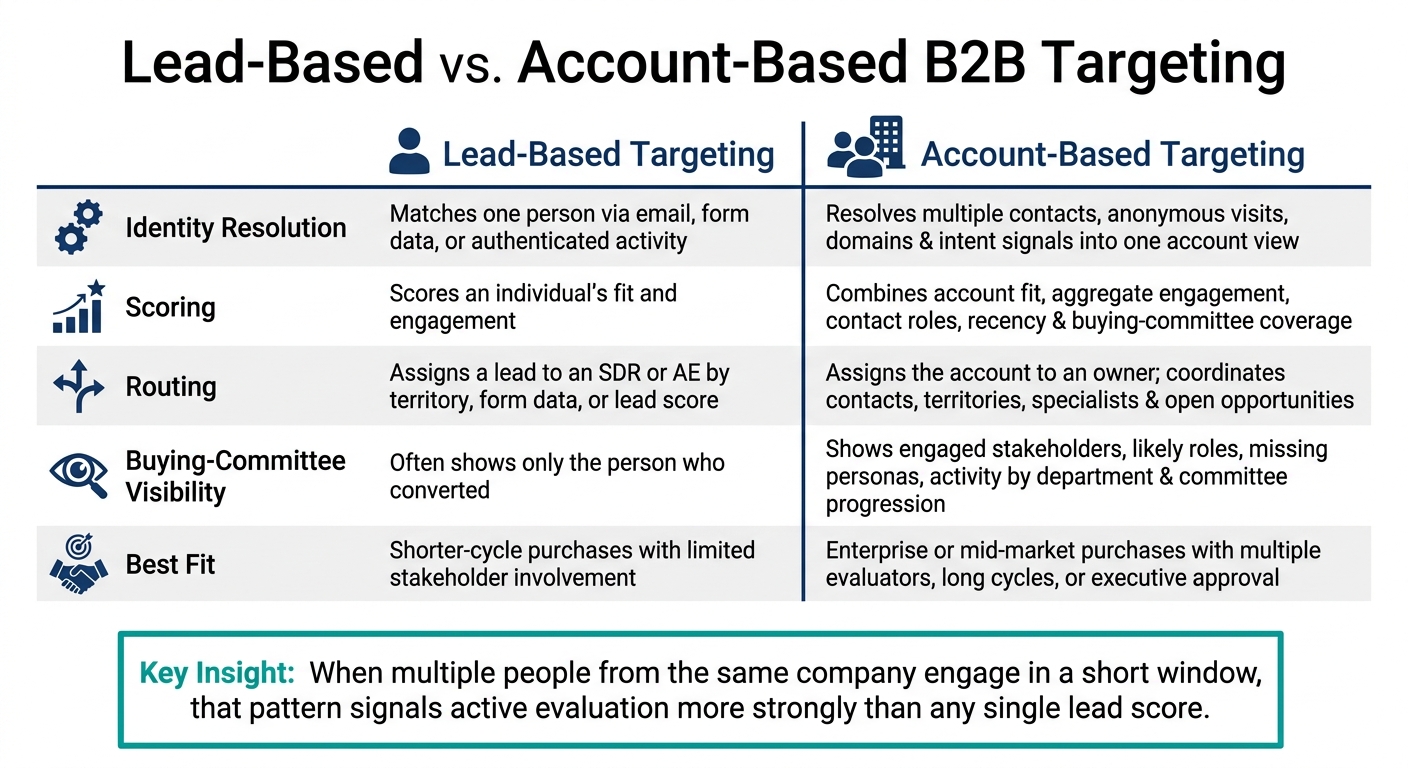
Lead-Based vs. Account-Based B2B Targeting: Key Differences
Once your channels line up, the next step is simple: turn behavior into sales action. That means routing the right accounts, creating tasks, giving reps context, and opening opportunities when the signal is there. The goal is to move high-intent activity into booked meetings and a clean handoff to sales.
Trigger-condition-action workflows for demo progression
Every handoff workflow has three parts: a trigger, conditions, and actions.
Here’s a practical example. An identified account visits your pricing page twice within 14 days and downloads a buying guide. That’s the trigger. Before anything happens, the system checks whether the account fits your ICP, has at least 250 employees, operates in a target industry, has no open opportunity, and isn’t already in a customer or active-sales state. Those are the conditions. If the account passes, the workflow increases the account score, finds linked contacts, assigns the account to the right territory owner, and creates a sales task due within one business day. Those are the actions.
The seller should also get a short brief with recent behavior, account context, and the next best step.
Demo stages from booking to no-show recovery
It helps to treat the demo lifecycle as a set of clear states: Requested → Qualified → Booked → Confirmed → Completed → No-show → Recycled or Opportunity Created. Each state change should kick off a workflow. Don’t leave it to manual follow-up.
Before booking, the landing page or form should change based on the visitor segment. A named enterprise account might see an option for a tailored architecture session or an executive briefing. A lower-fit visitor might see a qualification call or a recorded walkthrough instead. Only ask for the fields needed for routing: company, work email, role, use case, company size, timeline, and meeting type. Pull the rest from CRM and firmographic data. For high-fit inbound requests, aim to reply within one hour. Score-qualified leads can follow a documented 24-hour SLA.
After booking, move both the contact and the account to Demo Scheduled. Send a confirmation that explains the meeting purpose and gives the buyer a way to submit questions. Before the meeting, send the seller an account-activity brief. That brief should include recent page views, downloads, campaign source, known contacts, prior conversations, and the likely use case. The same state change should also start confirmation, prep, and no-show recovery workflows.
No-show recovery should run on a set timetable. At 3-5 minutes after the meeting start, resend the meeting link. At 10 minutes, send a short, neutral rescheduling note. Later that same day, refer to the original use case and include a reschedule link. On the next business day, send one relevant resource or offer an async option. After two failed attempts, send the contact back to nurture based on fit and recent account activity. In one analysis of 6,428 B2B meetings across 15 industries, no-show rates dropped from 23% for meetings scheduled eight or more days out to 6.9% for same-day meetings, which suggests shorter booking windows are often linked to better show rates.
For stalled opportunities, start recovery based on inactivity, not random calendar dates. If no stakeholder opens a follow-up message or attends the agreed next meeting within 10 business days, create a seller task, alert the opportunity owner, and send a resource tied to the unresolved business problem. Once an opportunity exists, stop generic prospecting. From that point on, opportunity-specific communication should take over.
Lead-based vs. account-based targeting in complex B2B sales
Lead-based targeting works well when one person is doing most of the evaluation. But if the deal includes multiple stakeholders, procurement, security review, or executive approval, account-level orchestration is the better approach. That choice affects identity resolution, scoring, routing, and reporting.
| Dimension | Lead-based targeting | Account-based targeting |
|---|---|---|
| Identity resolution | Matches one person to a contact record using email, form data, or authenticated activity | Resolves multiple contacts, anonymous visits, domains, and intent signals into one account view |
| Scoring | Scores an individual's fit and engagement | Combines account fit, aggregate engagement, contact roles, recency, and buying-committee coverage |
| Routing | Assigns a lead to an SDR or AE by territory, form data, or lead score | Assigns the account to an owner and coordinates contacts, territories, specialists, and existing opportunities |
| Buying-committee visibility | Often shows only the person who converted | Shows engaged stakeholders, likely roles, missing personas, activity by department, and committee progression |
| Reporting | Measures contact conversion, lead acceptance, meetings, and revenue attribution | Measures account engagement, opportunity creation, pipeline velocity, committee coverage, and revenue by account |
| Best fit | Shorter-cycle purchases with limited stakeholder involvement | Enterprise or mid-market purchases with multiple evaluators, long cycles, or executive approval |
Account-level orchestration ties individual actions to one shared account plan. When several people from the same company engage within a short period, that pattern is a stronger sign of active evaluation than any single lead score. Route and prep at the account level, but shape the message for each person’s role. A CFO needs an ROI model. An IT leader needs integration and security details. An end user needs workflow clarity. Track these workflows with show rate, opportunity creation, and time to first seller touch.
Measure results, govern the program, and expand carefully
Metrics that connect behavioral targeting to pipeline
Once targeting is live across landing pages, email, chat, and demo handoff, the next job is simple: find out if it creates pipeline.
Engagement alone doesn't count as success. Clicks, chats, and page visits can look busy without leading anywhere. What matters is whether targeted accounts turn into opportunities - and whether those opportunities close.
A good way to track this is with a two-layer scorecard.
Leading indicators show whether the system is working day to day. These include segment flow, landing-page conversion rate, email click-through and reply rates, chat qualification rate, demo-booking rate, and demo show rate.
Pipeline indicators show whether the program deserves more budget and reach. These include marketing-qualified account (MQA) to opportunity conversion, opportunity creation rate, sourced and influenced pipeline value, win rate, sales-cycle length, pipeline velocity, and revenue.
Here’s what that can look like for one segment over one quarter:
| Metric | Example result |
|---|---|
| Eligible accounts | 1,200 |
| Segment exits | 180 |
| Landing-page conversion | 14% |
| Email click / reply rate | 9% / 6% |
| Chat qualification rate | 22% |
| Demos booked / attended | 75 / 60 |
| MQAs created | 24 |
| Opportunities opened | 8 |
| Pipeline value | $640,000 |
| Median time to opportunity vs. prior quarter | 12 days shorter |
Pipeline velocity can be expressed as (qualified opportunities × average deal value × win rate) ÷ sales-cycle length in days. If velocity stalls, don't guess. Adjust the segment, the threshold, or the trigger.
Then use those results to pick the next test.
A controlled optimization and governance process
Test one behavior against one funnel goal at a time.
Set a baseline first. Use either a prior comparable period or an eligible control group. Then change one variable only - the page message, email timing, chat routing, or score threshold. Leave everything else alone. That's the only way to know what moved the number.
Alongside the main metric, track guardrails such as:
- unsubscribe rate
- false-positive rate
- disqualification rate
- sales acceptance
- duplicate records
- customer complaints
A segment that drives clicks but also drives a high disqualification rate is not a win. It's a signal problem.
Score recalibration should come from CRM outcomes, not engagement data. If three visits to a technical documentation page often show up before closed-won deals, give that signal more weight. If repeated career-page visits line up with disqualification, suppress them. That's the kind of pattern that keeps the model honest.
Before you scale any segment, audit the basics: event names, identity resolution, duplicates, consent status, suppression lists, routing rules, retention, and access. Check suppression logic before rollout at scale, and make sure it covers all restricted records. Give each control a named owner. Review high-risk rules monthly or quarterly.
Even a segment with a strong click-through rate should not expand if consent records are incomplete or routing is shaky.
After measurement and governance are set up, scale only the segments that prove they create pipeline.
Conclusion: the minimum viable rollout for B2B teams
Start small. Define your ICP and funnel stages. Map the events and who owns them. Build recency-based segments. Connect your analytics, marketing automation, CRM, chat, and meeting systems.
Then launch one coordinated workflow across landing page, email, chat, and demo - not five.
Measure opportunity creation and pipeline value against a control group before you expand. Give the sales cycle enough time to mature before making a call. Only after identity resolution, event capture, routing, consent, and CRM outcomes are dependable should you add new behaviors, personas, channels, or account tiers.
Choose tools for account-level resolution, CRM sync, suppression, and pipeline reporting - not feature count.
FAQs
How do we define high intent in a B2B funnel?
In a B2B funnel, high intent shows up when a prospect starts doing things that hint they're close to a buying decision. That can mean multiple visits to pricing pages, repeat views of competitor comparison pages, demo requests, trial activations, or repeated engagement with bottom-of-funnel content.
A lot of teams put numbers behind this with lead scoring. Once a lead hits a set score threshold - or triggers a high-intent event - the team can move that person into a faster nurture track or pass them to sales.
What data do we need to start behavioral targeting?
Start with clean, synced data across your CRM and marketing automation platform. Focus on five core inputs: firmographics, role, funnel stage, account intent, and behavioral signals.
Track website engagement, content interactions, and email response rates. Capture these events as close to real time as you can so lead scores and lifecycle stages stay accurate. Then audit your CRM data on a regular basis so the team can actually use it.
When should an account be routed to sales?
Route an account to sales when it shows high-intent signals or hits a set lead score. Common signs include visits to pricing or competitor comparison pages, demo requests, or key engagement milestones.
Once that happens, notify sales automatically and pull the contact out of marketing nurture sequences so your team doesn't send mixed messages. For mid-market and PE-backed companies, DevriX can help improve this handoff.