User feedback helps me improve landing pages by showing why people do not convert. Analytics can show bounce rate, form drop-off, and device splits. But feedback shows the reason behind those numbers - confusing copy, weak proof, long forms, slow pages, or a mismatch between the ad and the page.
Here’s the short version:
- Analytics shows where people leave
- Feedback shows why they leave
- The best CRO process is simple: collect feedback, sort problems, test one change, log the result
- The best pages to review first are pages with high traffic, high drop-off, or a direct link to leads or sales
- The best signals to watch are conversion rate, lead quality, engagement, and traffic source
If I had to boil the whole article down to one idea, it would be this: feedback makes CRO less about guessing and more about fixing the right problem first.
I’d use feedback to spot patterns like:
- visitors who do not understand the offer
- people who expected one thing from the ad but saw another on the page
- users who quit at the form
- mobile visitors who hit bugs or slow load times
- leads that convert on-page but do not turn into pipeline or revenue
That matters because a page can look weak in analytics for very different reasons. A traffic-source issue, a copy issue, and a mobile bug can all hurt conversions - but each needs a different fix.
A simple way to think about it:
| Step | What I’d do | What I’m looking for |
|---|---|---|
| Collect | Use marketing funnel software for surveys, exit prompts, interviews, and session replays | Repeated complaints, objections, and friction |
| Sort | Group comments by issue type and segment | Patterns by source, device, and intent |
| Test | Write one hypothesis and change one main element | Cleaner read on what changed results |
| Track | Log outcomes and check lead quality too | Whether the lift helped the business, not just the page |
In short: user feedback helps me find the cause of poor conversion performance, turn that into a test, and then build the next test from what I learn.
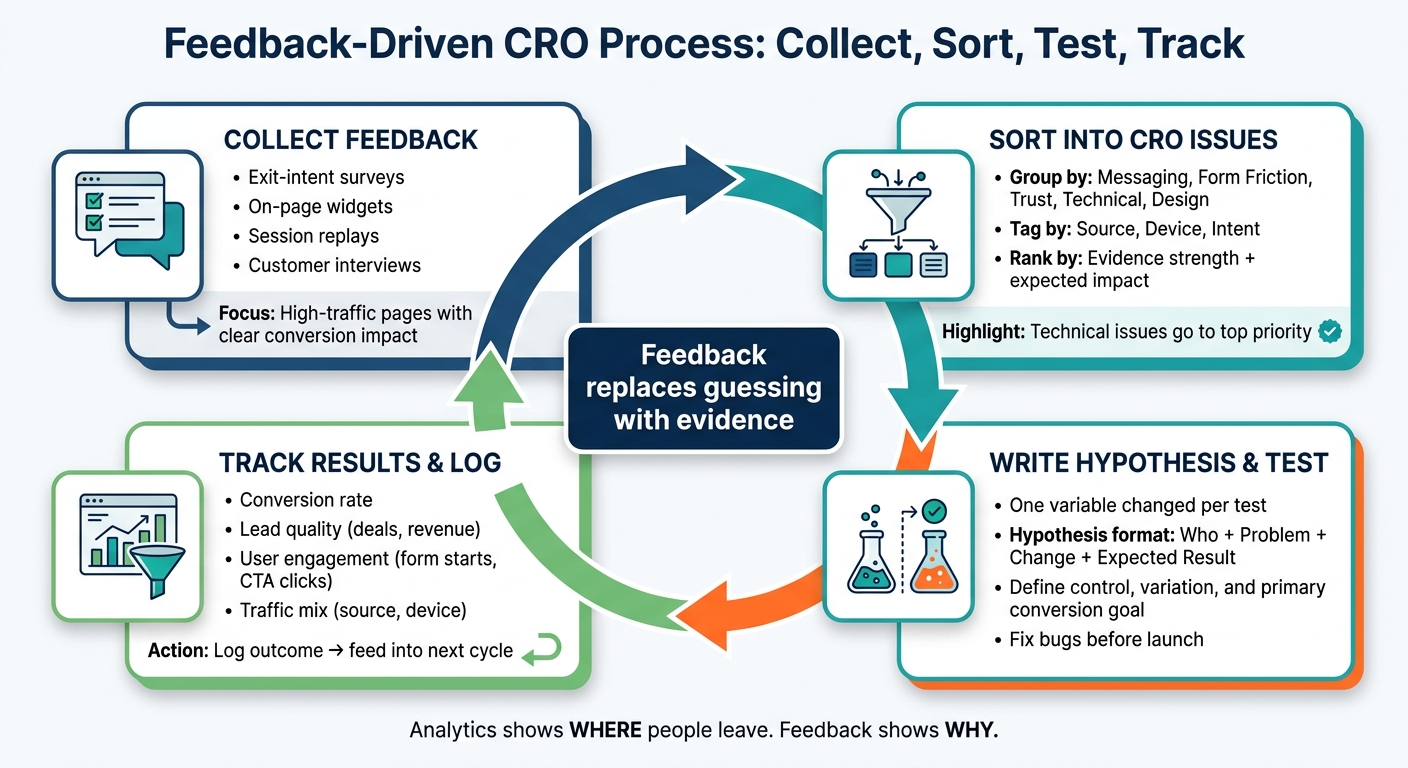
Feedback-Driven CRO Process: Collect, Sort, Test, Track
CRO Audit - A Real Example of How to Perform a CRO Audit of Your Website
sbb-itb-a84ebc4
Collect Feedback from the Right Landing Pages
Collect feedback only from landing pages that get enough traffic and have a clear effect on conversions. If a page gets too little traffic, it's easy to chase noise instead of patterns. You want enough responses to see the same issues come up again and again.
It also helps to segment feedback by traffic source. A visitor from paid search may expect something very different from a visitor who clicked through from email or social. If one segment reacts poorly, that often points to a message-match problem, not a page design problem. Once you know which pages matter most, you can pick the best way to gather feedback without slowing down the process.
Use Surveys, Widgets, and Exit Prompts
Exit-intent prompts can show why people leave - maybe they're unsure about pricing, or maybe the form feels like too much work. On-page widgets are useful for quick reactions to a headline or value proposition.
Keep the questions short and pointed. "What stopped you from signing up today?" will tell you far more than "How was your experience?" The goal is to find test ideas, not collect feel-good scores. Then pair those responses with behavior data to see whether the same issues show up there too.
Add Interviews, Session Replays, and Usability Checks
Session replays show where visitors hit friction or run into technical blockers on a landing page. Compare sessions from people who converted with sessions from people who left. What did converters do that abandoners didn't? That gap often points straight to a friction point you can fix.
Short customer interviews add another layer. They can bring out trust issues, persona mismatch, or objections that never show up in a survey. Tools that auto-flag rage clicks and dead clicks cut down the need for manual review. Put together, comments and replays show both what users felt and where they got stuck.
Choose Tools That Fit Your Funnel Workflow
Your feedback stack doesn't need to be complex. In many cases, one tool for replays and surveys, one for traffic context, and one backlog system for organizing findings is enough, or you can explore a directory for marketing funnels to find specialized software.
Sort Feedback into Clear CRO Issues
Turn raw feedback into a ranked list of testable CRO issues. Once you’ve got feedback in hand, sort it by issue type so you can see what needs fixing. Then use that list to shape your first test ideas to build high-converting sales funnels.
Group Comments by Issue Type
Start by putting each piece of feedback into a practical category. Common buckets include messaging clarity, offer relevance, form friction, trust signals, design clarity, and technical problems. This makes patterns easier to spot. If several visitors say they weren’t sure what they were signing up for, that usually points to a messaging mismatch. From there, you can send the fix to copy, design, or development.
Tag each item by source, device, and intent. That way, you don’t treat the same complaint as the same issue across every segment.
Rank Issues by Evidence and Likely Impact
Not every issue should get the same level of urgency. A 0% conversion rate from 1,200 sessions matters more than a 0% rate from 12 sessions because the signal is stronger. Rank each issue by how often it shows up, how sharp the drop-off is, and whether it appears at a key step like the hero section or form submit.
A lot of landing page problems come down to promise mismatch. The ad or email sets one expectation, and the page delivers something else.
Technical issues, like browser or device failures and slow load times, should go near the top because they affect every other optimization.
Use a Simple Issue-Priority Table
A shared table helps the team stay aligned on what to tackle first and why. Every row should tie back to specific evidence, not instinct. If the evidence is thin, mark the issue as "cautious" instead of "confident" so nobody makes a big change off weak data.
| Priority | Issue Category | Sample Feedback | Evidence Strength | Funnel Location | Expected Impact |
|---|---|---|---|---|---|
| High | Technical | "The 'Submit' button doesn't click on my iPhone." | High - multiple recordings + 90% mobile drop-off | Final CTA / Form | Critical |
| High | Messaging | "I thought this was a free trial, but it's asking for a demo." | Medium - 3 survey comments + high bounce rate | Hero Section | High |
| Medium | Form Friction | "The form is too long for a simple whitepaper." | High - form analytics show 70% field abandonment | Lead Form | High |
| Medium | Trust / Proof | "I've never heard of this company; is it legit?" | Low - 1 interview comment + low scroll depth | Proof / Testimonials | Medium |
| Low | Design | "The background color is a bit distracting." | Low - subjective; no correlation to drop-off | Entire Page | Low |
Once the table is in place, focus on the smallest change that tests the most important diagnosis first. Start the next test with the highest-priority issue.
Turn Feedback into Hypotheses and Landing Page Tests
Take ranked feedback and turn it into page changes you can test. Start with the highest-priority issue and use it to write your first hypothesis.
Write Test Hypotheses from Feedback Patterns
A good hypothesis explains who is affected, what problem needs fixing, what you plan to change, and what result you expect.
For example, if several survey responses say, "I don't understand what you offer," the hypothesis could be: "Because first-time visitors are unclear on the value proposition, simplifying the headline and subheadline will reduce bounce rate and increase conversions." That gives you something clear to test, not just a vague idea.
| Feedback Pattern | Hypothesis | Metric to Measure |
|---|---|---|
| Users ask "How much does it cost?" | Show pricing clearly to reduce friction and improve lead quality. | Conversion Rate / Lead Quality |
| Users complain the form is too long. | Shorten the form to 3 essential fields to increase completion rates. | Form Completion Rate |
| Users are confused about the next steps. | Add a "How It Works" graphic to increase trust and click-throughs. | Click-Through Rate (CTR) |
| Users mention competitors frequently. | Add a side-by-side comparison chart to increase decision-stage conversions. | Conversion Rate |
Next, keep the test tight. If you want a clean read on performance, isolate one change.
Test One Variable at a Time
Change one main element per test - whether that's headline wording, CTA copy, form length, proof placement, or trust badges. If you change several things at once, you won't know what actually moved the needle.
"Small changes can produce measurable CRO gains when it comes to landing page conversion rates." - Jennifer Lombardi, Founder, Kiwi Creative
Then tie the test to one primary conversion goal.
Set Up Tests with Clean Measurement
Before launch, define the control, the variation, and the one primary conversion goal. Estimate sample size and test duration based on current traffic and expected lift.
Also fix broken links, slow load times, and browser bugs before the test starts. If those issues stay live, they can skew results and make optimization data unreliable.
Once the test is live, track the primary metric and record the result for the next cycle. Log the outcome before you start the next test.
Track Results and Plan the Next Testing Cycle
When a test ends, write down what changed. Then use that outcome to decide what to test next.
Monitor the Metrics That Show Real Change
Don't stop at conversion rate. A lift can look good on paper and still bring in weak leads.
Track four signals: conversion, lead quality, engagement, and traffic mix.
| Metric Category | What to Track | Why It Matters |
|---|---|---|
| Primary Conversion | Conversion rate, form completions, key events | Confirms the main goal was met |
| Lead Quality | Qualified leads, deals created, revenue | Shows whether the lift turns into business value |
| User Engagement | Engaged sessions, form starts, CTA clicks | Shows where users drop off in the process |
| Traffic mix | Bounce rate, sessions by source, device split | Checks that the win isn't coming from a short-term traffic spike |
Use these signals to tell the difference between a page that got better and a page that just moved the problem somewhere else.
Track the gap between form starts and completions. Then break results out by source and device to make sure the pattern still holds.
Keep a Results Log for Repeatable CRO
After each test, log what changed, what got better, and which diagnosis was right.
Put the outcome in one shared log so the next test starts from evidence, not memory. Compare each result with the original hypothesis before planning the next round.
| Hypothesis | Page Element Changed | Primary Metric | Result | Confidence | Next Action |
|---|---|---|---|---|---|
Use the Confidence column to mark results that are statistically solid. Also flag inconclusive tests that need a longer rerun.
Conclusion: User Feedback Makes CRO More Precise
Feedback-driven CRO cuts guesswork and replaces it with evidence. Comments, surveys, and replays show objections analytics can miss. Issue sorting helps rank what to fix. Tests check whether the change worked. The results log helps the next cycle move with more direction.
FAQs
How much feedback is enough to spot real CRO patterns?
Focus on statistical reliability, not guesswork. Aim for a 95% confidence level so you’re less likely to mistake random noise for a real pattern.
Run tests for at least 1-2 weeks. And keep them live until you hit both your required sample size and statistical significance. Don’t make the call on thin data. A clear assumption is often safer than a conclusion pulled from too little traffic, like 42 visits.
Which feedback issues should I fix first on a landing page?
Fix the issues that block the most visitors from converting first: broken links, slow load times, and browser or device compatibility problems.
Next, focus on form friction, unclear CTAs or value proposition, and recurring trust gaps or objections that show up in surveys, chat, or support logs. Then make sure your tracking is accurate so you can confirm results.
How do I connect feedback-driven CRO tests to lead quality?
Don’t stop at raw conversion numbers. Track what happens after the form fill too.
Have your sales team report lead quality within 48 hours. Then connect your CRM to your testing and analytics tools so you can follow leads from MQLs to SQLs to paying customers.
That extra layer matters. A landing page change might increase form completions, but if SQL rates drop, the page probably pulled in lower-intent leads - not better prospects.