If two systems can both change the same record, you need clear sync rules - or your reports drift, your routing slows down, and your forecast gets shaky.
I’d boil the article down to this:
- Pick sync direction by object - not everything should move both ways
- Set field ownership rules - decide which system wins for each field
- Use fast event-based updates when timing matters - especially for routing and stage changes
- Define delete, merge, and conflict rules before launch
- Judge tools by whether they can enforce your rules, not by the demo
In plain terms, bidirectional CRM sync works when I treat it like a data-governance job, not just a connector setup. Contacts and accounts often need two-way updates. Deal stage, amount, lead score, and similar fields usually need one clear owner. And if sync breaks for even 1 hour, I want to know what reports, handoffs, and revenue workflows fail first.
A few points stand out:
- Low latency matters for MQL routing, territory changes, and forecast updates
- Last-write-wins is risky on revenue fields
- Field-level control is safer when sales and marketing both edit records
- Soft delete vs. hard delete should never be treated the same
- Audit logs and error history matter as much as the sync itself
If I were setting this up, I’d start with the rules, test them on live workflows, and only then pick the tool.
Finally: Bi-Directional Owner Sync Between HubSpot & Salesforce 🔄
sbb-itb-a84ebc4
How to Design the Right Sync Model
Start with a field-and-object audit. Map every record, field name, and duplicate value across systems. This is the work that stops record drift before it starts messing up handoffs and reporting. Once that map is done, set sync direction by object.
Choose Sync Direction by Object
Not every object should sync both ways. Contacts and companies are usually the best fit for bidirectional sync. Sales and marketing both update those records, so both systems need the latest data.
Deals usually move CRM → marketing. Activity logs can go both ways because a full touchpoint history gives both teams the context they need.
The rule is simple: sync both ways only when both teams actively edit the record. If one team owns it, keep it one-way.
Set Source-of-Truth Rules at the Field Level
Object-level sync direction is only the starting point. The hard part happens at the field level, where you decide which system wins when both systems have a value. Use three field-level rules:
- CRM wins
- CRM wins unless blank
- Fill only when empty
| Object | Field | Sync Direction | Source of Truth | Business Reason |
|---|---|---|---|---|
| Contact / Company | Name, Email, Organization | Bidirectional | CRM (Primary) | Keeps both teams working from the same customer record for outreach. |
| Lead | Lead Score | One-way (Marketing → CRM) | Marketing automation | Gives sales a direct signal on prospect engagement. |
| Opportunity | Deal Stage / Amount | One-way (CRM → Marketing) | CRM | Lets marketing track ROI and run nurture or suppression lists. |
| Contact | Enrichment Data | One-way (Tool → CRM) | Third-party enrichment tool | Keeps CRM records current with outside prospect data. |
| Activity | Email / Meeting Logs | Bidirectional | CRM | Gives sales and marketing the full history of touchpoints. |
Define Lead, Contact, and Account Priority
Set lead, contact, and account priority with ownership rules - not last write. That keeps MQL routing, territory assignment, and CRM reporting steady.
Next, define how updates, deletions, merges, and conflicts should work when both systems change the same record.
Update Logic, Deletions, and Conflict Rules
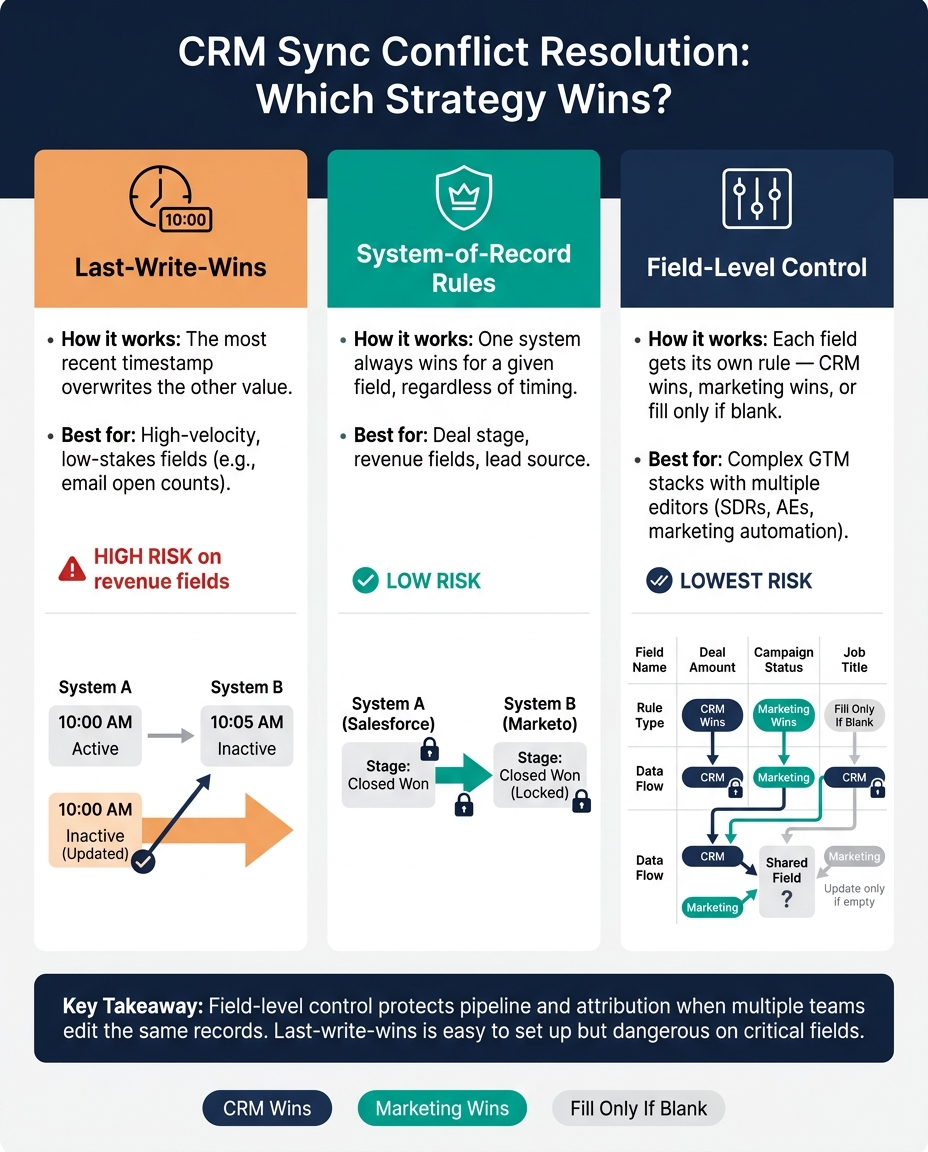
Bidirectional CRM Sync: Conflict Resolution Strategies Compared
Next, define how sync should behave when data changes, disappears, or collides.
Update Logic and Sync Scope
Use webhooks for near-immediate updates, and back them up with timestamp checks to catch anything that slips through. Add filters so only relevant records and events sync. That keeps data current enough for routing, handoffs, and forecasting.
A good trigger point is a deal-stage change or a score threshold. That way, the integration stays focused on the records that matter most to sales and marketing instead of pushing every minor update across systems.
Use schema checks and type validation to stop mapping mistakes before they spread.
Next, decide how the sync should handle records that get removed, merged, or archived.
Deletion, Merge, and Archive Rules
Treat soft deletes and hard deletes as two different actions. A soft delete keeps history in place for attribution and reporting. A hard delete removes the record for good. For high-value or legally sensitive records, require manual approval before a hard delete.
Use automated matching for clear merges, and send edge cases to a person for review. Merge events should keep the surviving record's history intact. If a downstream system supports suppression but not full deletion, log that limit in your audit trail to protect reporting integrity.
After that, define which system wins when both update the same field.
Conflict Resolution Methods
Conflicts happen when both systems update the same field before the next sync. Clear rules protect pipeline accuracy, attribution, and rep trust in the data.
| Strategy | How It Works | Best For |
|---|---|---|
| Last-write-wins | The most recent timestamp overwrites the other value | High-velocity, low-stakes fields like email open counts |
| System-of-record rules | One system always wins for a given field, no matter when the change happened | Deal stage, revenue fields, lead source |
| Field-level control | Each field gets its own rule - CRM wins, marketing wins, or fill only if blank | Complex GTM stacks with multiple editors |
Field-level control tends to hold up best when SDRs, AEs, and marketing automation are all editing the same records. The reason is simple: sync rules only work when every field has a clear owner.
Last-write-wins is easy to set up, but it can break down fast on critical fields. Field-level control takes more effort, but it does a better job protecting the data behind pipeline and attribution.
Reporting Impact Across Marketing, Sales, and RevOps
Once conflict rules are in place, reporting becomes the gut check: do lifecycle, attribution, and forecast reports line up with live data? If they don’t, the problem usually starts with the rules behind the sync. Those rules decide whether lifecycle, attribution, and forecast reporting stays trusted or starts to drift.
Lifecycle, Pipeline, and Forecast Reporting
When sync is off, marketing teams can’t clearly see which campaigns lead to closed deals. Sales teams lose the context behind the leads they get. The result is messy lifecycle reporting and weaker pipeline and forecast reporting.
Field-level ownership helps keep lifecycle, pipeline, and forecast reports steady.
Attribution and Campaign ROI
Bidirectional sync keeps campaign membership, lead score, and touchpoint data lined up across CRM and marketing tools. That’s required for reliable multi-touch attribution and campaign ROI. When data shows up late, attribution windows break down and ROI reporting gets weaker.
Monitoring Integration Health
Watch for incomplete fields, sync failures, and report mismatches. Monitor sync health on a continuous basis. Set up automated alerts for integration failures, data quality issues, and latency spikes, track data completeness as a standing KPI, and conduct quarterly reviews to catch drift before it affects executive reporting. Each team needs its own mix of fields, reports, and sync controls. Those signals help you decide if the integration needs tuning or if it’s time to replace it.
The table below maps each team to its main reports, the fields that matter most, and the sync rules that shape report accuracy.
| Team | Key Reports | Critical Fields | Sync Rules That Affect Accuracy |
|---|---|---|---|
| Marketing | Attribution accuracy, campaign ROI, MQL volume | Lead source, campaign ID, behavioral scores | Bidirectional sync of campaign membership and lead scores |
| Sales | Win rates, pipeline velocity, response time | Lead status, opportunity stage, contact context | Real-time sync of lead status and contact context |
| RevOps | Data completeness, sync latency, integration health | System IDs, last sync date, field definitions | Field-level rules and conflict resolution |
Tool Selection and Final Recommendations
What to Look for in Sync Tools
Once your sync rules are set, the next step is simple: check whether the tool can actually enforce them.
When you talk to vendors, ask one blunt question: What breaks if the integration fails for an hour, a day, or a week? That answer will tell you more than a polished demo ever will.
Use the criteria below to test whether a tool can support the object, field, and conflict rules you already mapped.
| Criteria | What to Check |
|---|---|
| Sync depth | Real-time sync, custom objects, and support beyond scheduled batch imports |
| Field-level control | Custom field mapping and conflict handling that match your source-of-truth rules |
| Logging and auditability | Full sync logs, error history, and clear traceability for field changes |
| Security and access controls | Role-based access controls to prevent unauthorized modifications and sync conflicts |
| Batch and real-time processing | Support for both batch and real-time data processing, with strong API capabilities |
For mid-market and PE-backed teams, iPaaS platforms are often the better fit when workflows run across several systems. Native connectors work best for common apps with simpler integration needs. Custom builds come with the most maintenance risk, mostly because teams tend to underestimate legacy-system complexity.
Before you start any tool trial, put the vendor through your top-priority workflow using real data. If the tool can't complete the sync from end to end in a trial environment, reject it.
Where to Research Funnel and RevOps Tools
If you need a starting point to compare options, use a curated directory instead of a vendor list shaped by ads. Marketing Funnels Directory has a curated list of tools and vendors, including a section for mid-market and PE-backed teams focused on turning funnel activity into board-ready pipeline.
Conclusion: Rules First, Tools Second
Rules first, tools second: choose sync direction by object, set field-level ownership, define deletion and conflict rules, then pick the tool that can enforce them.
FAQs
Which CRM objects should sync both ways?
Objects tied to shared touchpoints and lifecycle status should sync both ways so teams keep one clear view of the customer. That usually includes contact details, lead scores, deal stages, and activity logs.
When that data stays in sync, sales and marketing work from the same accurate source of truth. It also supports real-time updates as prospects engage with content or move through the pipeline.
How do I choose a source of truth for each field?
Assign ownership based on team responsibility and the system where the data is created or updated most often. In most cases, marketing owns campaign engagement and lead source data, while sales owns contact details and pipeline status.
Write down ownership and update rules for each field. When conflicts come up, give priority to the system where that data point starts or where it’s maintained most often. Review field mappings on a regular basis so your sync logic stays in line with how teams work today.
What happens to reporting if sync fails or lags?
When bidirectional sync fails or slows down, data gets split across systems. That leads to conflicting reports and an incomplete view of the customer journey. In practice, that can hurt attribution accuracy, skew pipeline movement, and put sales and marketing out of step.
Reporting lives or dies on clean, real-time data. So when sync delays show up, data-driven decisions get weaker - and wasted revenue becomes a lot more likely.