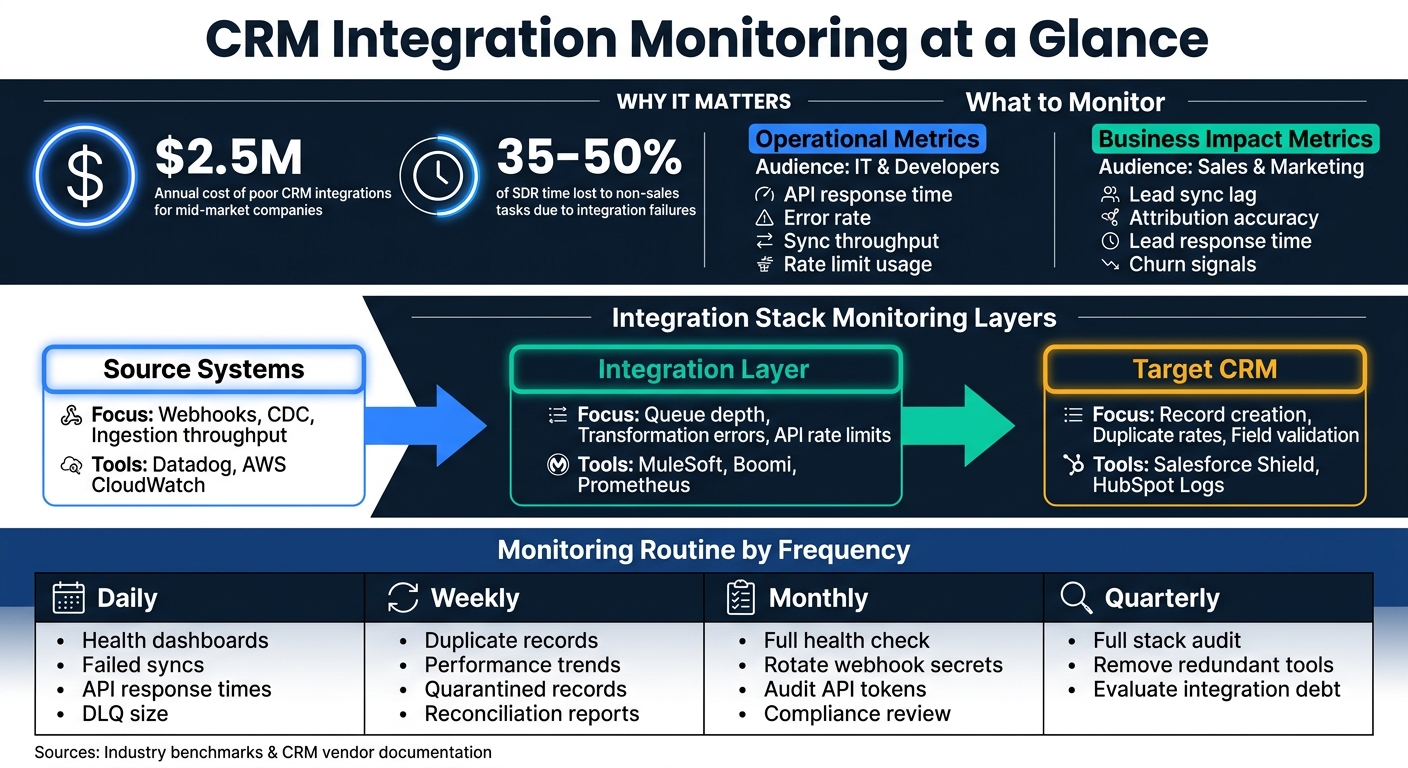
CRM integration monitoring ensures smooth data flow between your CRM and connected systems like marketing tools and software vendors, ERP platforms, and billing software. It helps detect issues like sync failures, data corruption, and latency, preventing costly errors and wasted resources. Poor integrations can cost mid-market companies up to $2.5 million annually and consume 35–50% of SDRs' time on non-sales tasks.
Key Takeaways:
- Metrics to Track: Monitor API call volume, error rates, data latency, throughput, and data quality (e.g., duplicates, missing fields).
- Monitoring Layers: Focus on source systems, integration layers, and target CRMs like Salesforce, HubSpot, or Dynamics 365.
- Alerting Best Practices: Avoid alert fatigue by setting thresholds for sustained issues (e.g., error rate > 2% over 5 minutes).
- Data Quality: Use validation, deduplication, and field audits to maintain clean records.
- Security: Implement least-privilege access, OAuth 2.0, and encryption standards (AES-256, TLS 1.2+).
- Compliance: Align with GDPR, SOC 2, HIPAA, and other regulations using audit logs and DLP scanners.
By combining daily checks, structured monitoring strategies, and effective incident management, you can ensure reliable CRM integrations that protect your data and support your business goals.
CRM Integration Monitoring: Key Metrics, Layers & Daily Routines
Key Metrics for CRM Integration Monitoring
Core Metrics to Track
When monitoring CRM integrations, focus on the metrics that matter most. On the technical side, keep an eye on API call volume, error rates, data latency, and throughput. Specifically, tracking P90 latency can help identify bottlenecks, and any operation taking longer than 3 seconds should raise a red flag.
Equally important are indicators of data quality. Monitor for sync failures, duplicate records, missing fields, and format mismatches (e.g., discrepancies in date or currency formats). Additionally, keep an eye on Dead Letter Queue (DLQ) volume, which can serve as an early warning system for hidden issues in your integration.
Operational Metrics vs. Business Impact Metrics
Metrics can be divided into two main categories, each catering to different audiences and objectives.
Operational metrics - like API response times, error codes, rate limit usage, and uptime - are essential for developers and IT teams. These metrics provide a real-time view of the integration's technical performance. On the other hand, business impact metrics focus on the bigger picture, translating technical performance into outcomes that matter to sales and marketing teams. These include lead synchronization delays, attribution accuracy, lead routing speed, and churn risk signals.
| Metric Type | Examples | Audience |
|---|---|---|
| Operational | API response time, error rate, sync throughput, rate limit usage | IT, developers, integration engineers |
| Business Impact | Lead sync lag, attribution accuracy, lead response time, churn signals | Sales, marketing, customer success |
"Operational metrics show how work is performing in real time... This visibility exposes capacity strain, process bottlenecks, and quality gaps before they affect revenue or customer satisfaction." - Ben Kazinik, Senior SEO Manager, monday.com
How to Set Metric Baselines
Before setting up alerts, it’s essential to understand what "normal" performance looks like. The best way to do this is by monitoring your integration over a 24-hour period. This will give you accurate data on response times, peak loads, and error frequencies.
Once you have this baseline, you can establish specific thresholds. For example:
- Flag response times over 3 seconds.
- Trigger a circuit breaker after 5 consecutive sync failures.
- Aim for a cache hit rate of at least 70%.
For data quality, schedule weekly duplicate scans and automatically merge records with a confidence level above 95%. Make sure to cross-check these thresholds against your CRM vendor's guidelines, as platforms like Salesforce, HubSpot, and Microsoft Dynamics 365 have unique API rate limits and throttling policies that can influence what "normal" looks like.
Next, we’ll explore how to build a monitoring strategy that leverages these baselines effectively.
sbb-itb-a84ebc4
Master Batch Data Sync: The Ultimate Integration Pattern for Data Warehouse, CRM & Beyond!
How to Build a CRM Integration Monitoring Strategy
Once you've established your baselines, the next step is crafting a monitoring strategy that spans every layer of your integration stack.
Where to Add Monitoring Across the Integration Stack
A comprehensive monitoring approach should address three key layers: source systems, the integration layer, and the target CRM. Each layer has its own potential failure points and requires specific tools to monitor effectively.
| Stack Layer | Monitoring Focus | Example Tools |
|---|---|---|
| Source Systems | Webhooks, Change Data Capture (CDC), ingestion throughput | Datadog, AWS CloudWatch |
| Integration Layer | Queue depth, transformation errors, API rate limits, latency | MuleSoft, Boomi, Prometheus |
| Target (CRM) | Record creation success, duplicate rates, field validation failures | Salesforce Shield, HubSpot Logs |
Key checkpoints for monitoring include inbound validation, data enrichment, field mapping, outbound API calls, and downstream acknowledgments. This approach ensures issues are identified exactly where they happen, preventing them from escalating further down the pipeline.
Your telemetry should be built on three core components: metrics, logs, and distributed traces. Metrics provide a high-level view of system health and help track service-level objectives (SLOs). Logs allow for detailed investigation at the payload level. Distributed traces help you pinpoint latency issues across service boundaries.
"Good monitoring converts reactive firefighting into measurable reliability improvements." - Vikas Bansal, Practice Lead, Custom Integrations, Sama Integrations
Setting Up Alerts and Thresholds
Triggering alerts for every minor error can overwhelm your team with false positives, leading to alert fatigue - a state where engineers start ignoring notifications. Aim for a false positive rate below 10%.
Focus on symptoms, not noise. Alerts should trigger only for sustained problems, such as an error rate exceeding 2% over a 5-minute period. To further refine alerts, use multi-dimensional thresholds. For instance, set conditions like "error rate > 2% AND requests > 100/minute" to ensure you're catching real issues while filtering out irrelevant noise.
Each alert should include a direct link to a runbook - a concise guide that helps on-call engineers quickly identify and resolve the issue. This transforms incident response into a structured, repeatable process. For Salesforce, consider tiered API limit alerts: monitor usage at 50% of the daily limit (once per day), 80% (every 4 hours), and 90% (hourly).
These practices lay the groundwork for platform-specific monitoring strategies.
Monitoring for Salesforce, HubSpot, and Microsoft Dynamics 365
With a strong alerting strategy in place, you can tailor monitoring to the unique characteristics of each CRM.
Salesforce has "soft" API limits, allowing for brief overages but enforcing strict cutoffs if limits are exceeded for an extended period. Use Platform Events for asynchronous processes and track External IDs to prevent duplicate records during upserts. Assign a dedicated integration user and unique Connected App ID for each external system. This keeps audit trails clean and allows you to throttle specific integrations without affecting others.
HubSpot monitoring should prioritize workflow execution logs and property validation. Ensure critical properties are populated before workflows run, and deduplicate records before enrichment to avoid wasting API calls on duplicates.
Microsoft Dynamics 365 offers robust native connectors, but its error handling differs significantly from Salesforce and HubSpot. Familiarize yourself with its data integration documentation to identify platform-specific error codes and patterns.
To complement passive monitoring, incorporate synthetic tests. These scheduled tests simulate critical workflows, helping you catch issues like expired certificates or broken credentials before they impact users.
Data Quality and Security in CRM Integrations
Ensuring the quality and security of data in CRM integrations is just as important as monitoring technical and operational metrics. While metrics and alerts help maintain operational performance, strong data management practices protect your customer information and keep your systems running smoothly.
How to Monitor Data Quality
Data quality issues - like invalid email addresses or improperly formatted phone numbers - can quietly disrupt your CRM pipeline. To prevent this, validate data as it's ingested. Use tools like regex patterns and E.164 normalization to standardize records before they enter your CRM system. If a record fails validation, send it to a quarantine table for review rather than allowing bad data to flow through. This approach ensures only clean, usable data makes it into your system.
Duplicate records are another common issue. A confidence-score-based matching system can help manage duplicates without risking over-merging:
| Confidence Level | Score | Recommended Action |
|---|---|---|
| High | 95%+ | Merge automatically |
| Medium | 80–95% | Flag for manual review |
| Low | <80% | Investigate individually |
Regular field mapping audits are essential, especially after updates or new integrations. A simple mismatch - like mapping a text field to a numeric one - can cause silent sync failures.
Security Best Practices for CRM Integrations
Once your data quality is under control, the next step is securing your CRM integrations. Data breaches are costly, with the global average reaching $4.44 million in 2025, and 57% of businesses experiencing API misuse between 2023 and 2025. CRM integrations are often targeted because they connect multiple systems and provide broad access to sensitive information.
"CRM data security is no longer just an IT concern - it's a business-critical priority." - David Cockrum, Founder and CEO, Vantage Point
Implement least-privilege access policies, ensuring that each user or app only accesses the data it truly needs. Use OAuth 2.0 for API authentication, avoid hardcoded credentials, and regularly rotate API keys and tokens. Expired or unmonitored tokens are a common cause of sync issues.
For encryption, rely on AES-256 for data at rest and TLS 1.2 or higher for data in transit. Additionally, anomaly detection tools can help by flagging suspicious activities like rapid API calls, large data exports during off-hours, or logins from unexpected locations. Using tools to monitor brand mentions and keywords across the web can provide an additional layer of visibility into potential data leaks or unauthorized discussions of internal systems. For example, in early 2025, the hacking group Scattered Lapsus$ Hunters exploited a vulnerability in a third-party Gainsight application integrated with Salesforce, compromising data from over 200 companies.
"Zero Trust's foundational concept is simple: trust no one. That means no device, user, or app is considered secure by default." - Max Tatarchenko, CTO, SapientPro
Compliance and Audit Requirements
Monitoring isn't just about maintaining uptime - it also supports compliance with legal and regulatory standards. Frameworks like GDPR, SOC 2, CCPA/CPRA, and HIPAA impose specific requirements for CRM data handling.
| Regulation | Key CRM Monitoring Requirements |
|---|---|
| GDPR | Consent management, right to erasure, 72-hour breach notification |
| SOC 2 | Monitor security, availability, processing integrity, and confidentiality |
| CCPA/CPRA | Data minimization, right to delete, opt-out tracking |
| HIPAA | Access controls, encryption, and detailed audit logs |
Maintain immutable audit logs to capture activities like logins, record modifications, data exports, and API calls. Tools like Salesforce Shield's Field Audit Trail can retain data for up to 10 years and track up to 200 fields per object. Similarly, HubSpot's Sensitive Data Properties feature allows you to restrict access to personally identifiable and financial information.
To prevent accidental leaks of sensitive data, integrate automated DLP (Data Loss Prevention) scanners into your CI/CD pipeline. These tools use regex patterns to identify sensitive data in free-form fields or metadata before deployment.
"Automation and privacy are not mutually exclusive - they must be engineered together. Treat data transformations and consent enforcement as non-functional requirements for every integration." - Audited.online
How to Manage CRM Integration Monitoring Day to Day
Daily, Weekly, and Monthly Monitoring Routines
Keeping CRM integrations running smoothly requires regular monitoring routines tailored to the urgency of each task. Here's a breakdown of what to focus on at different intervals:
| Frequency | Key Tasks |
|---|---|
| Daily | Check integration health dashboards, review failed syncs, monitor API response times, verify scheduled jobs, and assess the dead letter queue (DLQ) size |
| Weekly | Look for duplicate records, analyze performance trends, process quarantined records, run reconciliation reports, and optimize slow queries |
| Monthly | Conduct a full system health check, rotate webhook secrets, audit API tokens, update data mapping rules, and review compliance documentation |
| Quarterly | Audit the entire integration stack, eliminate redundant tools, and evaluate accumulated "integration debt" |
Daily checks help catch critical issues immediately, while weekly and monthly routines focus on addressing slower-developing problems like performance bottlenecks or data inconsistencies. For example, weekly tasks like resolving duplicate records prevent long-term data quality degradation. Integration debt accumulates fastest after an acquisition, when two stacks run in parallel and nobody has decided which system of record wins. The M&A integration playbook for CRM, martech and data covers how to make that call early, before the duplicate licenses and the duplicate records both become permanent.
When these checks uncover anomalies, it's essential to have a solid incident management process to quickly diagnose and resolve the problem.
Incident Management and Root Cause Analysis
When integration issues arise, a structured approach to diagnosing and fixing them can save a lot of time. Start with a three-step process: inspect API error logs, verify authentication credentials, and check for rate limit issues. This method can resolve most failures in under 20 minutes.
Some issues, like "silent failures", can be harder to catch. These occur when an outdated API endpoint returns a 200 OK status but doesn’t process the data correctly. To spot these, set up volume-based alerts. For instance, if no records sync during peak hours, even when error logs look fine, it’s worth investigating.
For ongoing issues, use a dead letter queue to isolate problematic payloads and prevent further disruptions. Documenting incidents thoroughly builds a postmortem database that can guide future improvements.
"The best way to handle integration issues is to catch them before they become problems." - David Cockrum, Founder and CEO, Vantage Point
Using Monitoring Data to Improve Integrations Over Time
Monitoring data isn’t just for troubleshooting - it’s also a powerful tool for making long-term improvements. By analyzing trends in the data, you can identify recurring problems and refine your integration processes for better performance.
For example, if your logs reveal that API calls often exceed 3 seconds, applying field-level filtering to retrieve only essential data can boost retrieval speed by 40–60%. Similarly, shifting bulk imports or non-critical tasks to asynchronous processing can cut user wait times by as much as 80%.
Patterns like repeated date format errors signal the need to update transformation rules. Classify errors into categories - data-related, technical, or business process issues - to streamline fixes. Combining these insights with feedback from sales and marketing teams can also uncover hidden problems, like lead attribution errors, that technical logs alone might miss.
External Resources for CRM Integration Monitoring
How to Use Vendor and Platform Documentation
Vendor documentation often goes overlooked as a resource for refining monitoring strategies. Many teams stop at using these materials for setup, missing out on the deeper insights they offer for ongoing monitoring. These insights can seamlessly integrate with proactive measures discussed later.
Most major CRM platforms provide detailed recommendations for integration patterns. For instance, Salesforce advises using Platform Events for asynchronous data transfers, while HubSpot requires specific property configurations before workflows can trigger. Following these guidelines from the start can help avoid many common issues.
A particularly useful area of vendor documentation is API limit management. High-frequency monitoring can quickly hit API limits, causing synchronization delays. Salesforce and HubSpot both recommend increasing REST API limits to mitigate this. Ignoring these recommendations often results in integration disruptions.
Vendor documentation also highlights which error notifications should take priority. For example, Oracle flags login failures and errors in "Create Lead" or "Update Contact" operations as high-priority issues. Configuring alerts for these during setup ensures you can address problems before they escalate, keeping sync tasks on track.
Additionally, built-in tools like Salesforce Audit Logs or Oracle Eloqua's Auto Synch History reports allow you to export and analyze processing data. These tools are not just for compliance; they’re invaluable for spotting recurring issues early, preventing them from becoming major problems.
Vendor insights like these naturally complement resources such as the Marketing Funnels Directory, which can help streamline your search for additional tools and strategies.
How the Marketing Funnels Directory Can Help
The Marketing Funnels Directory serves as a curated resource to enhance your CRM integration monitoring. It offers a collection of vetted tools, vendors, courses, and books tailored specifically for RevOps professionals. By leveraging this directory, you can strengthen your monitoring capabilities and improve funnel optimization without wasting time on generic or irrelevant content.
How to Assign Monitoring Responsibilities Across Teams
In addition to leveraging documentation, assigning clear responsibilities across teams is critical for effective CRM integration monitoring. Tasks like duplicate tracking, field mapping audits, and lead attribution require well-defined ownership to maintain data quality.
Typically, RevOps teams focus on data accuracy, handling tasks such as identifying duplicate records, resolving field mapping errors, and addressing lead attribution issues. Meanwhile, IT or system administrators are responsible for the technical aspects, including API health, authentication, error resolution, and ensuring system uptime.
Without clear ownership, critical issues may go unresolved as teams assume someone else is handling them. Dividing responsibilities by category - data versus infrastructure - eliminates this ambiguity.
"We've been using Stacksync across 4 different projects and can't imagine working without it." - Alex Marinov, VP Technology, Acertus
Tools like Stacksync simplify this collaboration by offering centralized dashboards. These dashboards allow both RevOps and IT teams to monitor sync status, review audit trails, and analyze error logs without diving into raw API data. Companies using platforms like Stacksync have reported a 30–70% reduction in duplicate and mismatched records, a substantial improvement given how closely data quality ties to pipeline reporting and revenue attribution. Ownership gets harder when the two systems belong to two companies that just became one. After a deal closes, sync failures usually trace back to nobody owning the seam between the acquirer's CRM and the target's, which is the first item on the post-merger integration checklist for revenue and customer systems.
Conclusion
Monitoring your CRM integration isn’t a “set it and forget it” task - it’s a continuous effort that safeguards your leads, data integrity, and your team’s ability to make smart decisions. When integrations fail without warning, leads can disappear, attribution data becomes unreliable, and sales teams lose trust in the tools they rely on.
The key takeaway here? Shift from being reactive to being proactive. This means implementing automated alerts, creating daily and weekly monitoring routines, assigning clear responsibilities across teams, and prioritizing data quality as an ongoing responsibility rather than a one-time fix.
"Regular monitoring is essential to catch issues like low user adoption, poor data hygiene, or a lack of necessary features before they impact your sales." - Nutshell
The data speaks for itself. Using field-level filtering to optimize API data retrieval can boost integration performance by 40–60%. Asynchronous processing for non-critical tasks can reduce user wait times by as much as 80%. Over time, these improvements add up, creating a system that’s both more reliable and efficient.
FAQs
What’s the fastest way to tell if my CRM sync is actually broken?
The fastest way to spot if your CRM sync has issues is to watch for silent failures - problems that don’t announce themselves loudly but can quietly disrupt operations. These include unsynced records, error queues piling up, or automation that suddenly stops working. Keep an eye out for stuck records, unexpected differences in data, or workflows that aren’t behaving as they should. To stay ahead, make it a habit to review error logs and sync dashboards regularly. This proactive approach helps you catch problems early and keep your CRM integration running smoothly.
How do I set alert thresholds without creating alert fatigue?
To tackle alert fatigue, consider implementing dynamic thresholds that adjust automatically based on historical data and trends. This approach minimizes false positives by ensuring alerts are triggered only by notable deviations, rather than minor, routine fluctuations. Pair this with carefully set thresholds and advanced algorithms to make alerts more relevant and actionable. This way, your attention stays on the issues that genuinely require intervention.
Which monitoring metrics matter most for revenue (not just IT)?
When it comes to tracking revenue, the most impactful metrics reveal how well your CRM supports sales and drives growth. Some of the key areas to focus on include:
- Real-time pipeline visibility: This helps you stay on top of your sales opportunities and understand where deals stand at any given moment.
- Conversion rates: Measuring how effectively leads turn into paying customers is a direct indicator of your CRM's impact on sales performance.
- Data quality: Clean, accurate data is essential for reliable forecasting and closing deals efficiently.
Additionally, other crucial metrics include:
- Integration depth: A CRM's ability to seamlessly connect with other tools ensures smoother workflows and better insights.
- Data friction: Issues like duplicate records or inconsistent definitions can create bottlenecks and reduce the reliability of your data.
- Data hygiene: Maintaining up-to-date and accurate records ensures you can make timely, informed decisions that enhance your sales process.
By keeping an eye on these metrics, you can ensure your CRM is not just a tool but a driver of improved sales processes and revenue growth.