If I want better links, I don’t start with guesswork - I start with pages that already rank. Competitor backlink analysis shows me who links to those pages, what content earns those links, and which sites link to competitors but not to me.
Here’s the short version:
- I focus on SERP competitors, not just business rivals
- I export backlink data like referring domains, anchor text, target URLs, link type, and first-seen dates
- I review dofollow links first, then check topic fit and anchor patterns
- I find top-linked competitor pages to see what formats pull links
- I run a backlink gap analysis to spot sites linking to 2 or more competitors but not to me
- I turn that into a page-by-page outreach list instead of sending every link to the homepage
Why this matters: backlinks still affect rankings, and pages with more referring domains often have a stronger shot at page-one visibility. But the point is not to copy a rival line by line. The point is to use their link profile as a working map.
I’d treat this process as a simple 4-step plan: pick the right competitors, review link quality and anchor use, find link gaps, then match each target domain to the right page on my site. That’s where backlink data turns into action.
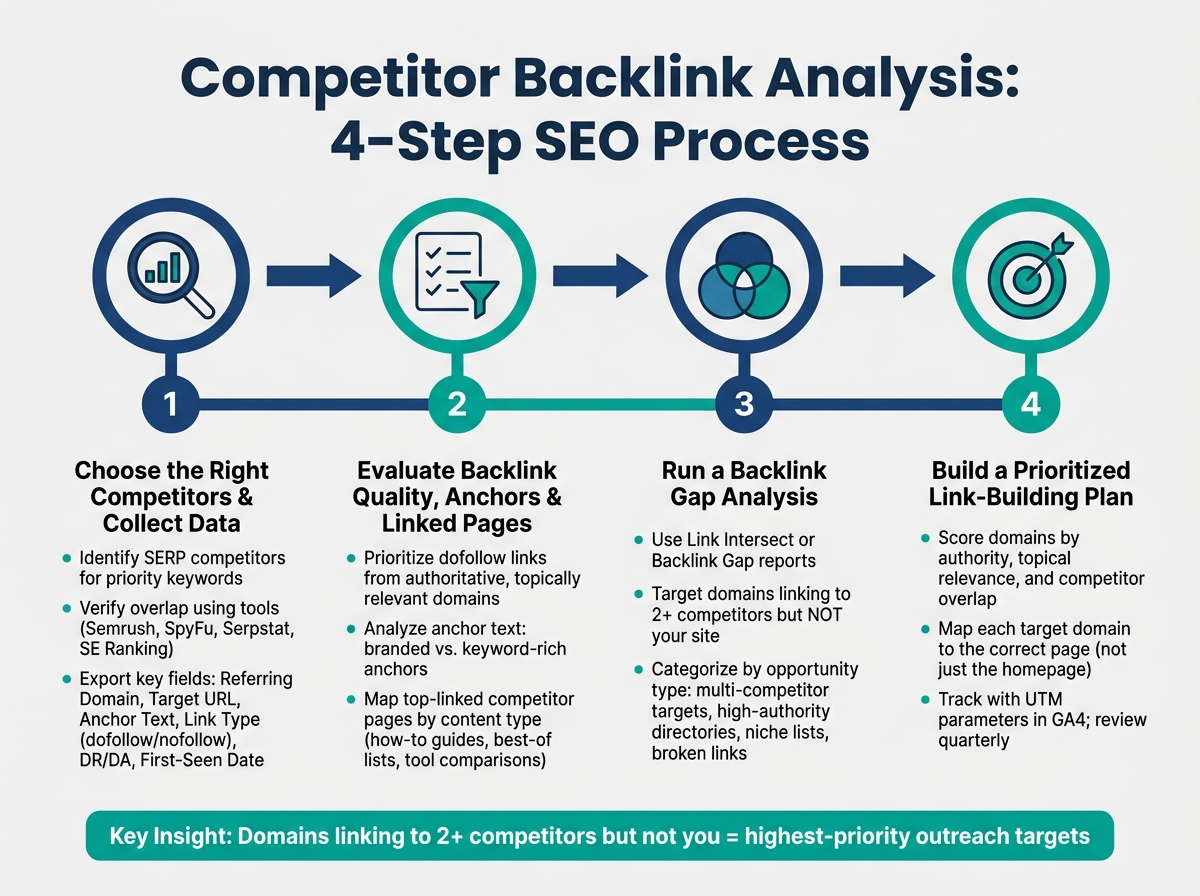
Competitor Backlink Analysis: 4-Step SEO Process
Step 1: Choose the right competitors and collect backlink data
Find competitors using SERP checks and SEO tools
Start with the domains that show up on page one for your priority keywords. That gives you a practical competitor set based on who already ranks for the terms you want.
Then verify overlap in Semrush, SpyFu, Serpstat, or SE Ranking. The goal is simple: confirm which sites keep showing up for the same keywords you're targeting. If a niche directory appears in the results, flag it. It may not be a direct competitor, but it could be a link source worth reviewing.
Once you've locked the competitor set, export the backlink data you need.
Export the backlink fields that matter
Don't dump every field into a spreadsheet. Pull the data that helps you judge link value and spot patterns. Export each competitor's backlink data into Google Sheets or Excel.
| Field | Why it matters |
|---|---|
| Referring domain | The source site linking to your competitor |
| Target URL | The specific competitor page receiving the link |
| Anchor text | Reveals how the linking site frames the content |
| Link type (dofollow / nofollow) | Determines whether the link passes SEO value |
| DR or DA | A quick proxy for the referring domain's authority |
| First-seen date | Shows link velocity and how recently the link was earned |
With the raw data in place, you can clean up the sheet and make it easy to compare one site against another.
Set up a review sheet for repeatable analysis
Use one sheet to compare referring domains, anchor text, and target pages across competitors. Make it sortable by DR, link type, topical relevance, and target page. That way, patterns stand out fast instead of getting buried in rows of data.
Update the sheet every quarter to keep it useful.
Next, review quality, anchors, and linked pages.
sbb-itb-a84ebc4
How to Find Competitor Backlinks in Semrush (Step-by-Step)
Step 2: Evaluate backlink quality, anchor patterns, and linked pages
Once your spreadsheet is clean, you can start turning the export into something useful. The goal here is simple: figure out which domains are worth your time, what anchor text tells you about link intent, and which competitor pages keep pulling in links. That scorecard helps you sort real link chances from plain noise before you build your gap list.
Check domain quality and topical relevance
Not every referring domain in your export deserves attention. Focus first on domains that are authoritative, closely tied to your topic, active, and reviewed by humans. In practice, a high-authority site with no clear tie to your space is often less useful than a lower-authority site that fits your niche well.
For ranking goals, put dofollow links first. Treat nofollow links as a second-tier signal for traffic and brand visibility.
After that, look at anchor text. It shows how publishers frame the pages that win links.
Review anchor text to understand link intent
Competitor anchors usually land in two buckets: branded anchors, which help build credibility, and keyword-rich anchors, which point to product category terms for search engines and high-intent buyers. If you see a competitor with a heavy share of keyword-rich anchors from authoritative sites, that usually means those topics connect with publishers in your space.
That said, there’s a catch. If the same pattern comes from low-quality or off-topic domains, it can signal over-optimization. That’s not something you want to copy.
Next, map the pages earning those links so you can line up content format with link demand.
Map top-linked competitor pages by content type
Pull the Top Linked Pages or Best by Links report for each competitor in the tool you use. Review the pages with the highest number of referring domains, then check which formats pull the most links.
In many cases, competitors earn the most links to:
- Educational how-to resources
- Best-of and comparison pages
- Curated tool lists
When one format keeps showing up across a competitor’s link profile, compare it with what you already have. If a competitor page on the same topic has far more referring domains than your version, treat that page type as a gap and move it up the list for Step 3.
Step 3: Run a backlink gap analysis and turn findings into opportunities
Use the pages and anchor patterns from Step 2 to spot domains that link to competitors but not to you.
Use Link Intersect or Backlink Gap reports
Open Link Intersect or a Backlink Gap report and enter your domain along with a few competitors. These reports show referring domains that link to multiple competitors but not to your site. Sort the results by your authority metric, then scan for sites with recent reviews or updated pages. Domains that show up across two or more competitors usually deserve attention first. They already write about your niche and have already linked to this topic.
Match gap domains to competitor pages and anchors
For each gap domain, look at the competitor URL and anchor text. That tells you what kind of asset earned the link - a listing, guide, comparison page, or guest post. This part matters more than people think. If the link goes to a competitor integrations page, build a similar technical asset - not a blog post.
Sort opportunities by likely SEO value
Not every gap domain deserves the same amount of work. A simple way to keep this sane is to group findings by effort and likely SEO upside.
| Opportunity Type | How To Find It | Impact On SEO Planning |
|---|---|---|
| Multi-competitor targets | Use Link Intersect or Backlink Gap reports to find domains linking to 2+ rivals but not you. | High - signals a hub or directory that covers the whole category and is a realistic target. |
| High-authority general directories | Check whether competitors have profiles on G2, Capterra, or TrustRadius. | High - strong link equity and social proof, especially for buyers in the consideration phase. |
| Niche/industry lists | Use Google searches like [best marketing funnel tools](https://www.topmarketingfunnels.com/software-vendors/) or [industry] + software directory. |
Medium-high - drives high-intent, pre-qualified referral traffic. |
| Broken link or outdated info | Audit competitor listings for dead links or deprecated features. | Medium - a lower-competition way to suggest your site as a replacement. |
Use that ranking to build the target list you'll map to pages in Step 4.
Step 4: Build a prioritized link-building and page-mapping plan
Once your gap analysis is sorted by opportunity type, the next step is simple: turn it into a plan your team can act on.
Create a ranked list of link targets
Use your gap list to aim outreach at the domains most likely to improve rankings and traffic. Score each domain based on authority, topical relevance, and competitor overlap. If a domain links to several competitors and has strong authority, it should be near the top of the list.
Effort matters too. Some sites need manual review. Some want reciprocal links. Some charge fees. Work those factors into your ranking before you spend outreach time.
Prioritize general and niche directories for authority and qualified traffic.
That leaves you with a shortlist your team can tackle in order.
Map each target domain to the right page on your site
After you rank the domains, match each one to the page it is most likely to help. Don’t send everything to the homepage. Map each domain to a specific page instead. Developer directories should point to API docs. Business directories should point to product overview pages. Conversion-focused sources should point to landing pages with features, pricing, and social proof.
Use UTM parameters to track traffic, leads, and pipeline in GA4. Then check those mappings every quarter to make sure destination pages still have updated screenshots, current pricing, and accurate feature lists.
Conclusion: Use competitor links as planning input, not a copy list
The goal isn’t to copy your competitors’ link profiles line by line. Use that data to spot the domains worth targeting, build pages that earn those links, and match each outreach target to the page that makes sense for your audience. That’s how competitor backlink analysis turns into an SEO plan.
FAQs
How many sites should I compare?
There’s no single “right” number here. Look at enough competitor sites to cover the main players ranking for your target topics, then use what you find to shape your plan - not to chase a certain volume.
For backlink analysis, keep your eye on relevant, high-quality competitor link profiles. Going after links from hundreds of weak or off-topic sites usually isn’t worth it, and it can hurt more than it helps.
How do I judge backlink quality?
Prioritize domains with high authority, a strong track record of trust, and clear relevance to your site. Those links tend to pass more link equity.
Look for sites with an active audience, recent updates, and signs of manual review. Skip outdated websites, thin content, and automated link farms - they can hurt rankings. Google cares more about quality and relevance than sheer volume.
Which page should I target for each link?
Link to the page that best fits the directory’s intent and the kind of page you want to promote.
For general SEO or resource pages, point the link to your SEO planning page or pillar page. For niche directories or funnel/RevOps listings, send the link to the matching funnel-specific page or section, using clear, relevant anchor text.