YouTube Community posts can drive leads and trials without a new video. I’d use them as a simple funnel layer: polls to learn intent, image posts to warm people up, link posts to push sign-ups, and replay or proof posts to move people closer to action.
Here’s the short version:
- Use each post for one job - awareness, consideration, conversion, or retention
- Match format to goal - polls for pain points, link posts for clicks, video shares for proof
- Post in a sequence - teaser, poll, CTA, reminder, follow-up
- Track every link with UTMs - so I can tie clicks to forms, trials, pipeline, and revenue
- Measure the right metric - impressions and engagement for early-stage posts, CTR and landing-page conversion for CTA posts
A simple rule I’d follow: videos build demand over time, Community posts push action right now. If I need webinar registrations, lead magnet downloads, or self-serve trial starts using marketing funnel software, Community posts give me a low-lift way to do it.
I’d also keep the reporting clean:
utm_source=youtubeutm_medium=communityutm_campaign=webinar_q3_2026ortrial_launch_augutm_content=teaser,poll,cta, orreplay
That setup lets me see which post led to the click, which click led to the form fill, and which lead turned into pipeline.
If I were running this channel, I wouldn’t post at random. I’d build short sequences around one offer, one CTA, and one reporting path. That’s what turns the Community tab from an engagement tool into a channel I can report on in plain funnel terms.
YouTube Community Tab & Posts - The COMPLETE Guide!
sbb-itb-a84ebc4
Match Community Post Types to Funnel Goals
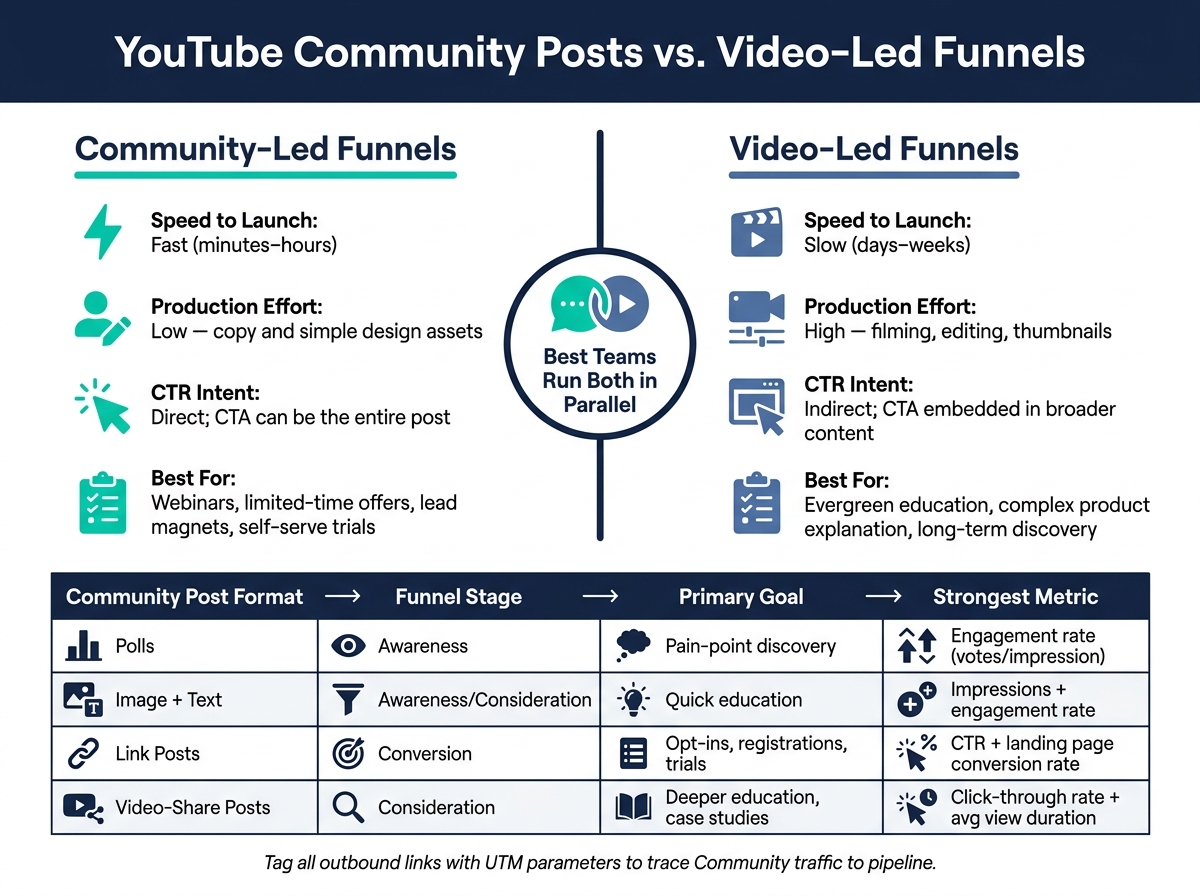
YouTube Community Posts vs. Video-Led Funnels: Speed, Effort & Conversion
Not every Community format should do the same job. Each post should aim at one outcome: gather signals, build intent, or drive a click. Get that match right first. Then work on cadence.
Best Formats for Clicks, Leads, and Sign-Ups
Use polls early to surface audience pain points. Then use those results to shape your next link post or webinar topic.
Image + text posts work well as primers and micro-educators. One image plus tight copy can explain a pain point, tease a lead magnet, or spotlight a single product benefit. They help warm up the audience without asking for a click.
Use link posts when the goal is a visit, opt-in, registration, or trial to build high-converting sales funnels. Make the CTA the whole post. Frame it around a clear problem-solution message.
Use video shares for consideration-stage buyers who need proof before they convert.
How to Measure Each Format by Funnel Stage
Measure each format by the result it should produce.
For awareness posts like polls and image + text, track impressions, unique reach, and engagement rate. For consideration posts like video-share and educational image + text, watch click-through rate to the video and average view duration on the linked content. For conversion posts like link posts, focus on CTR on the post itself, landing page conversion rate, and assisted conversions tracked with UTM parameters.
| Community Format | Best Funnel Stage | Primary Goal | Strongest Metric | Intent Level |
|---|---|---|---|---|
| Polls | Awareness / Insight | Pain-point discovery, topic research | Engagement rate (votes per impression) | Mixed; useful for segmentation |
| Image + Text | Awareness / Consideration | Quick education, pain-point agitation | Impressions + engagement rate | Moderate; warms audience |
| Link Posts | Conversion | Opt-ins, registrations, trial starts | CTR + landing page conversion rate | High; clicks signal strong intent |
| Video-Share Posts | Consideration | Deeper education, case studies | Click-through rate to the video, average view duration | Moderate to high |
Tag every outbound link with UTM parameters so you can trace Community traffic all the way to form submissions, sign-ups, and pipeline in your CRM using tools like Systeme.io.
Community-Led Funnels vs. Video-Led Funnels
The biggest day-to-day difference is speed. A Community post can go live in minutes. A video usually takes days or weeks for scripting, filming, and editing. If you need to fill webinar seats or push a limited-time discount, a Community-led approach is often the faster play.
Video-led funnels fit long-term, evergreen education better - things like multi-part tutorials, product deep dives, and content that can keep bringing in traffic over time. Community-led funnels fit time-bound campaigns and offers that need a direct CTA without the production load. That includes rep-free buying paths where the post itself moves prospects from problem to self-serve trial.
| Dimension | Video-Led Funnels | Community-Led Funnels |
|---|---|---|
| Speed to Launch | Slow (days–weeks) | Fast (minutes–hours) |
| Production Effort | High - filming, editing, thumbnails | Low - copy and simple design assets |
| CTR Intent | Indirect; CTA embedded in broader content | Direct; CTA can be the entire post |
| Best Conversion Use Cases | Evergreen education, complex product explanation | Webinars, limited-time offers, lead magnets, self-serve trials |
The most efficient teams run both in parallel: videos as the long-term discovery engine, Community posts as the short-term conversion accelerator. After format choice, sequence and timing shape how much conversion momentum the channel creates.
Build a Posting Rhythm That Creates Conversion Momentum
Once you match each post type to a funnel goal, the next move is sequencing. Timing matters. Momentum matters. If you post at random, conversions usually slip.
Channels that get clicks and sign-ups don’t treat Community posting like a casual habit. They treat it like a system. Every post should have a job before it goes live.
Use Primers, Amplifiers, Extenders, and Drivers
Each post type plays a different role in the sequence.
Primers start the conversation. They bring audience pain points to the surface before a topic or offer goes live. For example, a poll about the audience’s biggest conversion blocker can tell you what angle your next offer or video should use.
Amplifiers build on launch momentum. A post published on upload day that highlights one takeaway and one CTA is an Amplifier.
Extenders keep the topic in front of people after the first push. An image post that sums up key takeaways and links to the replay or a related checklist can reach people who missed the first wave.
Drivers focus on conversion. They send people straight to a sign-up or purchase page using a time-bound hook, social proof, and a short list of value bullets. Their job is simple: push the final action.
A role on its own isn’t enough. Timing has to back it up.
Schedule Posts Around Audience Behavior and Offer Timing
YouTube’s Audience tab includes a heat map that shows when your viewers are on the platform, and that heat map reflects each viewer’s local time. That’s a big deal if your audience is spread across Eastern, Central, Mountain, and Pacific time zones.
Use a Primer before upload, an Amplifier on launch day, an Extender after, and a Driver close to the deadline. Then test the same format across a few time windows. Compare impressions, engagement rate, and link click-through rate. That gives you your channel’s actual sweet spots instead of generic “best time to post” advice.
Choose a Rhythm Based on the Funnel Goal
Pick the cadence that fits the conversion job - not the calendar. If the video is the path to conversion, use an upload-centric rhythm. If the Community post is doing the selling, use an offer-centric rhythm.
These two cadences are a good place to start.
| Rhythm Type | Cadence | Ideal Use Case | Posts per Week | Core Metrics |
|---|---|---|---|---|
| Upload-centric | Primers 1-2 days before upload; Amplifiers on upload day; Extenders within 3-5 days | Supporting new videos, premieres, evergreen education | 6-8 | Video CTR, watch time, Community engagement rate, subscriber growth |
| Offer-centric | Primers 5-7 days before offer; Amplifiers and Drivers around launch date; Extenders post-event | Webinars, lead magnets, self-serve trials, limited-time discounts | 3-7 | Community post CTR on offer links, landing page conversion rate, leads generated, pipeline influenced |
Use the same UTM structure across all post types so you can measure each sequence cleanly. Then use the rhythm that fits the sequences that come next.
Design Community Post Sequences for Leads, Webinars, and Rep-Free Buying
Once you’ve picked your post types and posting rhythm, the next step is building sequences that move people from interest to action. Rhythm handles timing. Sequences turn that timing into conversions. Each post should move the audience one step forward and point to one clear action.
A Simple Sequence for Webinar Registrations
A B2B webinar sequence tends to work best over 7-14 days, with a clear path from curiosity to commitment.
Start with a teaser post 5-7 days before the event. Lead with a pain-point hook tied to the webinar topic. Instead of dropping the registration link right away, ask people to comment.
Then publish a pain-point poll 4-5 days out. Ask which challenge matters most to your audience. Each answer choice should map to a segment you plan to cover in the session. This gives you a read on the strongest objection or angle before you make the registration push.
The registration push should go live 3-5 days before the event. Keep it simple: a few learning outcomes, a visual, one UTM-tagged link, and a clear reason to attend live. If you’re offering a bonus resource like a template or checklist, mention it here to drive more sign-ups.
On the day of the webinar, post a short reminder 2-4 hours before kickoff. Use urgency-led copy and state the time zone clearly, like 2:00 PM ET / 11:00 AM PT. Then, 1-3 days after the event, post the replay link with a secondary CTA, such as a demo booking page, lead magnet, or free trial link. Give each one its own UTM tag so post-event conversions are tracked apart from live registrations.
For lower-intent buyers, don’t lean on urgency. Lead with proof and deal with objections head-on.
A Community Sequence for Product Interest and Self-Serve Trials
Self-serve buying paths usually need more proof before you ask for the trial or checkout. Each post should lower perceived risk before the CTA.
Start with an educational post that shows a workflow your product improves. Keep it practical. Break down a real process in a few steps instead of listing features. Pair it with a soft CTA, like saving the post or watching a related video.
Next, run a buyer-objection poll. Ask what’s stopping subscribers from trying the product: implementation time, pricing confusion, data migration, or fear of lock-in. The results show you what to answer next, and they also signal that you’re paying attention.
Follow that with a social proof post. Share a short customer story with an outcome and a link to the full case study. Make sure the example fits your audience by company size, role, and problem to solve.
Then publish a pricing-context post. Focus on value, not public discounting. For example, show how a team could cover the monthly cost with one added closed-won deal. Link to the pricing page or an ROI calculator.
Close the sequence with a direct trial CTA post: one offer, one image of the onboarding flow, one line answering the top objection from the earlier poll, and one UTM-tagged link to the trial sign-up page.
Once the sequence is in place, attribution is what makes it measurable.
Track Attribution From Post Click to Pipeline
Use one UTM schema across all sequence posts: utm_source=youtube, utm_medium=community, utm_campaign=webinar_q3_2026 or trial_launch_aug, and utm_content=teaser, poll, or cta to separate posts inside the same sequence.
Capture those values with hidden form fields and store them in your CRM. That way, every lead, opportunity, and closed-won deal can be tied back to the post that started the journey.
In GA4, filter sessions by utm_source=youtube and utm_medium=community. Then segment by campaign and content to see conversion rates by post type. Build pipeline reports by funnel type so demand-gen and RevOps teams can see registrations, opportunities, and revenue in one place, not just clicks.
Use the sequence that fits the conversion goal:
| Funnel Type | Post Sequence | Destination Page | Primary KPI |
|---|---|---|---|
| Webinar | Teaser → Pain-point poll → Registration push → Reminder → Replay + next-step CTA | Webinar registration page or event platform | Registrations, live attendance rate, post-event MQLs |
| Self-Serve Trial | Educational post → Objection poll → Social proof → Pricing context → Trial CTA | Product trial sign-up or checkout page | Trial starts, activation rate, trial-to-paid conversion |
| Evergreen Lead Magnet | Value snippet → Pain-point poll → Lead magnet CTA → Proof post → Nurture post | Lead magnet landing page or resource hub | Lead form submissions, downloads, lead-to-opportunity rate |
Tools, Analytics, and Next Steps
Use YouTube Analytics and Funnel Tools Together
Once your Community sequences are live, the next step is simple: prove which post drove each click and lead.
YouTube Studio gives you post-level metrics for Community posts, including impressions, clicks, likes, comments, and unique viewers. You can also filter by post type and time period. That makes YouTube Studio the right place to check post-level impressions, clicks, and engagement.
But that only shows what happened on YouTube.
To see what happened after the click, use GA4, automation, and CRM data. That’s how you trace Community traffic to webinar sign-ups, trial starts, leads, and revenue. The goal isn’t just to see whether a post got attention. It’s to connect Community activity to pipeline and closed business.
From there, RevOps or BI dashboards like Looker, Tableau, or Power BI can show pipeline value and closed-won revenue tied to Community activity.
For mid-market and PE-backed teams, the Marketing Funnels Directory can help compare funnel and RevOps tools for board-ready reporting.
How Operators and Growth Teams Can Evaluate the Stack
When you evaluate tools, focus on what changes reporting quality: attribution depth, UTM support, CRM integration, and reporting clarity. If a tool can’t connect leads to pipeline and revenue, move on.
Use the stack to judge reporting quality - not brand name recognition.
| Tool Category | What to Look For | Example Tools |
|---|---|---|
| YouTube Analytics | Post-level impressions, CTR, clicks by post type | YouTube Studio |
| Web Analytics | UTM session tracking, event tracking, conversion goals | Google Analytics 4 |
| Marketing Automation | Lead source capture, hidden form fields, campaign objects, sequence analytics | HubSpot, Marketo |
| CRM | Lead source fields, primary campaign source, pipeline and revenue by channel | Salesforce, HubSpot CRM |
| RevOps / BI | Multi-touch attribution, pipeline coverage, board-ready dashboards | Looker, Tableau, Power BI |
| Funnel Orchestration | Landing pages, lead capture paths, CRM sync | ClickFunnels |
Also, match your lookback windows to the sales cycle. Use about 24 days for transactional sales and 90+ days for enterprise deals.
Conclusion: Turn Community Posts Into a Measurable Funnel Layer
Community posts become a measurable funnel layer when UTMs, CRM source fields, and pipeline dashboards connect each click to revenue. That’s what makes the channel defensible in demand-gen and RevOps reporting.
FAQs
How often should I post Community updates?
Prioritize a regular posting schedule instead of locking yourself into a set frequency. What matters most is consistency. It helps subscribers know what to expect, keeps your audience engaged, and supports your funnel goals.
Use YouTube Analytics to check when your audience is most active, then time your posts around those peaks. Between video uploads, stay present with polls, behind-the-scenes updates, and simple questions that keep the conversation going.
Which Community post type drives the most conversions?
It depends on your audience, but Community posts often convert best when they include a direct call to action - like product demos, testimonials, or resources that lead people to a purchase or sign-up.
Use UTM parameters on your links so you can track click-throughs and sign-ups. Polls and image posts can help keep interest high, but for bottom-of-funnel conversions, clear value and social proof tend to do the heavy lifting.
How do I track Community posts from click to revenue?
Use UTM parameters on every link in your Community posts. That way, your analytics platform can track what YouTube traffic does after people land on your site.
Start by measuring click-throughs. Then look at what happens next - sign-ups, demo requests, or direct purchases. You can also use dashboard tools in the Marketing Funnels Directory to tie YouTube activity back to pipeline and ROI.