Live Q&A is one of the clearest signs of buying intent - and waiting 42 hours to follow up is too slow. I’d handle webinar questions like sales signals: collect them before the event, open Q&A at the right time, give one person the queue, sort by intent, route each question to the right speaker, and follow up within 24 to 48 hours based on what each attendee asked.
Here’s the short version:
- Collect questions early with a registration form field
- Open Q&A during peak attention, not only at the end
- Assign a moderator to sort and tag questions live
- Use direct prompts to pull out blockers, budget, and timing
- Filter chat noise so buyer questions do not get buried
- Match questions to the right speaker for clean answers
- Follow up by intent, not by attendance alone
A few numbers stand out:
- 73% of B2B marketers are measured on pipeline created
- Leads contacted within 5 minutes of an interaction are 9x more likely to convert
- Generic event follow-up misses the point if someone already asked about pricing, setup, or a demo
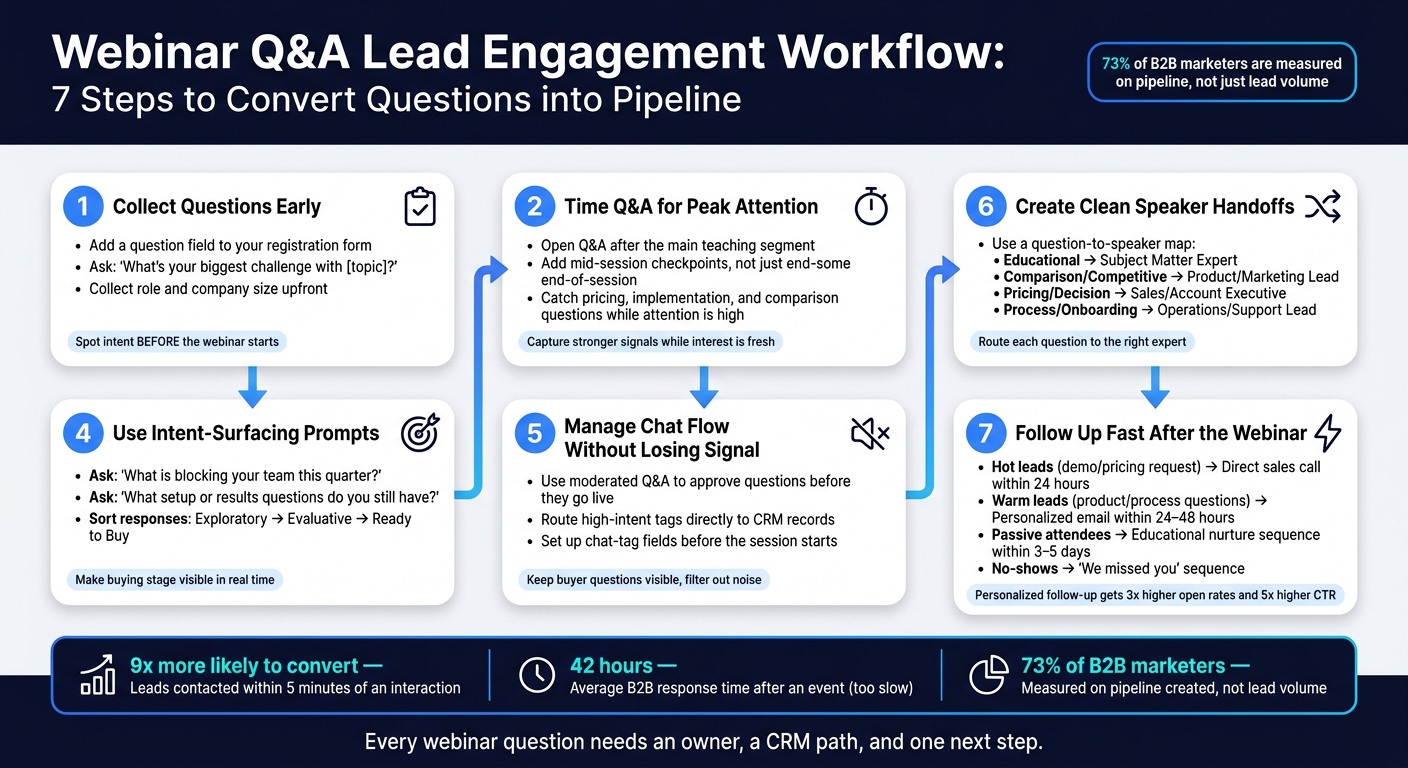
Webinar Q&A Lead Engagement Workflow: 7 Steps to Convert Questions into Pipeline
Webinar Q&A: How to Moderate & Answer Questions Live
Quick Comparison
| Tactic | What I’d use it for | Main outcome |
|---|---|---|
| Pre-event question collection | Spot intent before the webinar starts | Better prep and earlier lead sorting |
| Mid-session Q&A timing | Catch questions while attention is high | More buying-stage signals |
| Dedicated moderator | Keep the speaker out of the chat queue | Cleaner routing and tagging |
| Intent-focused prompts | Get clear questions instead of vague ones | Better follow-up paths |
| Moderated chat flow | Cut noise from greetings and tech issues | Buyer questions stay visible |
| Speaker handoff plan | Send each question to the right expert | Smoother answers and less drop-off |
| Fast post-webinar follow-up | Act on intent before it cools off | More sales conversations |
If I had to sum it up in one line: every webinar question needs an owner, a CRM path, and one next step.
Why Live Q&A Improves Lead Quality
Registration and watch time tell you someone showed up. Live Q&A tells you if they may buy. That makes Q&A one of the clearest live signs of purchase readiness.
When a person drops a question into webinar chat, they’re showing where they are in the buying process. A question about pricing, setup time, or implementation is a much stronger late-stage signal than simple attendance.
That matters because 73% of B2B marketers are now measured on pipeline created, not just lead volume. Behavior moves pipeline. Attendance by itself does not.
Follow-up should match the strongest signal each attendee gives. In plain terms: route follow-up by intent, not attendance.
| Engagement Signal | What It Reveals | Next Step |
|---|---|---|
| Asked about pricing or requested a demo | Decision stage, high intent | Direct sales call within 24 hours |
| Asked a comparison or value question | Consideration stage | Send a case study or proof asset |
| Answered a poll only | Warm lead | Personalized email with relevant content summaries |
| Attended, no interaction | Cold lead | Add to a "We missed you" or educational nurture drip |
The next seven tactics show how to capture those signals without losing momentum.
1. Collect Questions Before and During the Webinar
Most teams wait until the webinar is live to gather questions. That's a mistake.
If you collect questions before the session starts, moderators can prep better answers and spot intent early. That makes it much easier to sort and rank questions once the webinar begins.
Add a question field to your registration form. Ask: "What's your biggest challenge with [topic]?" Also collect role and company size up front. Pre-submitted questions can tell you a lot about buyer intent before anyone joins the room.
When the webinar starts, send new questions into the same priority system. Use a live queue so questions coming in during the session don't get lost. Platforms like ClickMeeting support moderated Q&A queues, so high-signal questions - such as pricing or technical questions - can be flagged without interrupting the speaker.
Set your lead fields before the webinar begins. Map role, territory, and intent fields to HubSpot or Salesforce before the webinar ends. Once questions are captured and tagged, the next step is deciding when Q&A should open.
2. Time Q&A for Peak Attention
If you wait too long to open Q&A, the session can lose steam. A better move is to add short Q&A checkpoints during the presentation instead of saving every question for the end. Once you set the timing, give one person the job of keeping the queue moving.
Platforms like Livestorm and EasyWebinar support this setup, with Q&A and polling built to run during the presentation, not just after it. That helps your team see what’s landing in real time and gives you a cleaner read on intent while attention is still high.
Open Q&A after the main teaching segment, when attendees have enough context to ask specific questions. That’s usually when pricing, implementation, and comparison questions start to show up - the signals sales teams care about most.
Time Q&A for the point of peak attention so you can catch stronger intent signals and act on them while interest is still fresh. Once the timing is in place, the next step is assigning a moderator who can sort, filter, and surface the best questions fast.
3. Assign a Dedicated Moderator
When one person is both presenting and managing chat, something usually slips. A dedicated moderator gives the speaker space to focus on delivery while someone else owns the queue, filters questions, and keeps the session moving.
That setup works best when one person clearly owns the queue.
The moderator’s main job is to tag and sort high-intent questions - pricing, timelines, comparisons, and implementation.
Before the webinar, hold a prep call. Use it to line up hand-off cues and define CRM fields for intent, tools, territory, and next steps.
During the session, that prep pays off. The moderator can restate key points, share relevant resources, and surface the highest-intent questions. Platforms such as ClickMeeting and WebinarJam let moderators approve questions before they reach the full audience.
After the session, log recurring questions and route high-intent leads right away while the conversation is still fresh.
With moderation in place, the next step is using prompts that draw out clearer intent.
sbb-itb-a84ebc4
4. Use Audience Prompts That Surface Intent
Most webinar hosts ask, “Any questions?” and leave it at that. That usually gets you vague replies or silence. Specific prompts get to the point faster. They bring out pain points, objections, and buying signals while the session is still live. The goal is simple: make intent visible, not fuzzy.
Ask focused prompts like, “What is blocking your team this quarter?” and “What setup or results questions do you still have?”
The type of question tells you a lot about buying stage. Sort responses by intent:
- Exploratory - the person is still learning
- Evaluative - the person is comparing options
- Ready to buy - the person is close to a decision
Have the moderator flag high-intent responses in real time and tag them in the CRM right away. Those tags should feed sales follow-up and post-webinar content.
High-intent questions shouldn’t only shape the live session. Reuse repeated questions in follow-up emails, guides, or ROI tools. Tag those questions in your CRM so sales can route follow-up by intent.
5. Manage Chat Flow Without Losing Signal
Live chat can bury buying signals in minutes. Greetings, tech issues, and side comments stack up fast, and high-intent buyer questions can disappear before anyone on the team gets to them. The fix isn't to slow the chat down. It's to filter it with moderated Q&A and preset routing.
Platforms like ClickMeeting and Livestorm let your team approve questions before they appear live. That helps keep the stream focused on buyer intent instead of noise. ClickMeeting's waiting room also gives you a place to share the agenda and FAQs before the session starts, which cuts repetitive messages during the broadcast. Demio adds automation rules that segment attendees in real time based on actions like joining late or engaging with specific content. The aim is simple: keep buyer questions visible and ready for action.
High-intent questions should go straight to the right CRM record. If someone asks about pricing, timing, or vendor comparisons, those intent tags from chat should flow right into that attendee's sales record so follow-up can start right away, without a manual handoff. Set up chat-tag fields before the session so the moderator can flag and route in one move, not two.
Once the queue is clean, the speaker can pass the highest-intent questions to sales without breaking the flow.
6. Create Clean Speaker Handoffs
Once you've filtered the chat, send each high-intent question to the right person.
Speaker overlap kills momentum. If the host and expert both pause and figure out who should answer, people notice. It feels clunky, and the room loses energy.
The fix is simple: use a question-to-speaker map. Route pricing, technical, and onboarding questions to the person best suited to answer them. Pricing and comparison questions should go to a sales or account executive. Those questions often signal buying readiness, so they need a direct answer. Technical implementation questions belong with a product or engineering lead. Process and onboarding questions should go to operations or support.
| Question Type | Speaker Role |
|---|---|
| Educational/Awareness | Subject Matter Expert |
| Comparison/Competitive | Product/Marketing Lead |
| Pricing/Decision | Sales/Account Executive |
| Process/Onboarding | Operations/Support Lead |
Use a short script for the handoff. Name the expert, then say why they're the right person to answer. That keeps the audience oriented and shows the team is organized.
Keep the handoff simple enough to do in one move. Also, preserve each attendee's intent tag during the handoff so the right follow-up can start right away. That makes post-webinar follow-up faster and more relevant.
7. Follow Up Fast After the Webinar
After the last question, speed is the signal. The second Q&A ends, follow-up begins. Every question asked during the session tells you something - and that signal fades fast.
Leads contacted within 5 minutes of an interaction are 9x more likely to convert. Treat that as the target, not a rigid rule.
Go by intent, not attendance. Someone who asked about pricing during Q&A does not belong in the same group as someone who stayed quiet the whole time. Your hottest leads - people who asked for a demo, pricing, or a meeting - should get a direct sales call within 24 hours. Product or process questions should get a personalized email within 48 hours. Passive attendees should move into an educational nurture sequence. No-shows should get a simple "we missed you" sequence.
| Lead Tier | Signal | Action | Timing |
|---|---|---|---|
| Hot | Requested demo, pricing, or meeting in Q&A | Direct sales call | Within 24 hours |
| Warm | Asked specific product/process questions | Personalized email with resources | 24-48 hours |
| Passive | Attended but did not interact | Educational nurture sequence | 3-5 days |
Mention the specific question the lead asked. Don't send a generic recap. Personalized post-event sequences get 3x higher open rates and 5x higher click-through rates than generic blasts. Pair that message with something useful, like:
- A relevant case study
- An ROI-focused resource
- A short discovery call link
Then give them one clear next step, not five.
Set ownership before the webinar starts. Decide who owns each lead tier, which asset gets sent, and which CRM stage each lead enters. Sync the webinar platform and CRM so triggers fire the moment a Q&A signal appears. That way, intent doesn't get lost once the session ends.
Preassign owners now so every question has a next step the moment the session ends.
Question Intake and Team Roles at a Glance
Use this quick reference to match each question source to the right team owner.
Where a question comes from shapes how fast you can sort intent. The table below shows how the three main capture methods stack up for lead gen:
| Capture Method | Speed | Control | Lead Value |
|---|---|---|---|
| Pre-submitted Questions | Low (Collected pre-event) | High (Full review time) | High (Signals intent early) |
| Live Chat Questions | High (Real-time) | Low/Medium (Requires triage) | Variable (Requires filtering for signals) |
| Poll-based Capture | Medium (Scheduled) | High (Structured prompts) | High (Surfaces specific intent/segmentation) |
If you need cleaner segmentation, use structured prompts. If speed matters most, live chat gives you that - but it also creates more noise. Pre-submitted questions take longer to gather, but they often give you an early read on buyer intent.
After capture method, the next choke point is role clarity.
Ownership matters more than source. If no one clearly owns intake, intent gets lost. This table keeps roles clear:
| Role | Triage Responsibilities | Delivery Responsibilities | Technical Support |
|---|---|---|---|
| Host | Monitors flow | Opens, transitions, closes | Backup only |
| Moderator | Filters, tags, prioritizes | Manages chat and handoffs | Handles attendee issues |
| Speaker | None | Answers selected questions | None |
The moderator owns triage, flow, and routing. That setup keeps the speaker focused on answers instead of sorting through chat. It also helps keep the signal clean, which makes handoff to sales much easier.
Clear intake and clear ownership help high-intent questions move instead of getting stuck before follow-up.
Conclusion
Live Q&A turns attendee intent into qualified next steps - but only if you capture it, route it, and act on it fast.
This only works when capture, routing, and follow-up are mapped out before the webinar starts. The average B2B response time after an event is 42 hours. That’s too slow if you want to move on buying intent while it’s still fresh. Close that gap with prebuilt routing, CRM triggers, and segmented follow-up.
Map the post-webinar workflow before the session begins. Set ownership, the CRM stage, and the next asset before the first question comes in. In plain terms, every question needs:
- an owner
- a CRM path
- a next step
When Q&A is treated as a workflow, not a chat box, webinars produce cleaner signals and faster pipeline.
FAQs
How do I score webinar questions by intent?
Score questions by topic.
Questions about pricing, service comparisons, timelines, results, or trust signals usually point to high buying intent. General or introductory questions, on the other hand, tend to signal earlier-stage interest.
Use this to segment your audience. Give higher lead scores to direct, purchase-related questions. If your webinar platform connects to a CRM, map those interactions to buyer journey stages so your team can follow up faster.
What should I sync between my webinar platform and CRM?
Sync contact details and engagement data between your webinar platform and CRM. That means registration and attendance, play rates, call-to-action conversions, chat activity, poll responses, and questions asked.
Why does that matter? Because it shows how attendees move through your sales funnel. You can segment leads with more precision, tailor follow-up based on what people actually did, trigger automated workflows, and update lead scores without doing it by hand.
How can a small team manage live Q&A well?
Assign a dedicated moderator to run the chat so the presenter can stay focused. That one change can make the whole session feel smoother. The moderator can also group similar questions into a few clear themes, which saves time and helps attendees feel like their input isn’t getting lost in the shuffle.
For Q&A, keep the process simple: ask attendees to start each question with "Q:". It gives the chat some structure and makes questions easier to spot in a busy feed.
If the volume climbs, the moderator can lean on polls or prepared FAQ responses to keep things moving without letting the session bog down. It also helps to have a backup plan ready - like a co-host who can step in or pre-recorded material you can use if tech problems pop up.