Want more people to watch your videos all the way through? Audience retention is key. It measures how much of your video viewers actually watch and directly impacts YouTube’s algorithm. Higher retention means more recommendations and better visibility for your content.
Here’s the deal:
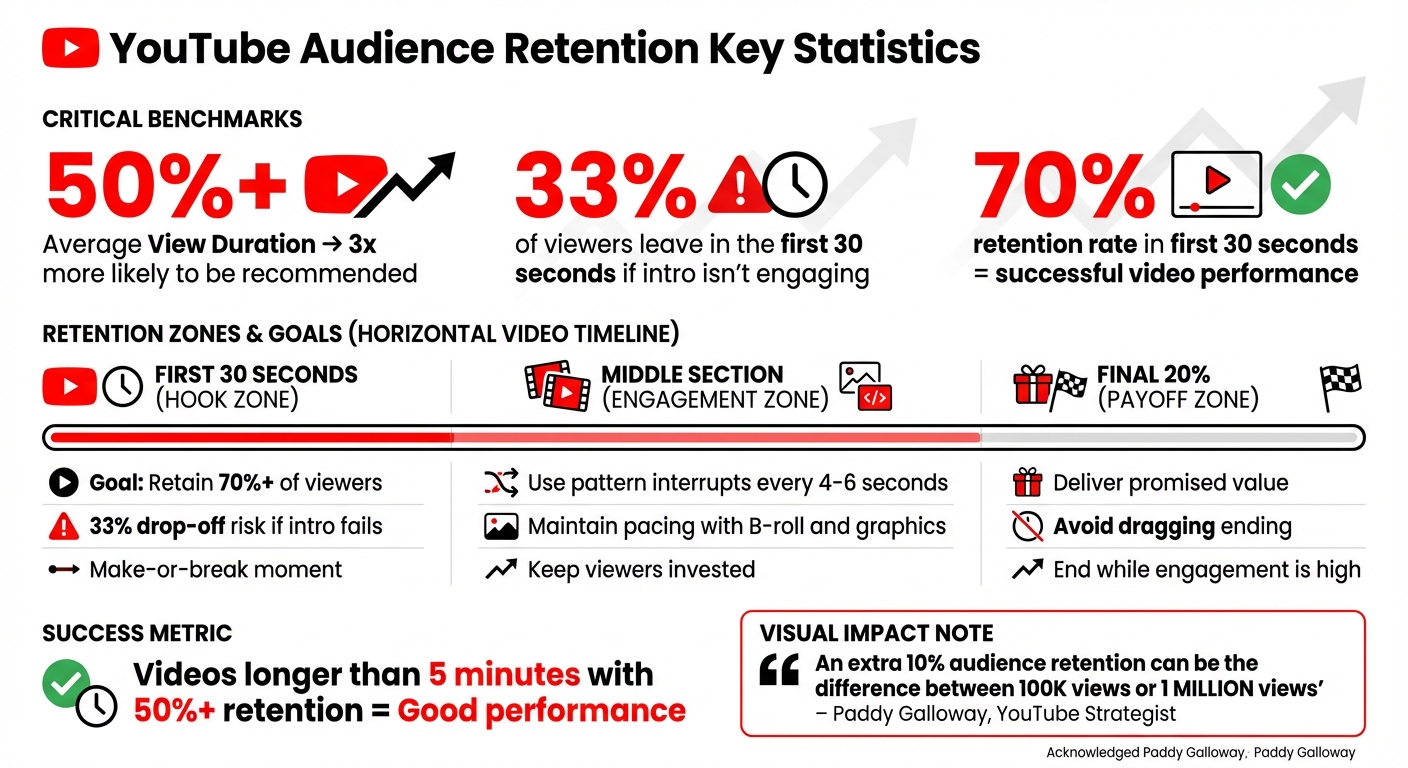
- Videos with 50%+ average view duration are 3x more likely to be recommended.
- Over 33% of viewers leave in the first 30 seconds if your intro isn’t engaging.
- Use retention graphs in YouTube Studio to spot where viewers drop off or rewatch.
Improve retention by:
- Hooking viewers in the first 30 seconds.
- Using pattern interrupts like jump cuts and B-roll.
- Analyzing your best-performing videos to replicate what works.
Retention data is your roadmap to better videos. Dive into YouTube’s analytics, fix drop-off points, and keep your audience watching longer.
YouTube Audience Retention: Key Metrics and Benchmarks for Video Success
How to Access YouTube Audience Retention Data
Finding Your Audience Retention Graphs
You can check your audience retention data using YouTube Studio, either on your desktop or mobile device. On desktop, log into YouTube Studio, navigate to the Content tab on the left-hand menu, pick a specific video, and click Analytics. For mobile, open the YouTube Studio app, tap Content from the bottom menu, choose your video, and then tap Analytics. You’ll find the retention report under the Overview or Engagement tabs.
Keep in mind that retention data typically takes 1–2 days to process after a video is published. This data is only available at the video level, not for your entire channel. Once you’re viewing the retention graph, click SEE MORE to unlock additional tools, such as comparing your video’s performance to others of similar length or filtering results by audience type, like subscribers versus non-subscribers.
The Engagement tab also features a "Key moments for audience retention" card. This highlights important sections of your video, such as intros, top-performing moments, spikes, and dips. However, this feature is only available for videos that are at least 60 seconds long and have reached 100 views. You can refine your analysis further by using the Segments drop-down menu, which filters data by viewer type (new or returning), traffic source (organic or paid), or subscriber status.
For deeper analysis, switch to Advanced Mode by clicking the option in the top right corner. This mode allows you to compare data across different time periods, export your insights, and examine retention by factors like geography or traffic source. You can even group up to 500 videos to view combined performance metrics in one place.
How to Read Audience Retention Metrics
Understanding the Core Metrics
Audience retention metrics reveal how viewers engage with your video. Absolute retention shows the exact percentage of viewers remaining at each second, making it easy to spot where people drop off or rewatch specific parts. On the other hand, relative retention compares your video's performance to others of similar length on YouTube, helping you see if you're above or below average in your niche.
Average view duration (AVD) calculates the estimated average minutes watched per view. This metric is a key factor in YouTube's recommendation algorithm. Videos with an AVD of 50% or higher are three times more likely to be recommended by the platform. For videos of varying lengths, average percentage viewed (APV) is more insightful, as it shows what portion of the video the average viewer watched.
Another critical metric is the 30-second hook rate, which measures the percentage of viewers still watching after the first 30 seconds. Successful videos usually retain at least 70% of their audience during this crucial period. If more than 33% of viewers leave within the first 30 seconds, it’s a sign your introduction needs improvement. As Rob Wilson, YouTuber-in-residence at vidIQ, puts it:
"If your video is longer than five minutes, and audience retention is above 50%, you're probably doing a good job".
By analyzing these metrics, you can fine-tune your content to improve retention and engage your audience more effectively.
Finding Where Viewers Drop Off
The retention graph is your go-to tool for identifying when and where viewers lose interest. This graph plots viewer percentage on the Y-axis and video time on the X-axis. The blue line represents your video's retention, while the gray area shows your channel's average retention as a benchmark.
Look for sudden dips or cliffs in the graph - these indicate points where viewers stopped watching or skipped ahead. Such drops are often caused by lengthy introductions, irrelevant tangents, technical issues, or slow pacing. On the flip side, spikes highlight sections that were rewatched, signaling high-value moments, while flatlines suggest consistent engagement throughout. If you notice bumps after dips, it means viewers skipped less engaging sections to get to more compelling parts.
Review timestamps with sharp declines to identify problem areas like awkward pauses, repetitive content, or poor audio quality. YouTube strategist Paddy Galloway underscores the importance of retention:
"An extra 10% audience retention can be the difference between a video getting 100k views or 1 million".
How to Improve Audience Retention
Improving Video Content and Structure
Once you’ve pinpointed where viewers are dropping off, it’s time to act. The first 30 seconds of your video are make-or-break - over 33% of viewers will leave if your introduction doesn’t grab their attention. Your hook needs to align with the video’s title and thumbnail while immediately addressing the viewer’s problem. Videos that retain over 70% of their audience during this critical window tend to perform much better.
To keep viewers engaged, use pattern interrupts. These are changes in visuals, camera angles, or context that occur every 4–6 seconds. Incorporate jump cuts, B-roll footage, on-screen graphics, or even music shifts to keep things dynamic. As MrBeast puts it:
"The secret to going viral is to keep people watching for as long as possible. If people click off, the video dies".
Another effective technique is creating open loops or "curiosity gaps." Tease a secret or result that will be revealed later to keep viewers invested. Adding video chapters can also help viewers navigate your content, making it easier for them to stay engaged. And don’t forget to script your videos carefully - cut out filler and avoid straying off-topic, as these can cause viewers to lose interest.
Here’s a quick breakdown of strategies by retention zone:
| Retention Zone | Goal | Strategy |
|---|---|---|
| First 30s | Hook the viewer | Use bold statements, previews, or high-stakes questions. |
| Middle | Maintain pacing | Add pattern interrupts, B-roll, and open loops. |
| Final 20% | Satisfy & Signal | Deliver the payoff and avoid dragging out the ending. |
Finally, take cues from your most successful videos to refine your approach further.
Analyzing Your Best-Performing Videos
Your best-performing videos hold the key to understanding what resonates with your audience. Start by reviewing your last 10 uploads and identifying the top three and bottom three performers. Look for spikes in your retention graphs - these are moments where viewers rewatched or shared specific parts of the video. These peaks highlight what’s truly connecting with your audience.
For instance, a case study showed a spike at 1:50 due to a practical example, while a drop at 7:30 was linked to text-heavy slides. The takeaway? Focus on adding more real-world examples and cutting back on text-heavy visuals. Similarly, Buffer saw a massive improvement in audience retention by using pattern interrupts like camera angle changes, B-roll, and on-screen graphics.
To make this process easier, create a spreadsheet to track what’s happening during key moments in your top-performing videos. Note details like storytelling techniques, camera angles, or the use of B-roll. If your strongest content appears late in a video, try moving it closer to the beginning to hook viewers early. Compare your latest videos to your channel’s average performance for similar lengths to measure whether your retention strategies are working.
sbb-itb-a84ebc4
YouTube Audience Retention Explained With Tips
Advanced Methods for Better Retention
Once you've mastered the basics of retention analytics, it's time to dive into more advanced techniques to fine-tune your strategy.
Using the Key Moments Report
The Key Moments Report provides a detailed look at where viewers rewatch, skip, or stop watching your videos. Spikes in the report highlight sections that grab attention - these could be moments worth expanding or moving earlier in future content. On the flip side, areas with drop-offs signal where pacing might need improvement.
"YouTube's search and discovery system loves videos that people have found satisfying, and a great way it determines that is audience retention".
Pay close attention to Top Moments - segments where viewer retention remains strong. These sections can inspire similar content or even standalone videos. If you notice bumps in retention after dips, it likely means viewers are skipping less engaging parts. This insight can guide you to tighten pacing or add video chapters to improve navigation.
"If your video is longer than five minutes, and audience retention is above 50%, you're probably doing a good job".
For deeper insights, use Advanced Mode to break down retention data by viewer type, such as new versus returning viewers or subscribers versus non-subscribers. This segmentation helps you see which audience groups respond better to specific content styles.
Armed with these insights, you can start experimenting with different content formats to boost engagement.
Testing Different Content Formats
Experimenting with video types and lengths is key. YouTube's "typical retention" metric automatically compares your new video to your last 10 uploads of similar length, giving you a clear benchmark. If a video underperforms, use the Key Moments Report to pinpoint where viewers lost interest and adjust your approach in future uploads.
You can also analyze how your audience engages based on the devices they use. Mobile viewers often prefer shorter intros and quicker pacing, while TV audiences are more drawn to longer storytelling and larger text on the screen. If a specific segment consistently generates a spike in retention, consider repurposing it as standalone content or incorporating it into a series.
The first 15 seconds of your video are crucial - viewers decide almost immediately whether to keep watching or move on. Experiment with various hooks, intro lengths, and pacing styles to find what resonates. Ending your videos while engagement is still high ensures you avoid unnecessary drag and leave your audience wanting more.
Conclusion
Keeping your audience engaged is the cornerstone of YouTube's recommendation system. As mentioned earlier, the first 30 seconds of your video and maintaining over 50% retention on longer content are critical goals. Make it a habit to review your retention graphs every week, pinpoint where viewers drop off, and use that data to improve your future uploads.
Take these insights and fine-tune your content. Identify weak spots where viewers tend to lose interest and cut them out. Look for patterns in your successful videos - what keeps viewers hooked? Use that information to replicate engaging elements and create videos that people want to watch all the way through. Regularly analyzing and adjusting your content will help you grow your channel faster.
Let your analytics guide your decisions. From crafting a strong hook to improving pacing and choosing the right format, your data is a powerful tool. The most successful creators rely on these insights to shape their strategy, proving that smart, data-driven choices matter more than the size of your budget.
FAQs
How can I use YouTube retention graphs to improve my videos?
YouTube’s audience retention graph is an incredibly useful tool for understanding where your videos might be losing viewers. You can find it under the Engagement tab in YouTube Studio. This graph shows the percentage of viewers still watching at any point in your video, giving you a clear picture of how your content is performing. By studying it, you can identify patterns: steep declines might point to weak or slow openings, dips could mean certain sections are confusing or dull, and a flatline suggests you’re holding viewers’ attention well.
Pay close attention to drop-off points - those sharp declines in the graph. Ask yourself: Is the intro dragging on too long? Does the middle section lack clarity or energy? Are you missing a compelling call-to-action at the end? To keep viewers engaged, consider tightening your opening, using teaser statements to hook them early, breaking up lengthy explanations, and incorporating eye-catching visuals or sound effects.
Consistently reviewing your retention graphs and making thoughtful adjustments can lead to more engaging videos. This not only increases watch time but also enhances viewer satisfaction and signals to YouTube’s algorithm that your content is worth promoting. If you’re looking for more ways to refine your strategy, the Marketing Funnels Directory offers tools and courses to help integrate these insights into your broader content approach.
How can I improve the first 30 seconds of my videos to retain more viewers?
The first 30 seconds of your video can make or break its success. This brief window is your chance to grab and hold your audience’s attention. Here are a few ways to make those seconds count:
- Start with a clear promise or question. Tell viewers exactly what they’ll get right away. For example: “In the next 30 seconds, you’ll learn how to double your click-through rate.”
- Show instant value. Hook your audience by offering a quick result or a compelling visual payoff within the first 10 seconds.
- Use a pattern interrupt. Add something unexpected - a striking sound, bold animation, or eye-catching visual - to stop viewers from scrolling and make them curious.
Keep an eye on your audience retention graph to find where people drop off. Experiment with different opening tactics to see what keeps them engaged. Platforms like the Marketing Funnels Directory offer tools and resources to help you fine-tune your approach and create openings that hold attention.
What are pattern interrupts, and how can they help keep viewers engaged in a video?
Pattern interrupts are those quick, unexpected shifts in a video - like a sudden change in visuals, an unexpected sound effect, or a shift in tone. These moments are designed to grab attention, shake up the routine, and pull viewers back in when their focus might be drifting.
When used strategically, pattern interrupts can help reduce viewer drop-off and keep your audience hooked from start to finish. Think of techniques like quick cuts, eye-catching animations, or surprising transitions to create a dynamic flow that keeps things fresh and engaging.