Mobile video SEO is all about making your video content work seamlessly on smartphones and tablets. With over 70% of YouTube views and 60% of global web traffic coming from mobile devices, optimizing for mobile is no longer optional - it's essential for staying visible and competitive online. Here's what you need to know:
- Mobile-first indexing: Google prioritizes the mobile version of your site for ranking.
- User behavior: Mobile users prefer vertical or square videos, often watch on mute, and expect fast loading times (53% abandon videos that take over 3 seconds to load).
- Key strategies: Focus on mobile-specific keyword research, metadata optimization, captions, thumbnails, and fast-loading formats like MP4 with H.264 codec.
- Tools to use: Google Keyword Planner, TubeBuddy, VidIQ, and YouTube Studio's Research Tab help identify trends and optimize content for mobile.
Whether you're on YouTube, TikTok, or Instagram Reels, success depends on understanding how mobile users interact with video: short attention spans, silent viewing, and quick consumption. Start by crafting concise, keyword-rich titles, optimizing metadata, and designing thumbnails that pop on small screens. Then, monitor metrics like watch time, click-through rates, and audience retention to refine your strategy. Mobile video SEO isn't just about rankings - it's about creating content that fits how people consume media today.
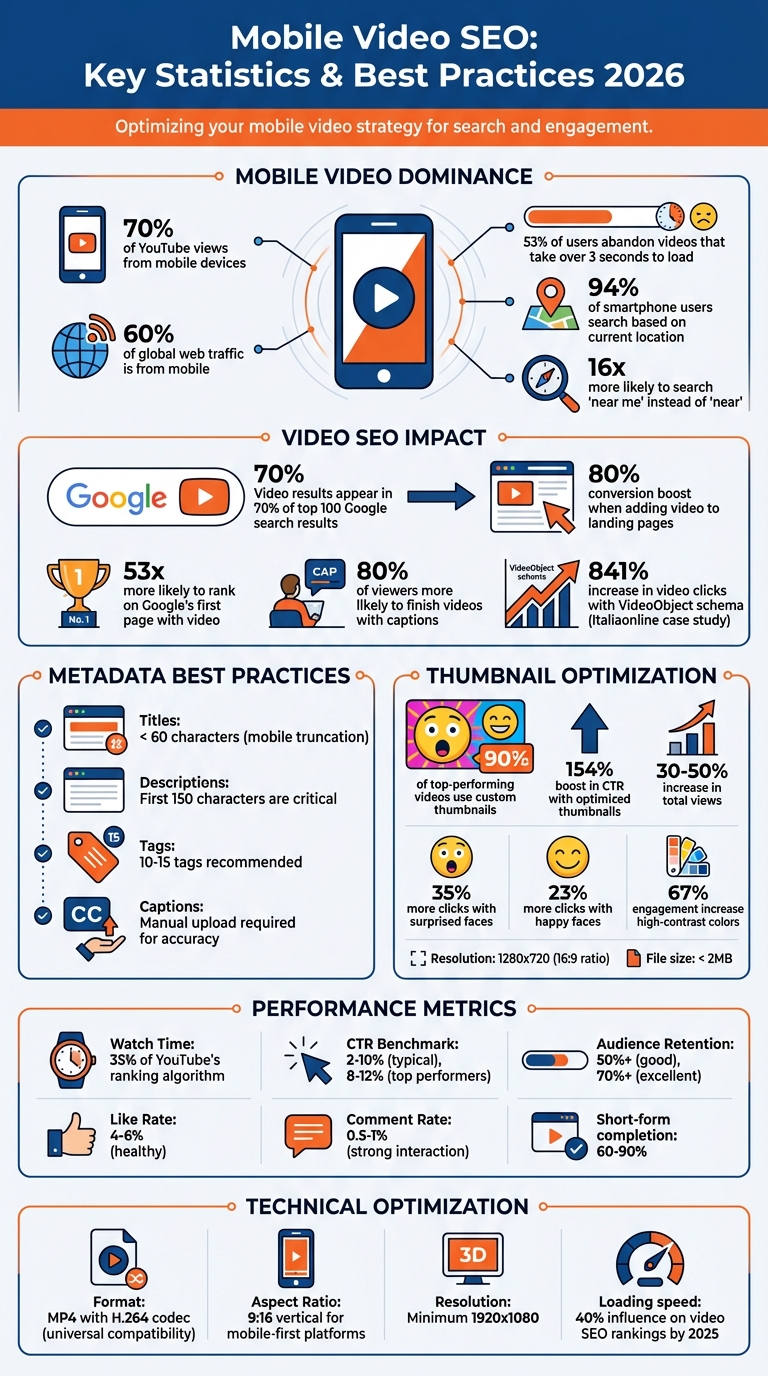
Mobile Video SEO Statistics and Best Practices 2026
How to Optimize Videos on Mobile
Keyword Research for Mobile Video SEO
Mobile video keyword research takes a different approach compared to desktop searches. Why? Because mobile users often rely on shorter queries due to smaller screens or use full conversational questions with voice assistants. Typically, these searches involve 2–3 word phrases when typed, or longer, more natural-sounding questions when spoken aloud. Mobile searches often indicate users are in a consideration phase - comparing products, reading reviews, or hunting for "best of" lists. Location matters a lot, too: 94% of smartphone users base searches on their current location, and they’re 16 times more likely to type "near me" instead of just "near".
"Mobile keywords tend to be more conversational, partly because many people use voice search on their phones."
- Dana Nicole, Author, Semrush
A quick tip: test your keywords directly on a smartphone. If Google doesn’t display a video carousel for that keyword, it’s likely not ideal for video content, no matter how high its search volume.
Now, let’s dive into how to uncover mobile-specific keywords and the tools that make this process smoother.
Finding Mobile-Specific Keywords
Start with question-based keywords, especially those beginning with "how", "what", or "where." These align perfectly with natural speech patterns and often face less competition. These types of keywords are key for optimizing video metadata and ensuring strong mobile performance.
Keep your primary keywords within the first 40 characters of video titles. Why? Mobile displays often truncate longer titles, so placing essential terms up front ensures they’re visible in search results. Also, don’t overlook common thumb-typing errors - consider variations of your target keywords to account for these.
For local content, update your Google Business Profile and incorporate "near me" phrases to capture location-based searches.
Once you’ve refined your keyword list, validate them using specialized tools.
Tools for Mobile Keyword Research
Here are some tools to help you identify and refine mobile-specific keywords:
- Google Keyword Planner: This free tool is a must for gauging overall search demand and finding video-friendly topics. Use the "Device: Mobile" filter to focus on mobile-only data, then cross-check these keywords with YouTube tools. You’ll notice that some desktop-popular keywords don’t perform well on mobile, while mobile-specific queries - especially "how-to" searches - dominate.
- TubeBuddy: It provides weighted scores and suggests mobile-friendly Shorts, making it a great resource for optimizing for mobile.
- VidIQ: Even the free tier offers useful metrics like Views Per Hour (VPH) and real-time alerts on trending mobile topics.
"YouTube is the second-largest search engine and should not be ignored - there are over 2.7 billion active users on YouTube, and publishing optimized videos can get your brand in front of potential customers."
- Jane Javor, SEO Manager, NP Digital
- YouTube Studio Research Tab: This feature highlights "Content Gaps", showing you terms that mobile users are searching for but aren’t finding satisfying video results.
- Semrush's Keyword Magic Tool: Use filters like "Questions" and "SERP Features" to pinpoint keywords that trigger video carousels.
- Google Trends: This tool is great for tracking "YouTube Search" data, helping you spot regional interest and breakout topics gaining traction on mobile. By identifying these trends early, you can create content before the competition catches on.
Using these tools effectively can provide the insights you need to build a strong mobile video strategy, setting the stage for success in a mobile-first world.
Video Metadata Optimization for Mobile
Once you've nailed down your mobile keywords, it's time to focus on optimizing your video metadata for small screens. With over 70% of YouTube views coming from mobile devices, your titles, descriptions, and tags need to be crafted for quick scanning and truncated displays. Remember, search engines can't watch your videos - they rely solely on metadata to understand your content.
Mobile screens only show a fraction of your text, so prioritizing key information at the beginning is crucial. YouTube, for instance, only displays the first 125 to 150 characters of your description in mobile previews, while titles often get cut off after about 60 characters. If your most important details aren’t front-loaded, mobile viewers could miss them entirely.
Writing Mobile-Friendly Titles and Descriptions
Keep your titles under 60 characters and place your main keywords at the start to avoid truncation. For example, instead of writing "A Complete Beginner's Guide to Mobile Video Marketing", go with "Mobile Video Marketing: Beginner's Guide."
Incorporate power words and numbers to grab attention and boost click-through rates. A title like "[2026 Guide] How to Optimize Video for Mobile" works well because it feels specific and timely.
For descriptions, treat the first 150 characters as premium space - this is the part users see before tapping "more". Start with a strong hook and a call-to-action, and include key links (like your website or social profiles) near the top so they're visible without scrolling.
Structure your full description with short paragraphs, bullet points, and plenty of white space to make it easy to read on narrow screens. For videos longer than 2–3 minutes, add timestamps to help viewers jump to specific sections. This not only improves viewer retention but also highlights important moments for search engines.
Adding Tags and Closed Captions
Tags play a key role in helping YouTube categorize your video and surface it in "Suggested Videos." Use a mix of 10–15 tags, blending broad terms (like "video marketing") with specific keywords (such as "mobile video SEO 2026"). Don’t forget to include your channel name as a tag to increase your chances of showing up in related recommendations.
Closed captions are a must for mobile videos. They keep viewers engaged and provide crawlable text that search engines can index. Avoid relying on YouTube's auto-generated captions, as they can be riddled with errors that hurt both your professionalism and SEO. Instead, upload accurate, manual transcripts in SRT format. You can take it a step further by saying your target keyword out loud in the video - search engines use speech-to-text technology, so this reinforces your metadata.
| Metadata Element | Mobile Best Practice | Recommended Limit |
|---|---|---|
| Title | Front-load keywords; use power words | < 60 characters |
| Description | Key info in first 150 characters | 200–300 words total |
| Tags | Mix of broad, specific, and channel tags | 10–15 tags |
| Captions | Manual upload for accuracy | N/A |
Optimizing metadata isn’t just about following rules; it’s about understanding how people interact with content on their phones. Short attention spans, silent viewing, and small screens demand a tailored approach for mobile consumption. By refining your metadata for clarity and engagement, you’re setting the stage for the next step: creating eye-catching thumbnails and compelling video hooks designed for mobile users.
Thumbnails and Hooks for Mobile Click-Through Rates
After fine-tuning your metadata, the next big player in grabbing attention is your thumbnail. On mobile screens, where over 70% of YouTube traffic happens, your thumbnail needs to deliver its message instantly. If it doesn’t catch the eye within seconds, users will scroll right past it. Considering mobile users decide to click in about 1 second, your thumbnail and the first moments of your video need to work harder and faster than ever.
Designing Thumbnails for Small Screens
When creating thumbnails, always design with mobile screens in mind. Test your thumbnail at actual mobile size - if it’s not immediately clear on your phone, it’s time to simplify.
Here are some tips for mobile-friendly thumbnails:
- Use 3–5 bold words in large, clear sans-serif fonts like Montserrat or Bebas Neue.
- Faces should dominate the frame, taking up at least 40% of the space. Expressive faces, especially those showing surprise or happiness, can boost clicks by 35% and 23%, respectively [33, 34, 35].
- Go for high-contrast color combos like yellow/purple or orange/blue. The 60-30-10 rule (60% dominant, 30% secondary, 10% accent) works well for creating visuals that pop on mobile feeds, potentially increasing engagement by up to 67% [33, 35].
"The 'squint test' is my go-to method for evaluating thumbnail effectiveness. If you can't immediately understand what the thumbnail communicates while squinting from across the room, it needs simplification." – Marcus Chen, Visual Content Designer
Avoid placing key elements in the bottom-right corner, as YouTube’s timestamp overlay can obscure them [32, 35]. Instead, position text in the top-left corner, which is where most viewers’ eyes go first on mobile. In fact, 87% of top-performing thumbnails in 2025 used this placement.
Stick to a 1280x720 resolution to maintain the 16:9 ratio, and keep file sizes under 2MB to ensure quick loading, even on slower mobile connections [32, 37]. Running a grayscale test can also help confirm that your design’s visual hierarchy is strong enough for small screens.
Creating Strong Video Hooks for Mobile
Once someone clicks on your video, the first few seconds are critical. You’ve got just 0.3 seconds to stop them from scrolling away.
To hook viewers:
- Add text overlays or captions immediately to engage those watching without sound.
- Skip long branded intros - mobile viewers want quick answers. Start by addressing their problem or goal in the very first sentence.
- Use the "curiosity gap" technique to keep them watching. For example, instead of saying, "Today I’ll show you how to edit videos", try, "This one editing trick saved me 4 hours last week - here’s exactly what I did." The latter sparks curiosity and compels viewers to stick around for the answer.
"Your thumbnail's #1 job... is to put a burning question in the mind of your viewer. Not just a question, but a burning question. A question that must be answered." – Thomas Frank, Creator
Close-up shots of faces showing strong emotions - surprise, happiness, intrigue - can also create an immediate connection and empathy [38, 40]. Frame your subject to direct attention toward key text or products in the shot [40, 41]. For the best visual quality, ensure your video resolution is at least 1920x1080, especially for high-density mobile displays.
| Strategy | Why It Works for Mobile | Key Tip |
|---|---|---|
| Bold Colors | Grabs attention in busy feeds | Use complementary palettes (e.g., blue/orange) |
| Emotional Faces | Builds immediate human connection | Crop close for visibility on small screens |
| Minimal Text | Reduces clutter on mobile | Stick to 3–5 words in bold sans-serif fonts [38, 39] |
| Curiosity Gap | Keeps viewers engaged by sparking questions | Tie the topic to something the audience cares about |
Custom thumbnails are a must - 90% of top-performing videos use them instead of auto-generated frames. Optimized thumbnails can boost click-through rates by up to 154% and signal relevance to YouTube’s algorithm, potentially increasing total views by 30–50% [33, 35, 40].
With your thumbnails and hooks fine-tuned for mobile, the next focus should be ensuring your videos perform seamlessly on these devices.
sbb-itb-a84ebc4
Technical Optimization for Mobile Video
Video loading speed plays a huge role in mobile video performance. By 2025, loading speed is expected to influence around 40% of video SEO rankings, making technical tweaks a must.
Improving Video Load Times
One effective way to speed up video playback is by moving the "moov atom" (metadata index) to the start of MP4 files. This enables "fast start" playback, allowing viewers to begin watching before the full file downloads. You can achieve this using FFmpeg with the +faststart flag.
Another game-changer is Adaptive Bitrate Streaming. Using protocols like HLS (HTTP Live Streaming) or MPEG-DASH, videos can automatically adjust their quality based on the viewer's network speed. This minimizes buffering and keeps viewers engaged.
For efficient data usage, set the HTML5 preload attribute to either "metadata" or "none." Choosing "metadata" downloads only basic video details like duration and dimensions, while "none" defers all downloading until the user presses play. Additionally, for muted background videos, removing the audio track can cut bandwidth usage by up to 20%.
Your server setup matters too. Make sure it supports HTTP 206 Partial Content, which allows browsers to fetch specific sections of a video file instead of downloading the entire thing. You can test this by running:
curl -I -H "Range: bytes=0-1023" [URL]
If configured correctly, you'll see an "HTTP 206 Partial Content" response.
Next, let’s dive into the best video formats and features for mobile optimization.
Mobile Video Formats and Features
Choosing the right video format is critical for smooth playback on mobile devices.
The MP4 format with H.264 (AVC) remains the go-to option for universal compatibility across devices and browsers. For modern browsers like Chrome and Firefox, WebM with VP9 offers smaller file sizes without sacrificing quality. AV1 provides the best compression but demands more CPU power and isn’t fully supported on older devices. Meanwhile, H.265 (HEVC) delivers high-quality streaming with excellent compression but works best on newer devices like those running iOS or Safari.
| Format/Codec | Compression Efficiency | Device Compatibility | Best Use Case |
|---|---|---|---|
| MP4 / H.264 | Good | Excellent (Universal) | General web and mobile fallback |
| WebM / VP9 | Very Good | Good (Chrome/Android) | High-resolution web video |
| AV1 | Excellent | Moderate (Newer devices) | Future-proofing and data savings |
| H.265 (HEVC) | Excellent | Moderate (iOS/Safari) | High-quality streaming |
For mobile-first platforms like TikTok, Instagram Reels, and YouTube Shorts, vertical video formats (9:16 aspect ratio at 1080×1920 pixels) are now essential. With over 75% of all video views happening on mobile devices, vertical formats deliver the full-screen experience users expect.
To further optimize, list video sources in ascending order of file size. This ensures browsers pick the most efficient compatible format. Use lazy loading to delay video downloads until they’re visible in the user’s viewport. And since many mobile users watch videos without sound, include captions using the WebVTT format. Captions not only improve accessibility but also help search engines index your video content.
Tracking Mobile Video Performance
You can't improve what you don't measure. With about 70% of all YouTube traffic now coming from mobile devices, understanding the right metrics is what separates a solid mobile video strategy from pure guesswork.
Key Metrics for Mobile Video
Watch time is the backbone of mobile video SEO, making up roughly 35% of YouTube's ranking algorithm. It’s all about the total time viewers spend watching your video. The longer you keep mobile users engaged, the more platforms push your content.
"Watch time is the currency of YouTube. The longer you keep people watching, the more YouTube will push your content." - Derral Eves, Founder, VidSummit
Audience retention rate highlights where mobile viewers lose interest. This percentage-based metric tells you if your opening hook is strong enough to keep distracted mobile users watching. For videos under 10 minutes, a retention rate of 65% or higher is excellent, while 50% is considered good. For short-form content like Reels or TikToks, completion rates often range from 60% to 90%.
Click-through rate (CTR) measures how effectively your thumbnail and title grab attention on small screens. A solid CTR falls between 2% and 10%, with top performers reaching 8% to 12%. If your CTR is under 4% after 72 hours, consider testing a new thumbnail with higher contrast or text that stands out better on mobile.
Average view duration (AVD) reveals whether your content aligns with what mobile users are searching for. A higher AVD means viewers are finding value in your video. Meanwhile, engagement rate - likes, comments, shares, and saves - signals how much your video resonates. A healthy like rate is 4% to 6%, and a comment rate of 0.5% to 1% shows strong interaction.
Traffic sources show how mobile viewers are finding your content - whether it’s through YouTube Search, Suggested Videos, or external platforms like Google Search. This insight helps you focus your efforts on the strategies driving the most mobile traffic.
| Metric | Mobile Significance | Benchmark/Goal |
|---|---|---|
| CTR | Measures thumbnail/title effectiveness on small screens | 2-10% (Typical) |
| Watch Time | Key signal for algorithm promotion | Higher is better |
| Audience Retention | Tracks drop-off points from mobile distractions | 50%+ (Good), 70%+ (Excellent) |
| AVD | Shows content relevance and engagement quality | 50% of total video length |
Analytics Tools for Mobile Video Data
YouTube Studio is your go-to tool for tracking mobile video performance. The mobile app allows you to monitor real-time views, watch time, and audience retention right from your phone. Use the "Key Moments for Audience Retention" report to pinpoint when viewers lose interest. If there’s a sharp drop-off in the first 30 seconds, your opening needs work.
The "Device Type" filter in YouTube Studio helps you compare engagement across mobile, desktop, and tablet users. Pair this with the "When your viewers are online" report to time uploads during peak mobile activity, boosting early engagement and increasing algorithmic visibility.
Google Search Console is great for tracking how your videos perform in search results. By filtering for "Search Type: Video", you can identify which queries bring mobile traffic to your embedded videos. Submitting video sitemaps here ensures proper indexing for mobile video content.
If you're publishing on Facebook or Instagram, Meta Business Suite offers mobile-specific analytics for Reels and video posts. It provides insights into completion rates and engagement patterns on mobile devices.
Third-party tools like TubeBuddy ($9–$49/month) and vidIQ ($7.50–$39/month) are tailored for mobile optimization. They offer features like competitive keyword scoring and thumbnail A/B testing, helping you fine-tune your strategy.
For a broader view, use Google Analytics with UTM parameters to track whether mobile viewers convert into leads or sales after watching your videos. This ties video performance directly to business outcomes.
Advanced Mobile Video SEO Techniques
Taking mobile video SEO to the next level means employing strategies that go beyond the basics. These advanced methods focus on creating interconnected content ecosystems that drive deeper engagement and better results. With semantic search prioritizing cohesive video networks over standalone videos, brands that build comprehensive topic coverage are outpacing those relying on one-off content. In fact, as of 2026, this approach is proving to be a game-changer.
Building Topic Clusters
Topic clusters are a way to structure your videos into a hub-and-spoke format. Here’s how it works: start with a central, all-encompassing pillar video that addresses a broad topic. Then, create multiple spoke videos that explore specific subtopics in depth. Each spoke links back to the hub, and the hub connects to all spokes. This setup shows search engines that your content thoroughly covers a subject, building what some experts call a "topical moat".
Adding semantic chapters and "Key Moments" to your topic clusters can significantly enhance mobile engagement, boosting average view duration by 65%. Additionally, 74% of informational queries now trigger AI Overviews, and 82% of those overviews include at least one video from a structured cluster. A real-world example? Italiaonline saw an 841% jump in video clicks and a 353% rise in organic search impressions after implementing video structured data across its platforms in mid-2024.
"In 2026, the focus has shifted toward Predictive SEO, where brands build clusters that address not just current queries but emerging intents."
For mobile-first optimization, aim for at least 12–15 spoke videos per pillar, especially in competitive niches. Use schema markup like VideoObject and Clip to help Google identify "Key Moments" in search results. Organizing these videos into YouTube playlists can also keep viewers engaged longer, encouraging binge-watching and increasing dwell time.
| Funnel Stage | Video Type | Ideal Mobile Length | Key Metric |
|---|---|---|---|
| Awareness | Explainer / Social Reels | < 60 seconds | Reach / Views |
| Consideration | Tutorials / Comparisons | 3–6 minutes | Watch Time / Dwell Time |
| Conversion | Testimonials / Demos | 2–3 minutes | Conversion Rate / CTR |
| Retention | FAQ / Support Guides | Varies | Engagement / Repeat Visits |
This cluster approach not only strengthens your SEO but also lays the groundwork for a more effective video marketing funnel.
Using Marketing Funnels Directory for Video Marketing
Integrating topic clusters into a structured marketing funnel can amplify your mobile SEO results even further. A complete video marketing funnel benefits from tools that automate scripts, streamline AI-driven production, and provide robust analytics. The Marketing Funnels Directory is a curated resource that helps you find the right tools and strategies to align your video marketing efforts with larger funnel campaigns.
This directory organizes tools by funnel stage, making it easy to find solutions for creating social media video ads (awareness), product explainers (consideration), and testimonial videos (conversion). This is especially helpful when scaling spoke content across multiple stages. For example, in 2026, it’s common to use AI avatars and automation tools to produce 12–24 spoke videos in one go.
To maximize the impact of your pillar pages, consider adding a lead magnet - like a downloadable template or a gated video series. These assets can help capture leads and guide users through your funnel. Tracking assisted conversions is another smart move, as it shows how educational spoke videos influence users before they convert on a transactional hub page. This ties your mobile video SEO strategy directly to measurable business outcomes, ensuring every effort contributes to your bottom line.
Conclusion and Key Takeaways
Mobile video SEO is a game-changer: video results now show up in 70% of the top 100 Google search results. If your videos aren’t mobile-friendly, you could be missing out on a huge chunk of traffic and conversions.
Start by getting the technical details right. Use MP4 with H.264 codec for faster loading times and enable lazy loading so videos only load when they’re actually visible. Prioritize a mobile-first design - vertical formats (9:16) and responsive players are essential for seamless viewing.
After the technical setup, focus on metadata optimization. Keep titles concise - under 50-60 characters - to avoid truncation on smaller screens. Place important keywords at the beginning of your descriptions, and always include closed captions since 80% of viewers are more likely to finish a video if captions are available. Don’t skip VideoObject schema markup - it’s a powerful tool for enabling rich snippets and "Key Moments" in search. For instance, Italiaonline saw an 841% increase in video clicks in 2024 just by implementing this step. These adjustments ensure your videos perform well on mobile, leading to better engagement and higher conversions.
To capture attention, focus on the first 3–10 seconds of your video. Use high-contrast thumbnails with bold text to stand out, and include timestamps to make navigation easier for mobile users. Monitor metrics like watch time, retention rates, click-through rates, and load speeds to identify areas for improvement.
The benefits are undeniable: adding video to a landing page can boost conversions by 80%, and pages with video are 53 times more likely to rank on Google’s first page. These strategies not only enhance the viewing experience but also deliver measurable business results. Take action, track your progress, and fine-tune your approach based on feedback from your mobile audience.
FAQs
How can I tell if a keyword is worth creating a mobile video for?
To figure out if a keyword is worth creating a mobile video for, focus on three key factors: search intent, competition, and engagement potential. Long-tail keywords tend to work well because they usually face less competition and attract viewers with a strong intent to convert. Tools like YouTube autocomplete and vidIQ can help you discover phrases your audience is actively searching for. Be sure to check the search volume and competition level for these keywords to gauge their potential.
What’s the fastest way to improve mobile video watch time and retention?
The fastest way to increase mobile video watch time and keep viewers hooked is by focusing on engagement strategies and technical tweaks. Start by using strong hooks, smooth transitions, and clear chapter markers to give your videos a solid structure. Dive into tools like YouTube Studio to pinpoint where viewers drop off, then tweak your content to address those weak spots.
On top of that, design eye-catching thumbnails, craft attention-grabbing titles, and organize your videos into playlists. These steps can help extend session watch time and keep your audience coming back for more.
What video format loads fastest on phones?
The vertical (9:16) video format is designed to load quickly on smartphones because it perfectly matches the dimensions of mobile screens. This makes it the go-to choice for platforms like TikTok and Instagram, where mobile video viewing is king.