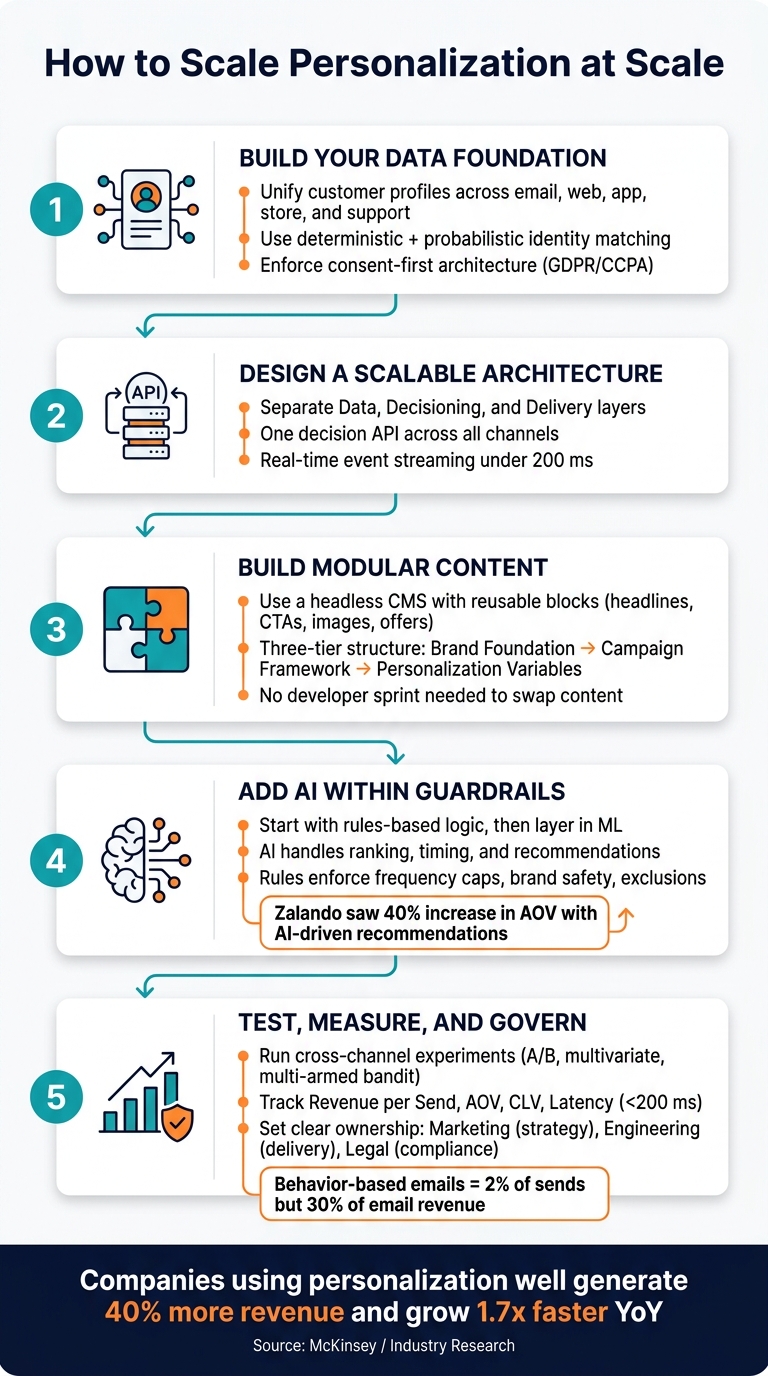
Personalization at scale works when data, decisioning, content, testing, and rules all line up. If they do not, teams end up sending off-target messages, wasting spend, and hurting trust. The article’s core point is simple: start with first-party data, use one decision system across channels, keep content modular, test across the full journey, and set clear ownership before volume grows.
Here’s the short version in plain English:
- Fix customer data first. Join profiles across email, web, app, store, and support systems.
- Use consent before activation. If permission is missing, do not personalize.
- Separate the stack into layers. Keep data, decision logic, and message delivery apart.
- Use one decision API across channels. That keeps email, web, mobile, and paid media in sync.
- Build content in blocks using a sales funnel builder. Swap headlines, offers, images, and CTAs without remaking campaigns.
- Start with rules, then add AI. Use rules for limits and exclusions; use AI for ranking, timing, and recommendations.
- Test across channels, not one by one. That is how I would measure real lift.
- Track money, relevance, and system health. Revenue per send, AOV, CLV, retention, latency, and error rates matter more than vanity metrics.
- Set ownership early. Marketing, engineering, legal, and a central personalization team each need clear roles.
A few numbers from the article make the case fast:
- 48% of personalized messages are still seen as irrelevant or intrusive
- Real-time decisions should land in under 200 ms
- Automated behavior-based emails make up just 2% of sends but drive 30% of email-attributed revenue
- Some companies generate 40% more revenue from personalization than average peers
- Brands using personalization well can see 1.7x year-over-year revenue growth
If I had to sum up the full piece in one line, it would be this: personalization does not scale through more campaigns; it scales through better systems.
How to Scale Personalization: A Step-by-Step System
Create Personalized Campaigns at Scale with Marketo Engage | Adobe for Business
sbb-itb-a84ebc4
Build the Data Foundation First
Before you add AI or open up new channels, get your customer data in order. It needs to be clean, connected, and based on consent. If it isn’t, personalization turns into guesswork.
Most of the time, the problem isn’t your marketing strategy. It’s disconnected data. That’s why identity resolution comes first: connect customer profiles before you automate decisions.
Unify Customer Profiles Across Systems and Devices
A usable customer profile pulls together a few core data sets: identifiers like email, phone number, and loyalty ID; purchase history from online and in-store activity; behavior signals like product views and abandoned carts; email and SMS engagement; and support interactions.
That support data matters more than many teams think. Sending a promo email to someone who already has an open support ticket is a quick way to lose trust.
Start with one main identifier, usually an email address or phone number, to anchor matching. Then use identity resolution to connect the rest.
- Deterministic matching uses exact identifiers like email or loyalty ID.
- Probabilistic matching infers identity from signals like device type or IP address, which helps with anonymous users who haven’t logged in yet.
| Method | How It Works | Best For |
|---|---|---|
| Deterministic | Exact match on email, loyalty ID, phone | Authenticated users at checkout or login |
| Probabilistic | Infers identity from IP, device, behavior | Anonymous or guest users |
For new users, contextual signals like device type, referral source, and location can help you build an immediate starter profile.
Once those profiles are connected, data standards and consent rules keep them usable.
Standardize Data Quality and Privacy Controls
Unified data only helps if it’s clean. Set five quality standards across every connected system: completeness so required fields are filled in, accuracy so the data matches reality, consistency so formats stay the same across tools, freshness so records are recently verified, and uniqueness so duplicates don’t pile up.
Phone number normalization is a common place where things go sideways. If formats vary from system to system, duplicate records show up fast.
Consent also isn’t optional, and it can’t be treated like a last-minute fix. Most customers fall under privacy laws like GDPR and CCPA. That means your personalization engine should check a customer’s consent status before making any content decision.
Capture consent at every touchpoint, including checkout, loyalty sign-up, and email opt-in. Then store the timestamp and source in one central record.
If rolling out a new personalization variable across email, in-app, and video still needs an engineering ticket, your data layer is the bottleneck.
Design an Architecture That Can Handle Growth
Once your profiles are clean, architecture becomes the thing that decides whether personalization can grow with you. The way you set up your stack affects whether it stays easy to run as traffic, channels, and campaign volume climb. This is the layer that turns unified profiles into consistent decisions across high-converting sales funnels.
Separate Data, Decisioning, and Delivery Layers
The strongest personalization stacks keep three layers separate: a data layer that stores unified customer profiles, a decisioning layer that runs logic and models, and a delivery layer that executes across channels like email, web, mobile, and SMS.
Each channel should call one decision API instead of running its own local logic. That keeps email, web, and app experiences tied to the same source of truth. If you don't do this, logic can drift, and so can frequency caps from one channel to another.
Use real-time event streaming to send customer actions to the decision layer in under 200 ms. If the engine can't hit that mark, serve a generic fallback.
For teams handling both real-time web interactions and outbound channels like email, a hub-and-edge pattern is often a good fit. Edge nodes handle instant on-site decisions in under 100 ms, while the central hub manages more complex outbound orchestration. This split helps when fast site decisions and slower outbound flows need to share the same logic.
That setup makes governance much easier before you add more channels.
Use Modular Content and Repeatable Rules
Big all-in-one templates slow personalization down. A better approach is to treat content as reusable blocks: headlines, product images, CTAs, and offers managed in a headless CMS. Then the decisioning engine swaps in the right block at runtime based on audience logic, with no developer sprint needed. One dynamic master template, for example, can switch the headline and CTA based on segment or funnel stage.
A simple way to organize this is with a three-tier content structure:
- Brand foundation elements that never change
- Campaign framework elements that shift by initiative
- Personalization variables that swap by segment
With this setup, adding a new audience segment doesn't mean building new creative from scratch. You just add a new data variable.
Taxonomy matters too. Clear naming conventions and metadata tags let automation and AI select the right content programmatically, without human input. If one system logs the same action as "Product_Viewed" and another calls it "PDP_Visit", your rules can misfire. That's the sort of small mismatch that causes big headaches.
Once content is modular, AI can optimize which block to serve instead of forcing teams to make new creative for every segment. At that point, the bottleneck shifts from production volume to decision quality.
Choose Rules-Based, AI-Driven, or Hybrid Decisioning
Rules-based decisioning relies on manual if/then logic. It's easy to audit and works well for compliance needs, suppression windows, and simple eligibility checks. But as segments and channels pile up, rules start turning into debt.
AI-driven decisioning uses machine learning to predict intent, rank products, and pick next-best actions. Zalando's AI-driven outfit recommendation algorithm, which used wishlist data to suggest complete looks, led to a 40% increase in average order value. The tradeoff is pretty clear: ML models need large behavioral datasets, and they can create black-box risk that makes governance harder.
Hybrid decisioning is the most practical model for many growing teams. AI handles optimization and content selection, but it works inside human-defined guardrails like frequency caps, brand safety rules, and exclusion logic. You get scale without giving up control.
| Feature | Rules-Based | AI-Driven | Hybrid |
|---|---|---|---|
| Best Use Case | Compliance, eligibility, simple offers | Predictive intent, product ranking | Enterprise-scale omnichannel CX |
| Scalability | Low; rules become hard to manage | High; handles millions of variants | Highest; scales without manual work |
| Governance | Full human control | Low; black-box risks | AI works within human-defined limits |
| Data Needs | Basic profile attributes | Large behavioral datasets | Mixed; needs clean profile data |
| Adaptability | Static until manually updated | Continuously learns from data | AI adapts within defined guardrails |
Start with rules in the places where traffic is highest, then layer in ML where data volume can support it.
Once the decision model is in place, keep testing it and measure whether it's improving revenue, engagement, and operating cost.
Testing, AI, and Performance Measurement
Once decisioning is live, the work changes. You’re no longer just building the system. Now you need to show that it moves the needle.
And that takes work. Personalization doesn’t sit still because customer behavior doesn’t sit still. What works today can drift next month, especially when traffic, offers, or user intent shift.
Apply AI Where It Improves Decisions
Start small, and start where the data is clean.
A few high-volume use cases are usually the best place to begin because they give you faster feedback and make it easier to spot what’s working. Keep AI inside the guardrails already set in the decisioning layer. Good starting points include propensity scoring, churn risk, send-time optimization, next-best-action logic, and product recommendations.
For recommendations, don’t stop at basic “customers also bought” logic. That approach is easy to launch, but it can miss an important point: some users need a push, and some were going to convert anyway. Uplift-aware models help separate those groups, which can protect margin while still tailoring the experience.
Once AI is in production, you need to watch it closely. Monitor calibration, input drift, and latency so the model stays accurate and responsive. Latency should be treated as a core KPI, not a side metric.
Run Ongoing Experiments Across Channels
Testing should happen across channels, not in isolation.
If you test email by itself, then web by itself, then mobile by itself, you only get part of the picture. To measure actual impact, run experiments across email, web, mobile, and paid campaigns together.
Use different test types for different jobs:
- A/B tests for big narrative shifts
- Multivariate tests for creative elements
- Multi-armed bandits for live allocation decisions
Use persistent holdout groups, and filter out users who were never exposed, so incremental lift is measured cleanly. Pick your primary metric before launch. Then add guardrails such as page latency, error rates, and unsubscribe thresholds.
This matters more than it may seem. With five unrelated metrics running at the same time, the chance of at least one false positive reaches 41%.
Those results should shape governance. If a rule, model, or content block keeps producing messy or uneven outcomes, it may need tighter review.
Track Business, Engagement, and Operational KPIs
Track three areas: value, relevance, and system health.
That sounds simple, but the choice of metric changes the conversation. Automated, behavior-based emails are a good reference point here. They make up only 2% of total sends but drive 30% of email-attributed revenue. That’s why revenue per send is often more useful than open rate when budget is on the table: it ties personalization to dollars, not just attention.
| KPI Group | Key Metrics | What It Tells You |
|---|---|---|
| Business & Revenue | Revenue per Send ($), Revenue per Visitor ($), AOV ($), CLV ($), Retention | Direct financial impact and long-term customer value |
| Engagement | CTR, Open Rate, Unsubscribe Rate, Feature Activation Rate, Recommendation diversity | How relevant and fresh the experience feels |
| Operational | Latency (<200 ms), Data Freshness, Time to learn from new behavior, Experience Coverage, Model Rollback Rate | System health and reliability |
One more thing: keep recommendation diversity high enough to avoid repetitive results.
Governance, Team Structure, and an Implementation Roadmap
Measurement tells you what’s working. Governance makes sure it doesn’t go off the rails at scale. Without clear ownership and firm guardrails, personalization can lead to compliance problems, off-brand messaging, and messy day-to-day execution. As brands expand personalization across more channels, governance is what keeps growth from turning into chaos.
Set Governance Rules Before You Scale Output
Set governance before output starts to grow. Once personalization is live across several channels, it’s much harder to fix approvals, permissions, and publishing rules than it is to build them in from day one.
A simple way to handle this is to separate fixed elements from flexible ones. Fixed elements like legal disclaimers, brand logos, and required disclosures stay the same. Flexible elements like headlines and imagery can change, but only within approved limits.
Role-based permissions help keep that structure in place:
- Local teams can adjust flexible content
- Central teams approve brand usage
- Only named owners can publish live assets
Each rule, test, and model should have one clear owner. If nobody owns it, things slip fast.
AI-driven recommendations or pricing should also be labeled clearly at the moment a user sees them. And if consent is missing, activation should stop right there. Consent has to come first.
| Risk Area | Impact | Mitigation Strategy |
|---|---|---|
| Privacy Violations | Legal fines (GDPR/CCPA), loss of trust | Consent-first data architecture; real-time CMP sync |
| Model Bias | Discriminatory pricing or off-target offers | Regular model oversight; diverse training data; human-in-the-loop reviews |
| Off-Brand Content | Brand dilution, inconsistent messaging | Fixed vs. flexible content guardrails; modular approval workflows |
Define Ownership and Shared Playbooks
Once the rules are in place, ownership needs to be clear. Personalization tends to work best when marketing owns strategy, engineering owns delivery, and legal owns compliance. A central personalization team then sets the standards that tie those groups together.
That central team can also build shared playbooks for the use cases that show up again and again. In most cases, it makes sense to start with new subscribers, first-time buyers, and high-value users who may be at risk of churning. From there, teams can move into onboarding or welcome sequences, cart abandonment flows, and loyalty milestones.
Each playbook should spell out a few core details:
- The trigger
- The audience segment
- The content blocks being used
- The approval path
- The main KPI
Conclusion: A Practical Roadmap for Scaling Personalization
The order matters here. Start by unifying first-party data. Then centralize rule-based personalization. After that, add streaming triggers and modular content. Next comes predictive AI, omnichannel orchestration, and continuous testing under clear governance.
When companies get this right, the payoff is hard to ignore. They generate 40% more revenue from personalization activities than average players, and brands that use personalization consistently see 1.7x year-over-year revenue growth compared to those that don’t. Those numbers don’t come from one tactic alone. They depend on the infrastructure, content system, testing process, and governance model all working together.
FAQs
How do I know if my data is ready for personalization?
Start with a data audit. If your data lives in separate systems, sits in silos, or lacks a single customer view, it’s not ready yet.
Before you scale, close those gaps. Your setup should be able to resolve identities across devices and channels, ingest data in real time, and support consent management.
When should I use rules instead of AI?
Use rules when you need interpretability and must clearly explain why a customer belongs in a given segment. They also fit early personalization work, especially when you’re dealing with a small set of precise, action-ready audience groups.
Shift to AI when personalization starts to outgrow what people can manage by hand. That usually happens when you have more than 4 or 5 segments, or when you’re working with hundreds of real-time signals. Unlike static rules, AI can adjust to behavior changes with less manual upkeep.
What should I measure first to prove impact?
Start by setting a baseline for your current conversion rates, engagement, average order value, and churn across channels and segments.
Then use holdout groups to compare personalized experiences with generic ones. That gives you a cleaner read on incremental lift instead of guessing based on surface-level changes.
As you scale, keep a close eye on conversion rate, average order value, and lifetime value by segment. That’s how you spot what’s working, what’s slipping, and where personalization is paying off.