Bottom-funnel retargeting works when I target buyers close to action, match the ad to the stall point, fix the path after the click, and judge results by pipeline and CPA - not clicks alone.
If I send the same ads to everyone, I waste spend without the right marketing funnel software. If I retarget pricing-page visitors, demo-form abandoners, trial users, and repeat visitors with the right next-step ad, I give the campaign a better shot at turning intent into revenue. That matters even more when LinkedIn ad costs are up 8% year over year and when pages that take more than 3 seconds to load can lose visitors before the pixel fires.
Here’s the full playbook in plain English:
-
Build tight audiences
- Segment by pricing-page visits, product-page depth, repeat sessions, and form starts
- Use short 1-7 day windows for hot traffic
- Filter out converters, customers, open deals, bounces, and non-ICP accounts
-
Match the offer to the stall
- Pricing-page exits: send demo, trial, ROI, or case-study ads
- Demo-form abandoners: send them back to scheduling
- Trial users who never logged in: send setup help
- Use proof first, urgency later
-
Fix the path before spending more
- Send people to the exact page tied to the ad
- Cut form fields and mobile friction
- Make sure pixel + server-side tracking work within 24-48 hours
-
Control pressure and measure the right way
- Start around 3-5 impressions per week per account
- Run 2-3 ad versions
- Wait for about 50 conversions per version before judging
- Track CPA, ROAS, assisted conversions, view-throughs, and pipeline influence rate
The core idea is simple: qualify hard, follow up fast, remove friction, and read performance by audience tier. That is how I keep retargeting focused on deals that are still in play instead of paying to chase low-fit traffic.
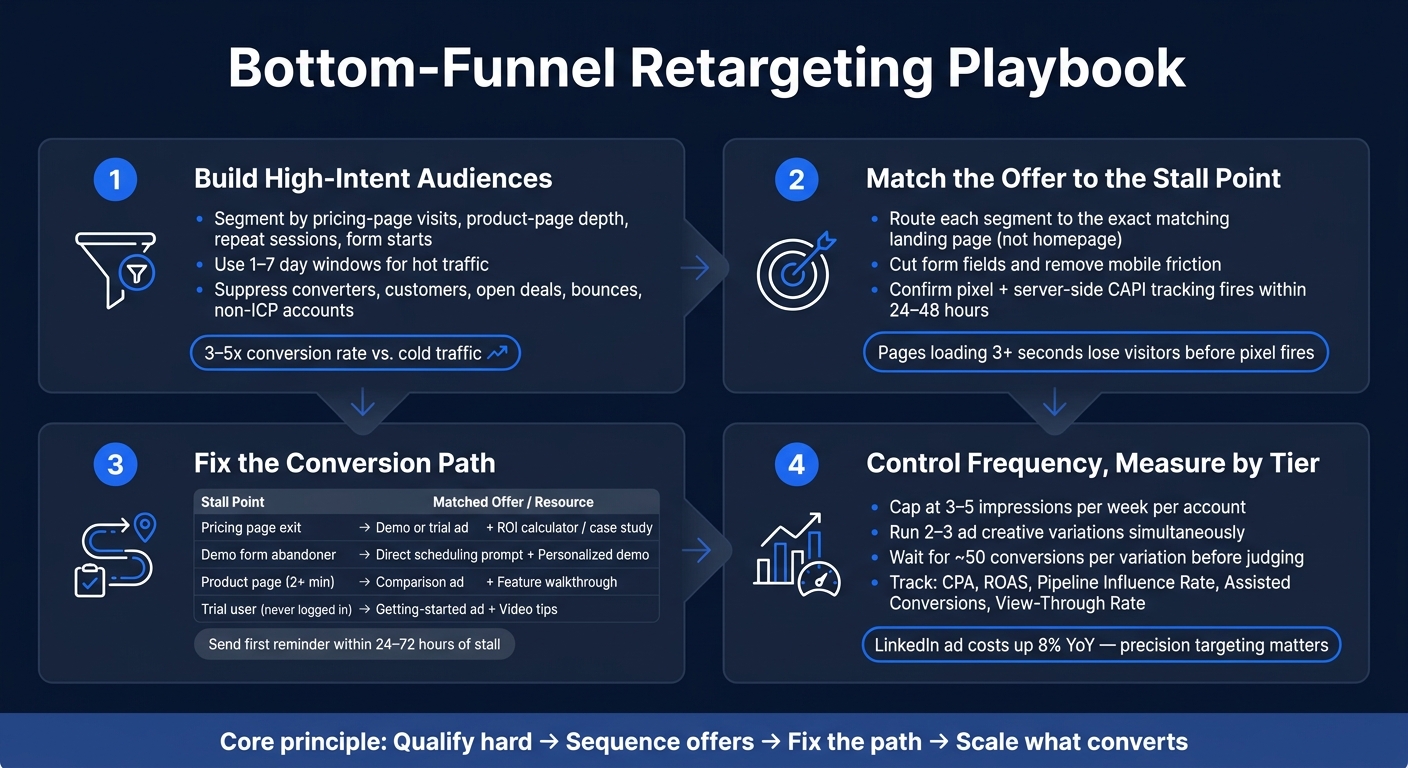
Bottom-Funnel Retargeting Playbook: 4 Steps to Convert High-Intent Buyers
1. Build High-Intent Audiences and Suppression Rules
One retargeting pool is a budget leak. Someone who visited your pricing page is not the same as someone who landed on the homepage and left. They need different ads, different timing, and often a different ask.
Segment by Page Depth, Conversion Stage, and Return Frequency
Use page depth, time on site, and return visits to separate buyers from casual traffic.
| Behavioral Segment | Intent Signal | Recommended Offer |
|---|---|---|
| Pricing page visitors | High intent, actively evaluating | Case study or ROI calculator |
| Product page visitors who stayed 2+ minutes | High intent, deep research | Product walkthrough or feature overview |
| Repeat visitors with 3+ sessions | Very high intent, active consideration | Personalized demo offer |
In B2B, add firmographic filters on top of behavior. Use IP-to-account matching to screen by company size, industry, and revenue before visitors enter the pool.
Layer Recency Windows to Match Buying Urgency
Fresh intent needs fast follow-up. Recency matters just as much as behavior. A pricing-page visit from yesterday means a lot more than one from three weeks ago.
Use 1-7 day windows for your highest-intent segments. Put more budget and more direct messaging behind those audiences. Less urgent traffic, like content downloaders, can stay in a 14-30 day window with a lighter touch.
Suppress Converters, Customers, and Non-ICP Accounts
Suppression matters as much as targeting. Exclude people who already converted - form submissions, booked demos, active customers, and open deals - with a standard 30-day exclusion window. Exclude 10-second bounces. Check these lists every month so recent converters stay out of the pool.
Also suppress government agencies, irrelevant industries, and companies outside your target revenue range. That keeps spend centered on ICP-fit accounts. Tighter firmographic suppression lifts MQLs and opportunity rates.
Once the audience pool is clean, you can line up each segment with the offer that fits. This ensures your marketing funnel resources are allocated to the highest-converting opportunities.
sbb-itb-a84ebc4
2. Sequence Offers Based on Where Buyers Stalled
After you’ve cleaned up your audience, line up each ad with the exact step where the buyer stopped. A person who left a demo form is in a very different spot from someone who spent time on a product page and left. The sequence should follow the buyer’s last action - not the way your campaign is organized.
Start with Reminder Ads That Point to the Exact Next Step
Your first ad should send people back to the specific action they didn’t finish. If someone made it to your demo booking page but didn’t submit the form, the ad should send them back to book the demo. If a trial user signed up but never logged in, show them a short video walkthrough that makes the first steps feel simple.
Dynamic creative can help by pulling in the exact product or feature the person viewed. Send that first reminder within 24 to 72 hours of the stall.
| Drop-off Point | Recommended First Ad | Offer |
|---|---|---|
| Pricing page exit | Demo or trial ad | ROI calculator or case study |
| Product/feature page (2+ min) | Comparison ad | Product walkthrough or feature overview |
| Abandoned demo form | Direct scheduling prompt | Personalized demo offer |
| Trial user who never logged in | Getting-started ad | Video tips or "getting started" guide |
Add Proof to Clear Last-Mile Objections
Once the reminder ad has done its job, the next step is proof. This is where you deal with the final objections holding the buyer back. Pricing-page stalls usually need proof of value. Product-page stalls often need proof that your product stands apart. Enterprise stalls tend to need proof that your product can handle scale.
For pricing-page visitors, an ROI calculator or a customer case study with a clear financial result can do the job. For product-page visitors, use a comparison ad or a feature walkthrough. For enterprise or mid-market buyers, show enterprise-focused customer logos or success stories that speak to scalability.
Use Urgency or Incentives Carefully for Final Pushes
Urgency can work well, but don’t use it too early. If your first ad leads with a discount, people learn to wait for the deal next time. Save urgency for the last stage of the sequence, and use it only for your highest-intent segments - like recent pricing-page visitors or trial users with 24 hours left.
Start with non-monetary incentives such as:
- Trial extensions
- Priority implementation support
- A strategy consult
Keep discounts for the last step.
Even a strong sequence can fall flat if the landing page, form, or checkout still has friction.
3. Fix the Conversion Path Before Scaling Spend
Even a well-sequenced offer can fall flat if the page behind the ad is generic or off-message. This is the step where stalled intent turns into demos, trials, calls, or purchases. Before you put more money into retargeting, clean up the path from click to conversion.
Route Each Audience to the Most Relevant Page, Not the Homepage
Each audience segment needs its own landing page. Section 2 is about sending buyers to the right next step. This section is about what they see when they arrive.
Pricing-page visitors should land on the pricing page or an ROI calculator. Product-page visitors should see comparison pages or feature walkthroughs. Cart abandoners should go back to checkout. Repeat visitors should get a direct demo offer.
The page has to match the ad promise exactly. If the ad says one thing and the page shows another, people leave before they even read the offer.
Remove Form, Checkout, and Load-Time Friction
Page speed matters, but don't stop there. Check your forms too. Keep them to the fewest fields needed for the next step. Every extra field, redirect, or layout issue adds friction.
On mobile, make sure tap targets are big enough. Also remove hover-based elements like menus or size guides that don't work on touchscreens.
Fix Tracking, Conversion Definitions, and View-Through Logic
Bad tracking leads to bad calls. Before you scale spend, confirm that your conversion events - form submissions, demo bookings, and purchases - fire the right way through both browser pixels and a server-side Conversions API (CAPI). Server-side tracking gets around browser ad blockers and cookie limits, so you get a better view of where visitors drop off. If event data doesn't show up within 24-48 hours after setup, tracking is likely broken.
Last-click attribution is another problem, especially in retargeting. It often hides the ads that warmed up the account before the final conversion. Use assisted conversion reporting instead, so you can see retargeting's actual role in the path. The goal is simple: measure whether retargeting helped move buyers to conversion, not whether it got the last click.
| Metric | What It Measures | Why It Matters |
|---|---|---|
| View-Through Conversion Rate | Users who saw the ad but didn't click, then converted | Shows influence on accounts that convert through other channels |
| Pipeline Influence Rate | % of pipeline that touched a retargeting ad | Shows contribution to deals, not just clicks |
| Assisted Conversions | Ads that were part of the path but not the last click | Helps avoid undercounting retargeting's actual impact |
| Lead Gen Form Open Rate vs. Completion | Form opens vs. completions | Shows whether the offer or form length is the blocker |
Once tracking is clean, move to frequency caps and audience-level optimization. With the path fixed, you can control frequency and optimize by audience tier.
4. Control Frequency, Measure Results, and Optimize by Tier
Once the audience is clean and the path is fixed, the last lever is cadence, measurement, and tier-level bidding.
Set Frequency Caps, Cooldown Windows, and Creative Rotation
Too much repetition burns budget and wears people out. For B2B display retargeting, 3-5 impressions per week per account is a strong starting point. It keeps your brand in view without crowding the buyer.
Match cadence to intent. Use 3-5 impressions per week for active accounts. For recent abandoners, use tighter bursts. High-intent groups like demo or trial abandoners often respond well to a tighter 7-day window with direct-response ads and urgency.
Run 2-3 creative variations per campaign at the same time. Then be patient. Wait until you have at least 50 conversions per variation before you call a winner.
Judge Results by Bottom-Funnel Outcomes
Retargeting should be judged by CPA, ROAS, and pipeline influence rate - the share of deals or pipeline that touched retargeting before close.
Last-click attribution misses a lot here. It tends to shortchange retargeting because these campaigns often assist the conversion instead of closing it outright. That’s why pipeline influence matters alongside CPA and ROAS.
For operators and portfolio companies, pipeline influence rate is the leadership metric. It ties retargeting spend to deals already in motion. Use assisted conversion reporting in your ad platforms instead of leaning only on last-click models.
Optimize by Audience Tier, Not Account-Wide Averages
Account-wide averages can blur the picture. A pricing-page visitor is not the same as a demo abandoner, and treating them the same usually leads to weak budget decisions.
The fix is simple: bid and budget by intent tier.
The table below maps bottom-funnel behavioral tiers to the right ad type and offer:
| Behavioral Segment | Intent Level | Recommended Ad Type | Offer |
|---|---|---|---|
| Demo starters | Very high | Demo prompt | Personalized demo offer |
| Pricing page visitors | High | Demo or trial ad | Case study or ROI calculator |
| Checkout/cart abandoners | High | Direct recovery ad | Checkout incentive or reminder |
| Product page visitors (2+ min) | High | Comparison ad | Product walkthrough or feature overview |
| Repeat visitors (3+ sessions) | Very high | Sales follow-up | Personalized demo offer |
After 30 days of tier-level data, switch from Maximum Delivery to Cost Cap at 10%-15% below achieved CPL. At that stage, the playbook is straightforward: keep cadence tight, read results by tier, and scale the segments that convert.
Conclusion: A Simple Bottom-Funnel Retargeting System That Converts
The playbook is simple. Bottom-funnel retargeting works when four things line up: narrow audiences, sequenced offers, a clean conversion path, and tight measurement.
It starts with audience quality. Segment by page depth and return behavior, use short recency windows for hot signals, and suppress converters and customers. When the pool is clean, retargeting tends to convert at 3-5x the rate of cold traffic.
Then comes the offer sequence. Start with reminder ads, follow with proof, and use urgency last. That order matters. You’re not throwing the same message at everyone - you’re matching the pitch to where the buyer is.
From there, send each segment to the page that fits best, cut form friction, and check tracking before you put more money behind the campaign. If the path is messy, even good traffic leaks.
For measurement, track ROAS, CPA, and pipeline influence. Use view-throughs to catch assisted conversions. And don’t judge performance off account-wide averages. Read results by audience tier, because that’s where the signal is.
Qualify hard, sequence offers, fix the path, and scale what converts.
FAQs
Which audiences should I retarget first?
Start with the highest-intent bottom-funnel audiences:
- Cart abandoners
- Pricing and product page visitors
- Demo requesters and trial users
For warmer nurture, include content downloaders and repeat visitors. Leave out recent converters and current customers so you don't waste budget.
How do I know if my retargeting ads are working?
First, make sure tracking works. Pixels and conversion tracking should fire on key pages like pricing, sign-up, and purchase.
Then measure ROAS, CPA, and pipeline influence - not just last-click. Also check assisted conversions, including view-through and click-assisted impact.
If CTR drops or frequency gets too high, refresh creative and tighten audiences or exclusions to cut ad fatigue.
What should I fix before increasing spend?
Before you spend more on ads, fix the leaks that drain budget and drag down results.
Start with your website experience. Slow load times, confusing navigation, and weak mobile usability can push away high-intent visitors before you capture or track them.
Then check your retargeting setup. Your retargeting pool should be qualified. Exclude:
- Recent converters
- Current customers
- Visitors who bounced in under 10 seconds
Also, make sure your tracking pixels and conversion APIs are set up correctly. If tracking is off, you can’t trust the data - and that makes every spend decision harder.