Pinterest Lead Ads make it simple to collect user information directly on Pinterest without relying on landing pages. While lead ads keep users in-app, some campaigns benefit from dedicated landing page builders to provide more detailed information. Users see a pre-filled form when they engage with your ad, making it easier to capture their details. With 619 million monthly users and 96% of searches unbranded, Pinterest is a powerful platform for reaching users early in their decision-making process. Lead costs range from $2.00 to $8.00, often outperforming Meta and Google in cost efficiency.
Key Steps to Launch Pinterest Lead Ads:
- Set Up a Pinterest Business Account: Use a professional email, claim your website, and set up an ad account.
- Install the Pinterest Tag: Add tracking codes to your site for better campaign insights.
- Prepare Visuals and Lead Forms: Use vertical images (1,000×1,500 pixels) with bold text and clear CTAs. Keep lead forms short and integrate them with your CRM using tools like GetResponse.
- Launch Your Campaign: Choose the "Conversions" objective, set a budget, and use targeting tools like keywords, interests, and Actalike audiences.
- Optimize and Track: Regularly review metrics like Cost Per Lead and test creative variations to improve results.
Pinterest offers unique opportunities for long-term engagement, as Pins remain relevant for months. By focusing on high-quality visuals, precise targeting, and ongoing optimizations, you can generate leads effectively by creating a sales funnel while staying cost-efficient.
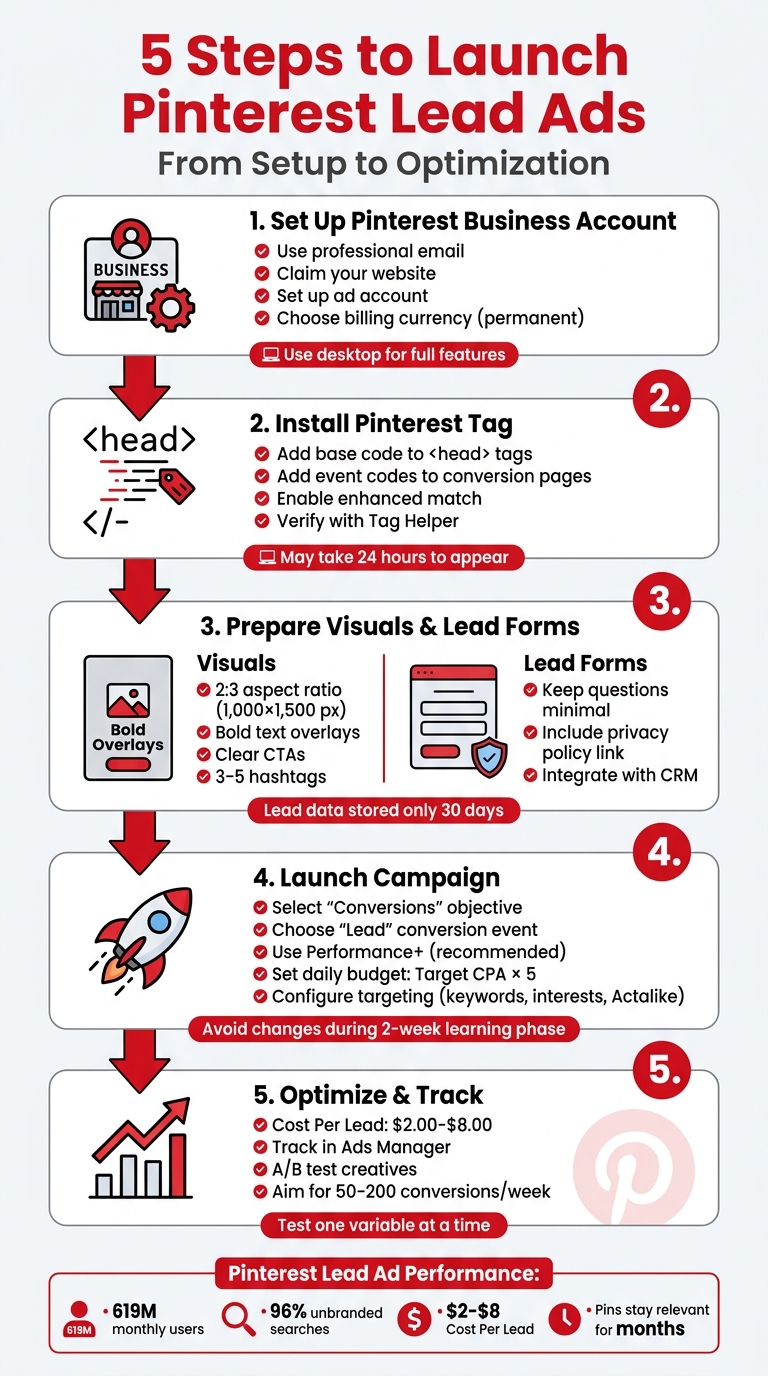
Pinterest Lead Ads Setup: 5-Step Launch Process
Pinterest Ads for Beginners: How to Start a Lead Generation Campaign
To maximize your results, ensure your campaign connects to a high-converting lead capture page to manage your new prospects effectively using marketing funnel software.
sbb-itb-a84ebc4
Pre-Launch Preparation
Follow these three key steps to ensure your Pinterest Lead Ad campaign runs smoothly and tracks results accurately.
Set Up a Pinterest Business Account
Start by creating a free Pinterest Business account. Use a professional email, your business name, website URL, and a brief business description. Once done, open a dedicated ad account and select your permanent billing currency. Important: Use a desktop to access all business features.
"If you select the wrong billing currency during setup or need to switch the account currency, you will need to create a new account in the correct country and/or currency." - Pinterest Business help
Don’t forget an often-overlooked step: claiming your website. This involves either adding a meta tag or uploading an HTML file to your site. Doing this enables conversion tracking, attribution, and the use of Rich Pins.
Once your business account is set up, the next step is implementing the Pinterest Tag for tracking.
Install and Configure the Pinterest Tag
The Pinterest Tag is essential for tracking and optimizing your campaigns. It consists of a base code and event codes. You can install it through an integration partner, by emailing your developer, or manually. Add the base code to every page of your site within the <head> tags to track visitors and build audiences. Event codes, on the other hand, are added only to specific conversion pages.
Enable automatic enhanced match to improve tracking accuracy, and confirm the setup using the Pinterest Tag Helper or by checking the Event History in Ads Manager. Keep in mind that it may take up to 24 hours for the tag to appear in Ads Manager after installation.
Once your tracking is in place, you’re ready to focus on perfecting your creative assets and lead form setup. This is a critical step in learning to build high-converting sales funnels that turn Pinterest traffic into customers.
Prepare Visual Assets and Lead Form Questions
Create eye-catching, high-quality visuals with a 2:3 aspect ratio, such as 1,000×1,500 pixels. You can use images, videos, or carousels. Max-width video ads are particularly effective, as they expand across the mobile feed, grabbing more attention. To make your visuals stand out, use bold text overlays, 3–5 relevant hashtags, and clear calls-to-action. For example, instead of a generic image, include text like "Free Guide: 10 Steps to Start Your Business" to show users exactly what they’ll get.
For lead forms, keep it simple. Only request essential information to boost completion rates. Include a mandatory link to your privacy policy and customize the completion message to suit your campaign goals. Pinterest makes it easy by pre-filling user details from their accounts, allowing submissions without leaving the app. Keep in mind that lead data is only stored for 30 days, so integrate with a CRM like Salesforce or use tools like Zapier to back up your data.
Creating and Launching a Pinterest Lead Ad Campaign
Once your account, tracking, and creative assets are ready, it’s time to build your campaign in Pinterest Ads Manager. Follow these steps to set up your campaign effectively and reach the right audience.
Choose the Campaign Objective and Budget
Start by selecting the Conversions objective and choosing "Lead" as your conversion event. As of 2026, Pinterest recommends using Performance+ for conversion-focused campaigns. This tool automates budget management and bidding, simplifying the process by reducing manual inputs by 50%.
"Performance+ became the recommended default... Pinterest is, in plain terms, telling advertisers to stop micromanaging what the system can handle better algorithmically." - Cedric Yarish, AdManage.ai
For budgeting, calculate your daily spend by multiplying your target Cost Per Acquisition (CPA) by five. For instance, if your target CPA is $6.00 per lead, set a daily budget of at least $30.00. You can choose between a fixed daily budget or a lifetime budget. Brands using Performance+ daily budgets have reported a 3% lower CPA compared to fixed budgets.
Pro Tip: If your campaign generates fewer than 50 conversions per week, start with a "Consideration" objective to build up tracking signals before switching to Lead Ads for digital products. Also, avoid adjusting your budget during the initial two-week learning phase, as this can disrupt the algorithm’s optimization process.
Set Up Targeting Options
Define your audience by selecting demographics, interests, and keywords at the ad group level. Pinterest’s "Potential audience size" bar in Ads Manager is a helpful tool to ensure your targeting isn’t too broad or too narrow. Combining keywords with interests can help you capture both immediate search intent and long-term user behaviors.
To scale your campaigns, consider using Actalike audiences. These groups are modeled after your most valuable customers or site visitors. For effective targeting, ensure your customer lists have at least 100 matches on Pinterest. Additionally, retarget users who have visited your site or interacted with your Pins by leveraging audiences built through the Pinterest Tag.
For example, during a 2025/2026 campaign, KIA launched the EV3 in Australia and New Zealand using Performance+ to drive lower-funnel lead conversions. The result? An 18% improvement in Cost Per Lead compared to their initial targets.
Once your targeting is set, shift your attention to crafting high-quality visuals and ad copy.
Design and Upload Creative Assets
Upload vertical images with a 2:3 aspect ratio in approved file formats. Use the "Stack Your Story" layout: place key text overlays at the top, visuals in the middle, and supporting details at the bottom. Keep in mind that while Pin titles can have up to 100 characters, only the first 40 are immediately visible - so lead with your strongest value proposition.
Write concise, clear ad copy that explains your offer. For example, use phrases like "Download Our Free Social Media Calendar Template" or "Get 15% Off Your First Order." Ensure your Call to Action (CTA) is direct, such as "Sign up", and include a link to your privacy policy, which is required for lead forms.
Experiment with different ad formats to optimize submission rates. Video ads, especially max-width videos that expand across the mobile feed, are highly engaging. Carousel ads work well for showcasing multi-step processes or product collections. For even better lead quality, consider Quiz ads, which encourage interaction and provide more qualified leads.
Best Practices for Lead Generation
Once your campaign is live, the work doesn’t stop there. Regular tweaks and improvements are crucial to getting the most out of your lead generation efforts.
Optimize Ad Creative
Your ad creative is the first thing potential leads see, so it needs to grab attention right away. Use short, clear text overlays to highlight perks like "Free Shipping" or "Limited Time Offer" in fonts that are easy to read on mobile screens. Your call-to-action (CTA) should be straightforward and tell people exactly what to do. Phrases like "Sign up," "Shop now," or "Get a quote" work better than something vague like "Learn more."
For video ads, keep them between 6–15 seconds and make sure they’re effective without sound since they autoplay silently in users' feeds.
Sweaty Betty, a UK-based athleisure brand, used a full-funnel campaign with Shopping ads tailored to Pinterest trend data. By targeting women aged 18–54, they achieved a 39% increase in ROAS year-over-year and cut their cost per acquisition by 34% compared to other digital channels.
Once your creative is on point, fine-tune your audience targeting to take your campaign performance to the next level.
Refine Targeting for Precision
Think of Pinterest as a visual search engine, which makes keyword targeting a must for reaching users who are actively searching for ideas. Combine keyword and interest targeting to connect with both general browsers and high-intent users. Use the Pinterest Trends tool to match your campaign to seasonal trends, like focusing on "spring cleaning" keywords in March.
To expand your audience, create actalike audiences. These let you target new users who share traits with your top customers. Just ensure your customer lists have at least 100 matches to make this work on Pinterest. If your goal is to bring in entirely new leads, upload your current customer list to Ads Manager and exclude it from your targeting. This way, your budget is spent on fresh prospects.
Customize the Lead Form and Thank-You Page
A short lead form is more likely to get completed. While Pinterest lets you add custom questions, stick to the basics - name, email, and one or two qualifying questions tailored to your offer.
On the thank-you page, set clear expectations. Let users know what happens next, like when they’ll receive their discount code or e-book. Also, make sure the landing page matches the look and feel of your Pin to create a smooth, cohesive experience. Don’t forget to include a valid privacy policy link - Pinterest requires this before your form can go live.
Tracking and Post-Launch Optimization
Launching your campaign is just the first step. The real challenge lies in monitoring its performance and fine-tuning it to improve results. Post-launch optimization is essential for strengthening your lead generation strategy, as it relies on data-driven adjustments to boost lead quality and campaign effectiveness.
Track Conversion Metrics
To measure your campaign's performance, head to the Ad Reporting section in Pinterest Ads Manager. Customize your table by clicking the pencil icon and adding columns for "Lead" and "Cost per lead" under the Engagement section. This will give you a clear view of how your campaign is performing. Typically, Cost Per Lead ranges from $5.00 to $30.00, while Cost Per Click for traffic campaigns is usually between $0.10 and $1.00. For awareness campaigns, CPM rates generally hover around $2.00 to $5.00.
Automate lead syncing with tools like LeadsBridge, Zapier, or Salesforce to connect new leads directly to your CRM in real time. Keep in mind that new campaigns often enter a "Learning Mode" that lasts between 48 hours and two weeks. During this period, performance may fluctuate as the algorithm identifies potential converters. To allow the algorithm to work effectively, limit changes to no more than two rounds per week and aim for 50–200 conversions weekly to provide enough data for meaningful optimization.
A/B Test Ads and Lead Forms
A/B testing is an essential method for refining your campaigns. To get clear, actionable insights, test only one variable at a time. Focus on impactful elements, such as comparing static images to video content, experimenting with different calls-to-action (e.g., "Sign up" vs. "Get a quote"), or adjusting the number of questions in your lead form. While shorter forms tend to increase completion rates, adding a few qualifying questions can help you attract higher-quality leads.
Run your tests until they reach statistical significance, which could take anywhere from a few hours to several weeks, depending on your audience size. To ensure conversion events are being tracked correctly, use the Pinterest Tag Helper Chrome extension before scaling your budget.
Integrate Leads into Marketing Funnels
Once you've analyzed performance and made your optimizations, it’s crucial to integrate leads into your marketing funnels quickly. Route captured leads into your email and nurture campaigns without delay to maximize their conversion potential. Automate this process using tools like Zapier or LeadsBridge to send leads directly from Pinterest forms to your CRM or email marketing platform.
When setting up these integrations, ensure that custom questions from your Pinterest forms are mapped correctly to corresponding fields in your CRM. Additionally, use integration settings to automatically segment leads into specific email lists based on the form they completed. For businesses aiming to create more robust marketing funnels, the Marketing Funnels Directory offers resources like tools, courses, and vendors to guide you from lead capture to conversion.
Conclusion
The success of your Pinterest Lead Ads campaign hinges on consistent testing and swiftly integrating leads into your system. Pinterest Lead Ads excel at capturing high-intent leads on a platform where users often look for inspiration and embark on new projects. By following the setup steps - creating a Business account, installing the Pinterest Tag, designing vertical creatives, and tailoring lead forms - you establish a strong starting point.
What sets great campaigns apart is continuous testing and adjustment. Supplying at least 10 creative variations per ad group enables you to gather meaningful data and pinpoint the combinations that perform best. For example, Dermstore's holiday 2025 campaign leveraged creator-led content to achieve a 50% higher outbound click-through rate and an 8% stronger seven-day return on ad spend compared to their standard assets.
It’s important to remember that Pinterest operates as a visual search engine rather than a traditional social media feed. With 97% of top searches being unbranded, the platform allows you to engage users before they’ve aligned with a specific brand. To maximize this opportunity, use a 30-day attribution window and integrate your CRM and sales funnel tools promptly to harness fresh intent.
From account setup to creative testing, each step reinforces your campaign's foundation for success. By committing to ongoing testing and quick optimizations, you can drive meaningful lead generation and achieve measurable marketing outcomes.
FAQs
Do I need a website to run Pinterest Lead Ads?
You don’t need a website to use Pinterest Lead Ads. That said, having a website can strengthen your lead generation strategy. Leads collected through Pinterest Ads Manager can be downloaded directly or synced with tools like Salesforce, simplifying campaign management and helping you streamline your processes.
What should I ask in the lead form to get better leads?
To attract higher-quality leads, include up to three targeted questions that help you understand your potential customers better. These questions should focus on their needs, preferences, or intent. For instance, you might ask about their interests, budget, or any specific requirements they have. Make sure your questions align with your business objectives and are designed to gather actionable information. This approach not only improves the quality of leads but also sets you up for more effective follow-ups.
How do I send Pinterest leads to my CRM automatically?
To streamline Pinterest lead management, you can use tools like Zapier, Salesforce, or the Pinterest API to sync leads directly with your CRM. Once someone submits a lead form, their responses can either be downloaded from Pinterest Ads Manager or transferred automatically using these integrations.
If you don’t see the option for Lead Ads, reach out to your Pinterest account manager. They can help enable this feature and ensure your forms are set up to transfer data seamlessly.