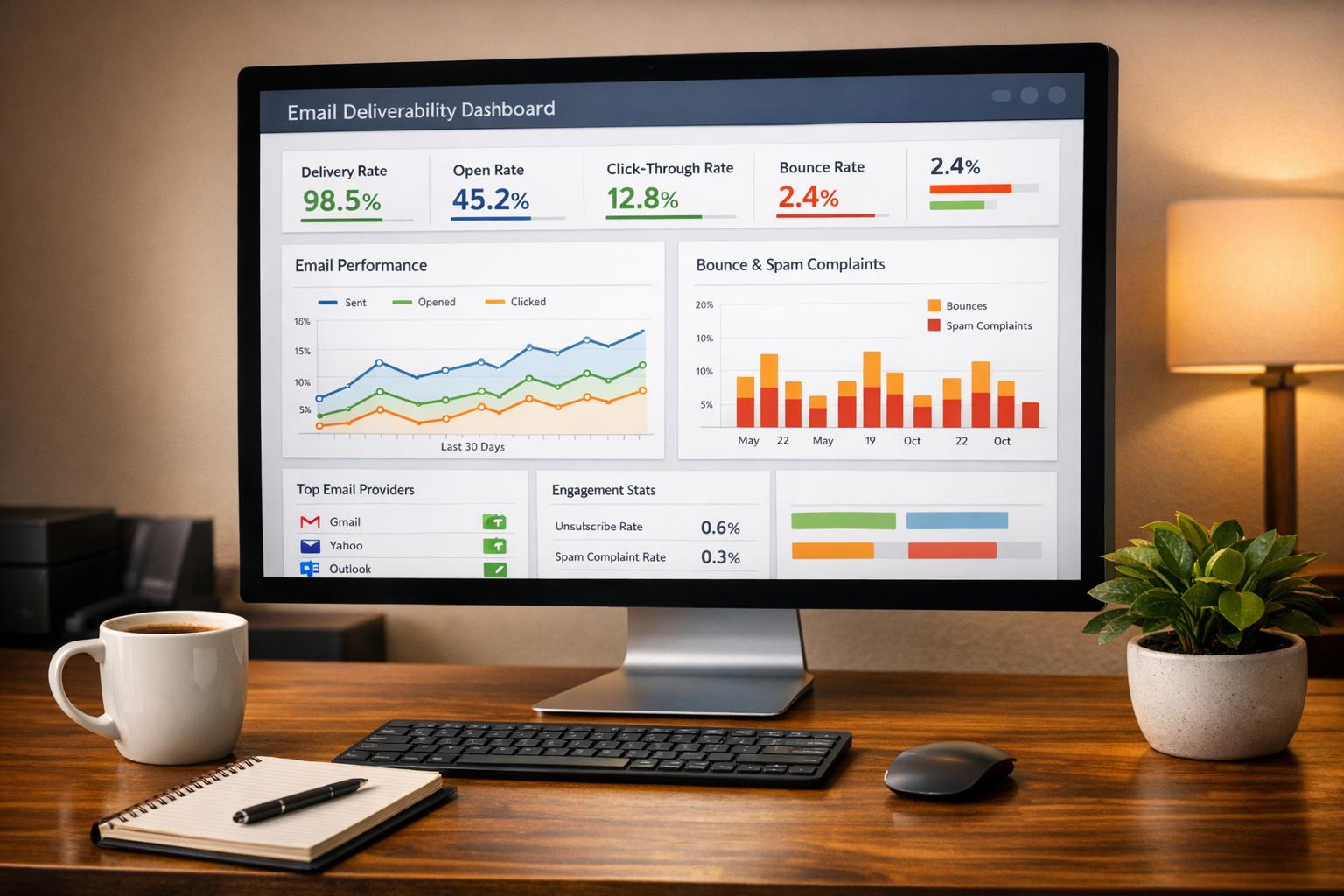
Want to know if your social media efforts are paying off? Measuring social media conversions is how you track actions that matter - like purchases, sign-ups, or demo requests - rather than just vanity metrics like likes or shares.
Here’s what you need to do:
- Set clear goals: Define what success looks like for your business (e.g., purchases, leads, or downloads). Distinguish between macro-conversions (big wins like sales) within your high-converting sales funnels and micro-conversions (steps like adding items to a cart).
- Track conversions effectively: Use marketing funnel software and tools like UTM parameters, GA4, and platform pixels to capture data. Combine browser and server-side tracking to avoid missing key insights.
- Analyze performance: Focus on metrics like conversion rate, ROI, and cost per acquisition (CPA). Break down data by channel, campaign, and audience for actionable insights.
- Refine campaigns: Use historical data to set benchmarks, adjust budgets, and optimize targeting. Feed conversion data back into platforms to improve ad delivery.
Key takeaway: Stop chasing vanity metrics and start measuring what drives revenue. With a solid tracking and analysis system, you can confidently allocate your budget and scale results.
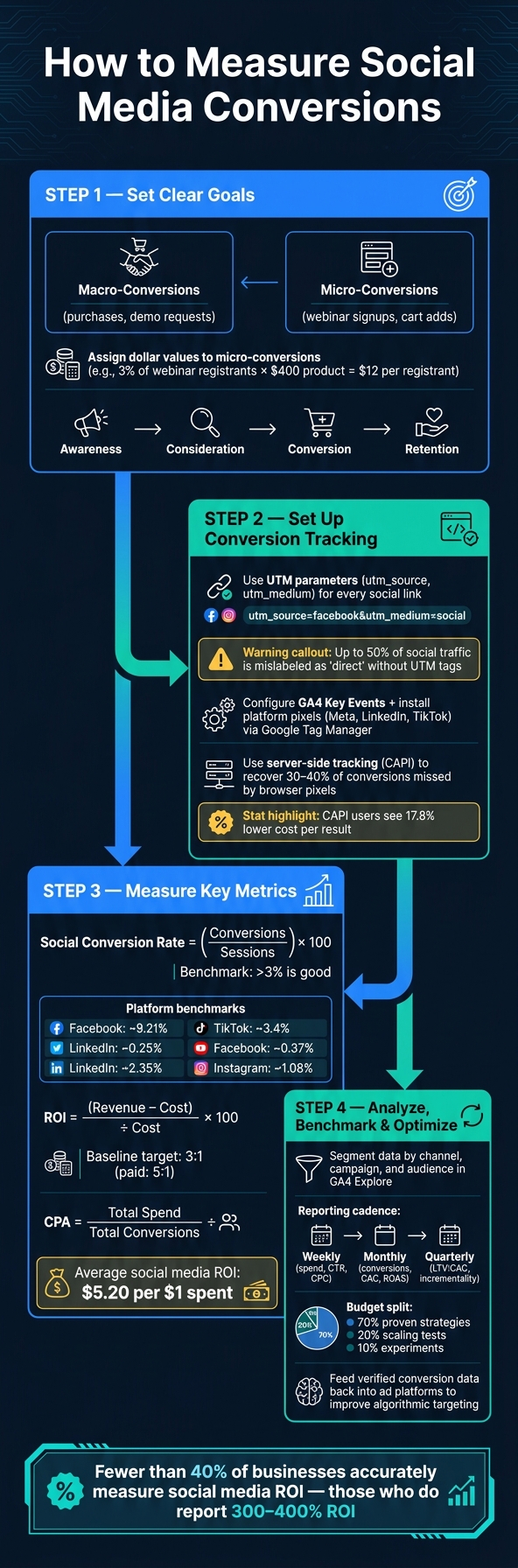
How to Measure Social Media Conversions: 4-Step Framework
How to Measure Social Media Performance Like a Pro
sbb-itb-a84ebc4
Defining Your Conversion Goals
Setting clear success criteria is essential - without them, you might end up tracking every possible action without understanding their relevance. As Brandwatch aptly puts it:
"The goal isn't to track everything. It's to track the actions that directly connect to social media ROI and business growth."
Clarify Your Business Objectives
Start by determining what your business needs most at this moment. Is it more revenue, an increase in leads, or greater brand awareness? Once you've identified the priority, focus on the social media actions that directly support that goal.
Keep in mind the difference between macro- and micro-conversions. Macro-conversions, like a completed purchase, represent major revenue drivers, such as sales funnels for digital products. Micro-conversions, on the other hand, are smaller actions that indicate intent, such as signing up for a webinar. Both are important, but they serve different purposes in your analysis. Here's a practical tip: assign a dollar value to micro-conversions. For example, if 3% of webinar registrants eventually buy a $400 product, you can estimate that each registrant is worth about $12 in expected revenue. This approach helps you justify your spending and compare campaign performance more effectively.
Once you've clarified your objectives, align them with the appropriate stages of the marketing funnel for accurate measurement.
Map Conversions to Funnel Stages
Each conversion goal should correspond to a specific stage in the marketing funnel. This ensures focused measurement and honest reporting.
| Funnel Stage | Objective | Example Conversion Events |
|---|---|---|
| Awareness | Brand Reach | Video views (50%+), engaged sessions, branded search lift |
| Consideration | Intent Building | Lead magnet downloads, webinar registrations, pricing page visits |
| Conversion | Revenue/Leads | Completed purchases, demo requests, trial activations |
| Retention | Customer Value | Renewal confirmations, referral shares, onboarding completion |
For instance, in February 2026, BMW Group Malaysia ran a LinkedIn Lead Gen campaign for the 330Li M Sport. They used a "Request Demo" call-to-action in their social feed, leading to a dedicated landing page that matched the ad's visuals. This seamless connection between the consideration stage and a high-intent conversion action ensured a smooth user journey.
Mapping your goals to these funnel stages sharpens your tracking and reporting process.
Build a Conversion Tracking Plan
Once your goals are defined and mapped to funnel stages, the next step is to document them. Use a central resource, like a spreadsheet or a Notion page, to organize everything. For each conversion event, include:
- The event name
- The trigger (e.g., button click, page load, or form submission)
- Its assigned monetary value
- The UTM tags that identify social as the traffic source
Consistency is key when it comes to UTM parameters. Stick to lowercase letters and hyphens in your naming conventions to avoid fragmented data in analytics platforms like GA4. A standardized approach ensures your reports are reliable and your budget decisions well-supported.
"Every dollar you spend on social media ads should be traceable to a result." - Cometly
Defining your conversion goals lays the groundwork for accurate tracking and meaningful ROI analysis. This foundational step is critical for everything that follows.
Setting Up Conversion Tracking
To make sure you’re capturing every conversion, focus on three key tools: UTM parameters, GA4 conversion events, and social platform pixels. Together, they’ll help you properly attribute your social media efforts.
Use UTM Parameters for Social Links
UTM parameters are small tags added to URLs to track traffic sources. When someone clicks a tagged link, GA4 records where the traffic originated. Without these tags, up to 50% of your social traffic might be incorrectly labeled as "direct" in your analytics.
The most critical UTM parameters are:
utm_source: Identifies the platform, likelinkedinortiktok.utm_medium: Specifies the type of traffic. Usesocialfor organic posts andpaid-socialfor ads.
This distinction is essential because mixing up organic and paid traffic makes it impossible to fairly compare their performance.
| Platform | utm_source |
Organic utm_medium |
Paid utm_medium |
|---|---|---|---|
| Meta (FB/IG) | facebook or meta |
social |
paid-social |
linkedin |
social |
paid-social |
|
| X (Twitter) | twitter or x |
social |
paid-social |
| TikTok | tiktok |
social |
paid-social |
Key tips for UTM tagging:
- Always use lowercase (GA4 treats
facebookandFacebookas separate sources). - Replace spaces with hyphens for consistency.
- Use dynamic macros for paid campaigns to automate tagging. For example, Meta supports
{{campaign.name}}, and LinkedIn uses{{CAMPAIGN_NAME}}. - Avoid adding UTM tags to internal links on your site, as this can reset session attribution and skew your data.
Once your UTM tags are in place, configure your analytics to turn this data into actionable insights.
Set Up Conversion Events in Analytics Tools
In GA4, every interaction - like page views or form submissions - is tracked as an event. However, only the most important ones should be marked as Key Events. Doing this not only helps with Google Ads reporting but also makes these events available for bidding.
Here’s how to refine your setup:
- Identify actions that align with your conversion goals.
- Confirm these actions are being tracked in GA4.
- Mark them as Key Events in the GA4 Admin settings.
To monitor social performance specifically, filter your Acquisition reports using utm_medium values like paid-social or social. If social traffic appears under "Unassigned" in the Channel Grouping report, it’s likely due to mismatched utm_medium values. Fix your naming conventions, and the issue should resolve.
"Social Media ROI Tracking is a systems problem, not a reporting problem. If you want numbers that hold up under pressure, build a chain you can defend: strict UTMs → clean GA4 conversions → sane value assignment → consistent attribution view." - Social Media Marketing Techniques
Install and Configure Social Platform Pixels
Once your GA4 events are set up, enhance your tracking by integrating platform-specific pixels. These pixels work alongside UTMs and GA4 events to ensure comprehensive tracking. They also allow ad platforms to optimize delivery by targeting users most likely to convert.
The easiest way to manage all your pixels is through Google Tag Manager (GTM). Install GTM on your site once, and then use it to control all your pixels from a single dashboard. Here’s how to handle some of the major platforms:
- Meta (Facebook/Instagram): Install the base pixel sitewide and set up standard events like
PurchaseorLeadto trigger on relevant actions. - LinkedIn: Create a Conversion Action in Campaign Manager (Analyze > Conversion Tracking) and deploy the Insight Tag via GTM.
- TikTok: Install the base code sitewide and configure standard events for key pages or high-converting landing pages.
It’s worth noting that browser-based pixels can miss 30–40% of conversion data due to ad blockers and privacy tools. To address this, use server-side tracking like the Conversions API (CAPI) for Meta and LinkedIn. Meta even offers a one-click setup for CAPI, which requires no coding or extra server costs. Advertisers using both browser pixels and CAPI often see a 17.8% lower cost per result compared to those relying solely on browser pixels.
When implementing both browser and server-side tracking, make sure to pass a unique event_id for each conversion to avoid duplicate data.
"The difference between running ads with and without conversion tracking is like the difference between knowing you spent money and knowing if that money actually worked." - James Silvestri, Metadata.io
Measuring and Calculating Social Conversion Metrics
Once you’ve set up your tracking system, the next step is to evaluate how your social media efforts are performing. To do this, focus on three key metrics: conversion rate, ROI, and cost per acquisition (CPA).
Calculate Conversion Rate from Social Traffic
Your social conversion rate reveals how well your social media traffic achieves the desired action, whether that's making a purchase, signing up for a newsletter, or any other goal. The formula is simple:
Social Conversion Rate = (Social Conversions ÷ Social Sessions) × 100
For example, if you had 4,000 social sessions and 120 resulted in conversions, your conversion rate would be 3%. Generally, a rate above 3% is seen as a good benchmark across industries.
However, conversion rates can vary significantly by platform. For instance:
- Facebook: ~9.21%
- LinkedIn: ~2.35%
- TikTok: ~3.4%
- Instagram: ~1.08%
Understanding these averages helps you set realistic goals tailored to each platform rather than making unfair comparisons.
"A click only shows curiosity. A conversion happens only when the user completes the action you defined as success." - Ankita Srivastava and Priyanka Malik, Sprinklr
Once you’ve calculated your conversion rate, the next step is to evaluate profitability.
Measure Revenue and ROI from Social
Profitability is the ultimate measure of success. This is where ROI and CPA come into play.
- ROI Formula: (Revenue from Social − Cost of Social) ÷ Cost of Social × 100
- CPA Formula: Total Social Spend ÷ Total Conversions
When calculating costs, don’t just factor in ad spend. Include everything - labor (median hourly rate for social media managers is about $51/hour), content creation, software subscriptions, and agency fees. For smaller teams, software alone can range from $500 to $2,000 per month. Ignoring these costs can give you an inflated ROI, leading to unrealistic expectations and poor budgeting.
A good baseline for ROI is a 3:1 return, though paid campaigns often aim for closer to 5:1. On average, social media marketing delivers around $5.20 for every dollar spent, but this figure only holds if all costs are accounted for.
"Spending money on social media without tracking the return is like pouring water into a leaky bucket." - iSocialYou
These calculations provide a foundation for determining which campaigns are driving the most value.
Build a KPI Hierarchy
Not all metrics are created equal. To keep your reporting focused, organize your key performance indicators (KPIs) into tiers:
| Tier | Metrics | Focus |
|---|---|---|
| Tier 1 - Revenue | ROI, CPA, attributed revenue | Business profitability |
| Tier 2 - Engagement | Conversion rate, CTR, engagement rate | Campaign performance |
| Tier 3 - Awareness | Reach, impressions, share of voice | Brand visibility |
Tier 1 metrics, like ROI and CPA, should take priority in your reporting. Metrics in Tier 3, such as reach and impressions, are helpful for gauging visibility but shouldn’t be the focus of decision-making.
"Followers, likes, and impressions are vanity metrics that don't inform decisions." - KISSmetrics Editorial
Using this hierarchy ensures that your discussions with stakeholders remain centered on revenue and efficiency rather than superficial activity.
For more tips on refining your conversion tracking and finding tools to enhance your campaigns, check out the Marketing Funnels Directory (https://topmarketingfunnels.com).
Analyzing and Improving Conversion Performance
When it comes to improving conversion rates, it's not just about tracking the numbers but digging into the "why" behind them. By analyzing performance and making targeted adjustments, you can turn insights into meaningful results.
Segment Conversions by Channel and Campaign
Looking at overall conversion totals is a start, but it doesn't tell the whole story. Breaking down your data by channel, campaign, and audience gives you a clearer picture of what's working and what isn't.
To do this effectively, use consistent UTM parameters (source, medium, campaign, and content) to identify which channels are driving results.
In GA4, the Explore tab is your go-to tool for creating custom reports. Add dimensions like "Session source/medium", "Campaign", and "Landing page" to see how specific campaigns perform. For instance, you can isolate social traffic and pinpoint which campaigns lead to conversions. From there, analyze micro-funnel drop-offs to identify weak spots. For example, if a campaign generates plenty of traffic but few conversions, it could mean the ad and landing page aren't aligned. Maybe the ad promises one thing, but the landing page delivers something else entirely.
Here’s a quick rule of thumb:
- High conversion rate but low session volume? You might need to expand your reach.
- High sessions but low conversions? Focus on aligning your messaging between ads and landing pages.
This level of segmentation helps you track trends more effectively and adjust your benchmarks to reflect real performance.
Track Trends and Set Benchmarks
While industry averages can give you a general idea of what’s "normal", your own historical data is far more valuable. For example, a 3% conversion rate might be a win for one business but a missed opportunity for another - it all depends on your product, audience, and pricing.
As Postiz explains:
"The real magic of tracking social media ROI is that it flips your strategy from being reactive to proactive. Instead of just posting and hoping, you start making data-backed decisions."
Set SMART benchmarks (Specific, Measurable, Achievable, Relevant, and Time-bound) based on your data. For instance, you might aim to "Increase our LinkedIn landing page conversion rate from 4% to 7% by Q3 2026." Then, align your reporting cadence with the decisions you need to make:
| Cadence | Focus Metrics | Purpose |
|---|---|---|
| Weekly | Spend, CPM, CTR, CPC | Spot anomalies early |
| Monthly | Conversions, CAC, ROAS | Assess campaign performance |
| Quarterly | LTV:CAC, Incrementality | Plan budgets strategically |
Also, keep an eye on ad frequency. If users see the same ad more than 10 times a week, it’s a sign of creative fatigue, which can hurt your conversion rates.
Once you’ve identified trends and set benchmarks, it’s time to fine-tune your budgets and targeting.
Adjust Budgets and Targeting Based on Data
Your budget is a powerful tool - use it wisely. A 70/20/10 split works well:
- 70% for strategies you know will deliver.
- 20% for scaling successful tests.
- 10% for experimenting with new ideas.
When it comes to targeting, focus on precision. Upload lists of actual converters to platforms like Meta to create lookalike audiences. This helps you zero in on people who share characteristics with your existing customers, rather than casting a wide net.
Meanwhile, review ad performance reports regularly. Exclude demographics that underperform, such as specific age groups, locations, or devices that generate clicks but no conversions.
Finally, close the loop by feeding verified conversion data - like revenue, not just lead volume - back into the platforms. Tools like Meta's Conversions API can help algorithms optimize for high-value customers instead of just high click volumes. This ensures your campaigns are driving the kind of results that truly matter.
Conclusion: Key Steps for Measuring Social Media Conversions
Tracking social media conversions isn’t a one-and-done task - it’s an ongoing process. Start by revisiting your conversion goals. Break them down into macro-conversions (like purchases) and micro-conversions (like email signups), assigning a dollar value to each. This step ensures you can accurately calculate your Return on Ad Spend (ROAS).
Next, build a reliable tracking system. Use tools like UTM parameters, pixels (browser- and server-side), and CRM integrations to follow the journey from social clicks to revenue. As Social Media Marketing Techniques puts it:
"Social Media ROI Tracking is a systems problem, not a reporting problem."
Once tracking is in place, it’s time to analyze and refine. Look at your data by channel and campaign, test different attribution models, and send enriched conversion data back to ad platforms. This feedback loop can significantly improve algorithmic targeting. It’s worth noting that fewer than 40% of businesses accurately measure their social media ROI today, yet those who do often see impressive returns of 300–400% ROI.
To take your strategy even further, check out the Marketing Funnels Directory. This resource hub is packed with tools, courses, and guides tailored to social media, ads, content, and B2B funnels - perfect for optimizing every stage of your customer journey.
FAQs
Which conversions should I track first?
To get started, focus on tracking conversions that directly tie into your main business objectives. These fall into two categories: macro-conversions, such as completed purchases or finalized deals, and micro-conversions, like starting a form or booking a demo.
Take time to audit your funnel to pinpoint where users drop off. This helps you prioritize tracking the micro-conversions that ultimately drive those critical macro-conversions. It's also a good idea to assign monetary values to these events to better understand their impact.
For consistency, maintain a shared document that clearly defines these conversions. This ensures everyone on your team - and across platforms - is on the same page when it comes to tracking.
How do I avoid missing conversions due to iOS privacy and ad blockers?
To minimize the loss of conversion data due to iOS privacy settings and ad blockers, consider using the Meta Conversions API (CAPI). This tool allows you to send event data directly from your server, bypassing device-based restrictions.
For best results, run CAPI alongside the Meta pixel and implement event deduplication methods, such as using order IDs, to avoid duplicate data. Additionally, include UTM parameters for tracking non-cookie-based attribution. Don't forget to verify your domain in Meta Business Manager - this step supports Aggregated Event Measurement, helping you maintain accurate insights into your marketing funnel.
How can I attribute social conversions when people convert later or on another device?
To monitor social media conversions that happen across devices or over time, implement a multi-touchpoint tracking strategy. Start by collecting user identifiers, such as emails or customer IDs, early in their interaction with your brand. Tools like server-side tracking can help you navigate cookie restrictions, while integrating CRM or payment data with analytics ensures a more complete view of user behavior. In Google Analytics 4, check out the Conversion Paths feature under the Advertising section. Pair this with data-driven attribution models to gain deeper insights into how users interact with your campaigns.