If marketing, sales, and RevOps use different stage definitions, pipeline data gets messy fast. I’d fix that with 3 things: buyer-role input, stage exit rules, and CRM fields that store proof of movement.
Here’s the short version:
- I’d map stages to buyer jobs, not team activity
- I’d define binary exit rules based on proof in the CRM
- I’d separate journey, lifecycle, and opportunity stages
- I’d review stage conversion every quarter and flag drop-offs above 50%
- I’d track time-in-stage and use stage-based probabilities for forecasting
The article’s main point is simple: a usable stage map is less about naming stages and more about setting rules people follow the same way. That helps handoffs, pipeline reviews, and forecast quality.
A few numbers stand out:
- Complex B2B deals often involve 10 to 13 stakeholders
- A 50%+ drop at a stage transition is a warning sign
- Stage-weighted forecasting is tied to 2.3x better forecast accuracy
- One case cited a 40% lift in closed-won deals after tighter stage tracking
What I like here is the focus on proof. A webinar signup may show interest, but it does not prove buying progress. In B2B, the deal moves when buyers finish jobs like budget review, internal alignment, technical checks, and vendor selection.
So if I were summarizing the piece in one line, it would be this: build a funnel stage model around what the buyer has done, then lock that model into CRM fields, handoffs, and review habits.
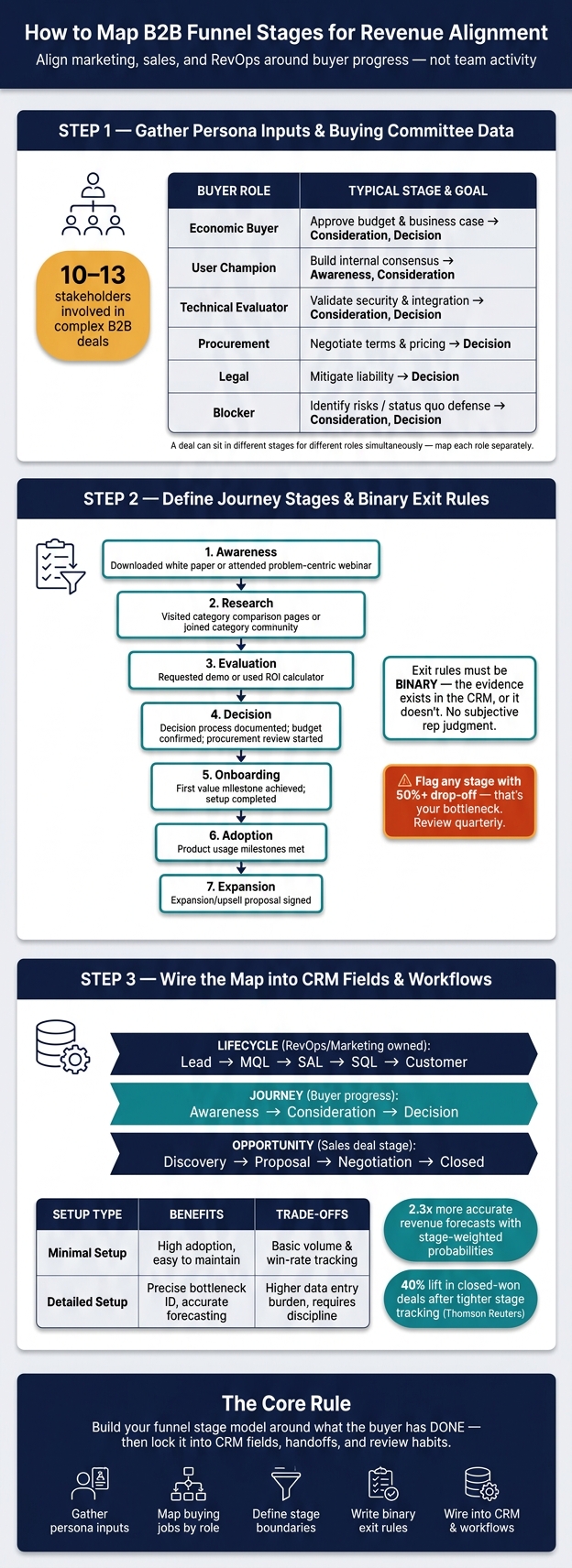
B2B Funnel Stage Mapping: 3-Step Framework for Revenue Alignment
Step 1: Gather persona inputs and buying committee data
Start with the last 6 to 12 months of CRM data. Look at closed-won deals first. Your goal is simple: find the industries, company sizes, revenue bands, and sales motions that produce the best win rates. If you sell through different motions - like enterprise field sales and product-led sales - map them separately. Mixing them together blurs the picture.
Then identify the trigger that made the deal urgent. What pushed the buyer to act? Common triggers include missing targets, board pressure, or losing a major account. Use win/loss interviews, call notes, and closed-won reviews to check that the pattern holds up.
Next, map the buying committee so each funnel stage reflects who needs to move before the deal can move.
Map the buying committee and each role's jobs
Complex B2B deals often involve 10-13 stakeholders. That matters because each person is trying to get a different job done. If you map them as one group, your stage gates stop matching buyer behavior.
| Role | Primary Buying Job | Key Concerns | Typical Stage |
|---|---|---|---|
| Economic Buyer | Approve budget and sign off on the business case | Strategic alignment, total cost of ownership | Consideration, Decision |
| User Champion | Evaluate daily utility and build internal consensus | Workflow impact, ease of use | Awareness, Consideration |
| Technical Evaluator | Validate security, integration, and technical fit | Stack compatibility, data privacy, maintenance | Consideration, Decision |
| Procurement | Negotiate terms and pricing | Contractual risk, payment terms, discounts | Decision |
| Legal | Mitigate liability | Compliance, indemnity, service-level agreements | Decision |
| Blocker | Identify risks or reasons to maintain the status quo | Disruption to current processes | Consideration, Decision |
A deal can sit in different stages for different roles at the same time. For example, if ROI has not been validated, the Economic Buyer may still be in Consideration while the User Champion is ready to decide. That's where forecast problems creep in. A rep may feel momentum, but one key buyer still hasn't cleared their job.
Use these role-level jobs to set up the stage exits in Step 2.
Persona-to-stage comparison table
Map each role to its main buying job and the objection most likely to slow it down. This gives you a cleaner way to decide which role must advance before the stage should change.
| Persona | Primary Buying Job | Likely Objections | Typical Stage |
|---|---|---|---|
| Economic Buyer | Validate ROI and approve budget | "Is this a strategic priority right now?" | Consideration, Decision |
| User Champion | Solve daily pain points and champion internally | "Is this easier than what we use today?" | Awareness, Consideration |
| Technical Evaluator | Confirm stack and security fit | "Does this integrate with our current tools?" | Consideration |
| Procurement / Legal | Mitigate contract and compliance risk | "Are the terms and security standards compliant?" | Decision |
Update this table after each win/loss review. Those updates will shape the stage boundaries and exit rules in Step 2.
sbb-itb-a84ebc4
Step 2: Define journey stages and stage exit rules
Now take the buying committee map and persona objections and turn them into a stage model the whole team can use the same way. The goal is simple: set clear stage boundaries based on buyer progress.
Build a practical stage model for B2B funnels
Your B2B journey map should follow how buyers make decisions, not how your team works internally. A good default stage set is:
- Awareness
- Research
- Evaluation
- Decision
- Onboarding
- Adoption
- Expansion
Each stage should represent one buying job.
As ZoomInfo puts it:
"Definitions must be based on measurable criteria, not on a subjective judgment. 'Interested' is not a stage. 'Downloaded the pricing guide' is one."
Good stage tracking can improve close rates in a material way.
Once you define the stages, set the proof that moves a deal out of each one.
Write exit rules based on verifiable buyer progress
An exit rule is the buyer evidence needed to move a deal to the next stage. It should be binary: the evidence is there, or it isn't. That cuts down rep-to-rep variation and makes CRM data more reliable.
Keep the criteria simple. Tie them to the proof that shows the buyer is ready for the next step. For example, moving a deal from Evaluation to Decision should require documented buyer progress - like the decision process, budget, and procurement review - not a rep's feeling that the meeting went well.
Be toughest with the rules at the first two CRM handoffs. That's usually where pipeline noise starts.
Stage exit rules comparison table
This table gives the team one place to check handoffs, QA, and pipeline reviews.
| Journey Stage | Buyer Progress Signal | Verifiable Exit Criteria (Evidence) |
|---|---|---|
| Awareness | Recognizing a problem or opportunity | Downloaded a white paper or attended a problem-centric webinar |
| Research | Evaluating different categories or approaches | Visited category comparison pages or joined a category community |
| Evaluation | Comparing specific vendors | Requested a demo or used an ROI calculator |
| Decision | Vetting and consensus | Decision process documented; budget confirmed; procurement review started |
| Onboarding | Implementation and first value | First value milestone achieved; setup/configuration completed |
| Adoption | Consistent value use | Product usage milestones met |
| Expansion | Scaling and new use cases | Expansion/upsell proposal signed |
Run a quarterly audit against this table. Pull the last 90 days of CRM data, calculate conversion rates at each transition, and flag any stage where drop-off is above 50% . That's your bottleneck.
Then revise the weakest stage rule before you map the model into funnel software tools and CRM workflows.
Step 3: Translate the map into CRM fields and team workflows
Take the stage rules from Step 2 and turn them into CRM fields and workflows. The goal is simple: marketing and sales should work from the same stage model. And each field should keep the proof that the buyer actually moved ahead.
Set up lifecycle, journey, and opportunity fields
Store each stage type in its own CRM field:
- Lifecycle: marketing or RevOps-owned lead status like Lead, MQL, SAL, SQL, or Customer
- Journey: buyer progress like Awareness, Consideration, or Decision
- Opportunity: sales deal stage like Discovery, Proposal, Negotiation, or Closed
Also add fields for Persona Role, Exit Rule Evidence, and Next Step Date. Before a record can move into later stages, require ICP fields like company size, industry, and title. Use standardized picklists and validation rules so records can't move forward if those fields are missing.
Keep every stage definition to one sentence. That forces clarity and cuts down on edge-case debates.
Connect stages to routing, scoring, nurture, and pipeline reviews
Once those fields are in place, use them across the funnel - not just for recordkeeping. Use journey stage for nurture, routing, and alerts. Use the same fields during pipeline reviews and in forecast management.
Content should match buyer progress. Early-stage buyers should get problem-centered content. Mid- and late-stage buyers should get solution-comparison content and demo invites. When a lead crosses the score threshold, route it to SDR automatically and alert SDR.
Capture a Stage Entry Date for each stage. That gives you time-in-stage data, which helps you see where deals slow down. If you forecast by stage, assign stage-based win probabilities like 10% for Lead and 50% for Proposal. Teams using stage-weighted forecasting are 2.3x more likely to produce accurate revenue projections than teams using unweighted methods. Set alerts for opportunities that sit in any stage longer than the historical average.
After Closed-Won, hand the account to customer success for onboarding.
CRM field design comparison table
Use the lightest setup your team will keep up to date. That's the tradeoff here: a lean CRM is easier to run, while a deeper setup gives you better diagnosis when deals get stuck.
| Design Level | Benefits | Tradeoffs | Reporting Impact |
|---|---|---|---|
| Minimal | High adoption; easy to maintain | Low diagnostic power; misses "why" deals stall | Basic volume and win-rate tracking |
| Detailed | Precise bottleneck identification; accurate forecasting | Requires high discipline; higher data entry burden | Granular velocity and conversion-by-persona reporting |
Start simple. Then add detail as adoption gets better.
Conclusion: Roll out the map, govern it, and keep it current
This process boils down to five moves: gather persona inputs, map buying jobs by role, define stages with clear boundaries, write binary exit rules, and wire it all into CRM fields and workflows. Each step builds on the one before it. Skip one, and the model starts to fall apart when teams try to use it day to day.
Once the map is live, governance is what keeps it usable. Marketing, sales, customer success, and RevOps should review it on a fixed cadence. RevOps should own the review triggers. When that review habit slips, stage definitions stop matching how buyers actually move. Over time, the map drifts away from real buyer behavior.
A stale map can throw off routing, reporting, and handoffs fast. The 50% drop-off threshold from Step 2 is the clearest sign that a stage rule - or the content tied to it - needs to change.
Better stage definitions do more than clean up reporting. They can improve closed-won results. Thomson Reuters tracked conversion at every stage and increased closed-won deals by 40%. That kind of gain comes from keeping the map current and making sure every team works from the same definitions.
If you need software to support that work, use a directory built for funnel and RevOps teams. The Marketing Funnels Directory lists funnel software and RevOps vendors. Its RevOps section covers tools for mid-market and PE-backed teams.
FAQs
How many journey stages should a B2B funnel have?
Aim for 5 to 7 journey stages. Five is a solid minimum if you want the model to stay useful. In many teams, six or seven stages gives you enough detail without making the CRM a pain to use.
A common middle ground is a six-stage model:
Lead → MQL → SQL → Opportunity → Proposal → Closed Won
What counts as proof that a buyer moved stages?
Proof that a buyer moved stages means the CRM stage-exit criteria were met through clear buyer actions and recorded decision signals - not just stronger interest.
That proof can show up in simple, visible ways: email replies, meeting attendance, content downloads, demo requests, demo completion, information exchange, budget or timeline discussions, proposal delivery, and a signed contract.
The key is to connect those actions to the right CRM stage values. Then use automation to move the record forward when the required actions happen.
How do I map journey stages in CRM without adding too many fields?
Use a simple stage picklist with 3 to 5 stages and clear, measurable exit criteria. Move deals forward with automation based on buyer actions - like demo requests or pricing page visits - instead of piling on extra fields.
Keep only the fields you need for qualification, routing, and reporting: standardized stage values, basic ICP data, and a created date or stage-entry date so you can track time in stage. Add new fields only when there’s a clear need.