Live streaming platforms are transforming training and education by enabling real-time interaction, boosting engagement, and offering tools for secure content delivery. If you're looking to choose the right platform, here’s a quick summary of what the top players - Muvi Live, Vimeo, Dacast, and Kaltura - bring to the table:
- Muvi Live: Known for low-latency streaming, strong security (Multi-DRM encryption, watermarking), and interactive features like live chat, quizzes, and two-way video calls.
- Vimeo: Offers high-quality streaming (up to 4K), interactive tools like polls and Q&A, and robust privacy features (AES-256 encryption, SSO).
- Dacast: Stands out with ultra-low latency, Zoom integration, and advanced security (AES encryption, DRM, IP whitelisting).
- Kaltura: Ideal for large-scale training with sub-5-second latency, LMS integration (e.g., Moodle, Blackboard), and advanced collaboration tools like breakout rooms.
Each platform caters to different needs. For example:
- Choose Muvi Live for branded app creation and secure, interactive training.
- Opt for Vimeo if you prioritize video quality and marketing integrations.
- Select Dacast for cost-effective live events with strong security.
- Go with Kaltura for enterprise-level training and LMS compatibility.
Quick Comparison
| Feature | Muvi Live | Vimeo | Dacast | Kaltura |
|---|---|---|---|---|
| Starting Price | $799/month | $108/month | $39/month | Custom Pricing |
| Latency | Ultra-low | Low (5–7 sec) | Ultra-low | Sub-5 seconds |
| Interactivity | Quizzes, chat | Polls, Q&A | Zoom integration | Breakout rooms |
| Security | Multi-DRM, Watermarking | AES-256, SSO | AES encryption, DRM | SSO, DRM, 2FA |
| Best For | Branded apps | HD content | Budget events | Large enterprises |
These platforms support the growing demand for digital training, with the eLearning market expected to reach $381.3 billion by 2026. The right choice depends on your specific goals - whether it's security, branding, or scalability.
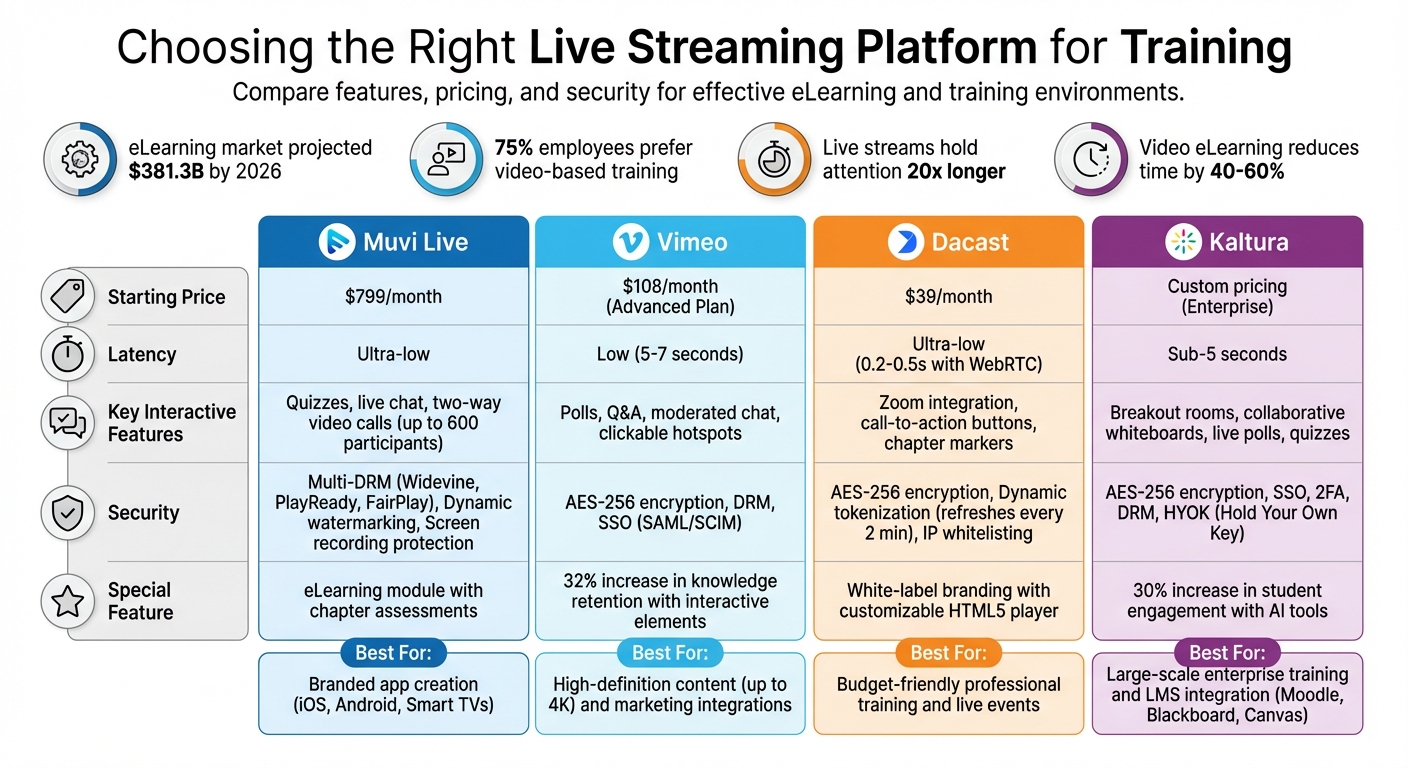
Live Streaming Platforms for Training: Feature and Pricing Comparison
Live Streaming Mastery: Complete Beginner Guide
sbb-itb-a84ebc4
1. Muvi Live
Muvi Live provides ultra-low latency streaming through its built-in CDN, making it perfect for real-time training. This setup ensures smooth, lag-free streaming, enabling real-time Q&A and quick responses. You can even broadcast professional sessions directly from your smartphone without needing extra encoding hardware. These features make it easy to run interactive, secure, and efficient training sessions.
Low-latency streaming
With DVR functionality, students can pause, rewind, or replay live streams as needed. Additionally, you can embed sessions directly on your website using HLS links, APIs, or SDKs, offering flexibility in how content is delivered.
Interactivity
Muvi Live enhances engagement with a live chat feature that supports both text and emoticons, along with one-click login options via Google, Facebook, or as a guest. Moderators can manage the chat by deleting messages or blocking users when necessary. A standout feature is Muvi Live Meetings, which enables two-way video calls with up to 600 participants and allows these sessions to be broadcast to thousands of viewers at once. The platform also includes an eLearning module where you can add chapter assessments, quizzes, and study material sharing directly into your training sessions for digital products.
Security features
Security is a priority with Muvi Live. It employs Multi-DRM (Widevine, PlayReady, and FairPlay) to prevent unauthorized downloads and piracy across various browsers and devices. Dynamic watermarking and screen recording protection add extra layers of security for your training materials. Additional tools like geo-blocking, VPN detection, and domain-level embed restrictions help control where your videos are accessed. Plus, a multi-level firewall offers 24/7 protection against DDoS attacks.
Analytics and reporting
Muvi Live provides real-time analytics to track key metrics like watch time, user locations, concurrent viewers, and chat activity. These insights help trainers understand viewer behavior, identify peak engagement times, and determine which content resonates most with learners. The platform also features auto-recording, which converts live sessions into on-demand videos for review or monetization.
Pricing
Muvi Live operates on a pay-as-you-go (PAYG) model, offering 10 GB of free bandwidth and 1 hour of streaming upon signup, along with a 14-day trial period. For more extensive needs, the Enterprise Plan is available at $799/month and includes 24/7 support.
2. Vimeo
Vimeo delivers high-quality streaming services tailored for branded training sessions. One standout feature is its low-latency mode, which reduces delays to just 5–7 seconds - perfect for real-time Q&A and live chat. However, this mode may compromise video quality on unstable networks. If low-latency isn't enabled, delays hover around 15 seconds, while the fail-safe mode extends delays to 60–70 seconds, prioritizing stability over real-time interaction.
Low-latency Streaming
This feature is available on Vimeo's Advanced, Premium, and Enterprise plans, with the Advanced Plan starting at $108 per month. However, keep in mind that low-latency streaming cannot run alongside auto-closed captions or corporate eCDN tools. If real-time interaction is essential, eCDN must be disabled. Testing your stream beforehand is recommended to ensure smooth performance.
Interactivity
Vimeo includes several tools to make live sessions more engaging. Features like moderated chat, live Q&A (with an option for anonymous participation), and audience polling help foster interaction. Additionally, you can incorporate clickable hotspots, overlays, and quizzes to guide learners and measure their understanding. These interactive elements can significantly boost engagement and improve knowledge retention by 32%. Vimeo also integrates seamlessly with marketing platforms like HubSpot and Mailchimp, making it easier to manage attendee data.
"I love all of the options you get with Vimeo. Their live streaming platform is the highest quality - live events that used to take a team of 5 can now be done with one person and a computer." – Ben Greenhoe, Director of Video and Photography
Security Features
Vimeo prioritizes content protection with AES-256 encryption during streaming, DRM for safeguarding content, and SSO (SAML/SCIM) access control for Enterprise users. Additional security options include domain-level privacy, password protection, geo-blocking, and IP address restrictions, ensuring compliance with regulations like GDPR. Vimeo also meets SOC 2 and HIPAA standards, though these features typically require an Enterprise subscription.
Analytics and Reporting
Vimeo's analytics tools provide a detailed look at viewer behavior. You can track metrics like total views, average watch percentage, geographic locations, and engagement trends. The "stream health" dashboard lets you monitor your broadcast's technical performance in real time, while post-event reports highlight when viewers were most engaged or dropped off - valuable insights for improving future training sessions.
Pricing
The Advanced Plan costs $108 per month and includes 7TB of storage, 10 user seats, and interactive features like live chat, polls, and Q&A for up to 100 attendees. The Enterprise Plan offers custom pricing and advanced capabilities such as SSO, backup streams, and 4K streaming. Vimeo also has a Free Plan, which provides basic hosting to help you get started.
3. Dacast
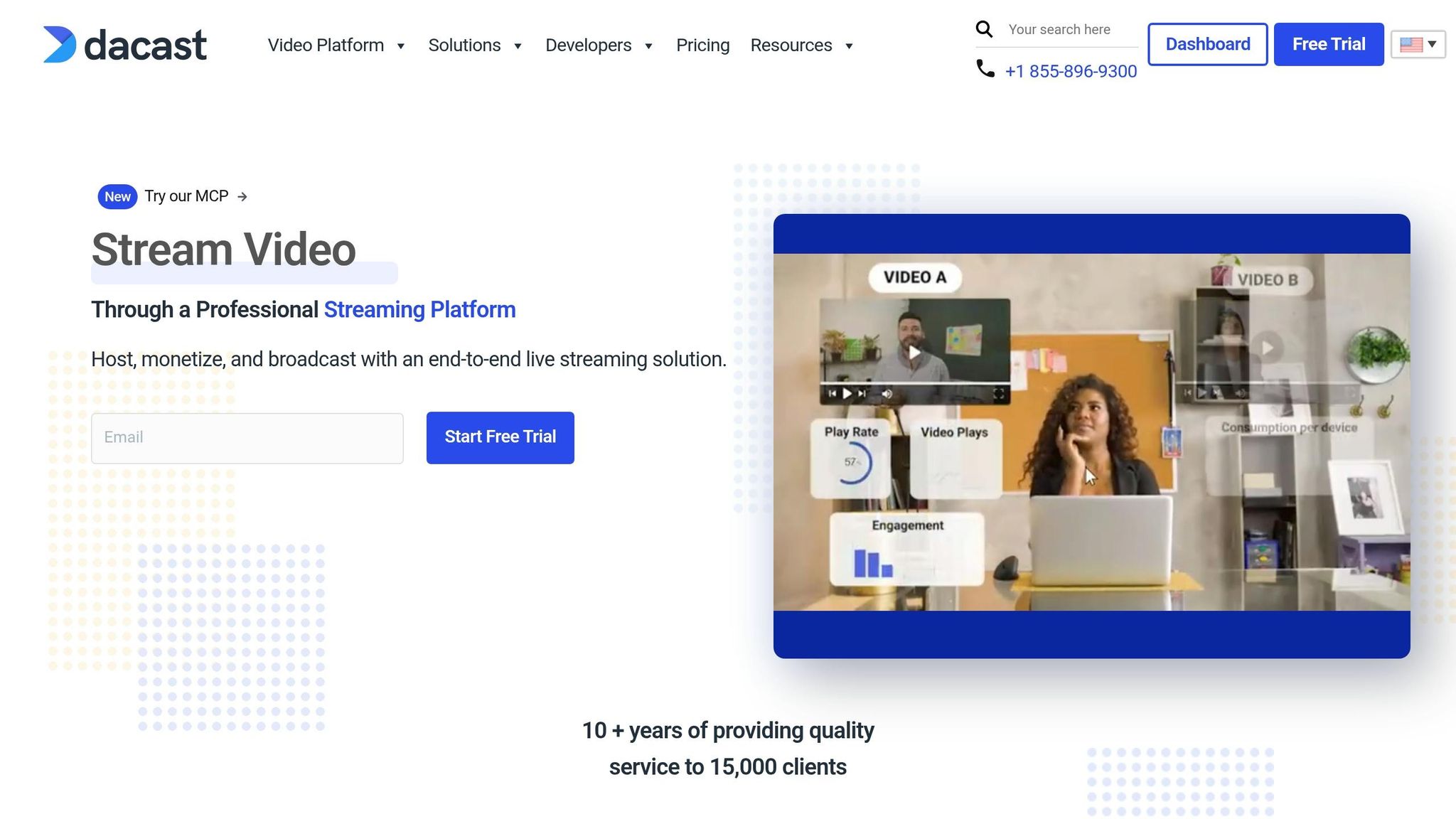
Dacast, like Muvi Live and Vimeo, is geared toward delivering tools essential for training. What sets it apart is its ultra-low latency streaming and seamless integration with virtual conferencing platforms.
Dacast provides a secure and adaptable streaming solution, offering standard low latency (5–15 seconds) that can be fine-tuned to sub-second levels using WebRTC (0.2–0.5 seconds) or SRT (1–2 seconds). This level of speed is critical, especially since 40% of viewers abandon videos if delays are noticeable.
Low-latency Streaming
To ensure smooth performance, Dacast uses RTMP ingest for professional encoders and delivers content through HLS/LL-HLS, ensuring compatibility across devices. By leveraging partnerships with CDNs, content is served from servers closest to viewers, reducing lag. Its AI-driven adaptive bitrate streaming further minimizes buffering by adjusting video quality in real time. For scenarios requiring instant interaction, WebRTC offers the quickest response time, though it scales less effectively compared to LL-HLS. This combination ensures reliable and efficient content delivery.
Interactivity
Dacast enhances engagement by integrating with Zoom for real-time, interactive classes. With Expo 2.0 video galleries, users can create branded training portals and organize content into playlists without needing technical expertise. Other interactive tools include call-to-action buttons, chapter markers, and live countdowns to build excitement before sessions begin. The platform also features a fully customizable HTML5 player, allowing businesses to apply their own logos and color schemes for white-label branding.
Security Features
Dacast goes beyond performance and interactivity by focusing heavily on content protection.
The platform employs AES-256 encryption and dynamic tokenization, which refreshes every two minutes, to enforce domain and geographic restrictions. Additional security options include password protection, IP whitelisting/blacklisting, and domain restrictions. For internal training, Dacast supports multi-factor authentication (MFA) and single sign-on (SSO). It also uses DRM to prevent unauthorized downloads. With piracy costing the U.S. economy over $29.2 billion annually, these measures are critical for safeguarding proprietary content.
"The support that Dacast offers is particularly good compared to other streaming providers, making them a clear choice for my business." – Lindsay George, CEO, ComeSee TV
Analytics and Reporting
Dacast provides analytics that refresh every 15 minutes, offering insights like geographic data, watch-time heatmaps, and stream health monitoring. These tools help identify where viewers drop off, enabling businesses to refine their training materials.
Pricing
Dacast offers several pricing tiers:
- Starter Plan: $39 per month (billed annually), includes 2.4 TB of bandwidth and 500 GB of storage per year.
- Event Plan: $63 per month, designed for occasional training events with 6 TB of bandwidth and 250 GB of storage.
- Scale Plan: $165 per month, ideal for larger needs with 24 TB of bandwidth, 2 TB of storage, phone support, and advanced features like DRM and SSO.
- Enterprise Solutions: Custom pricing available upon request.
4. Kaltura
Kaltura is known for its sub-5-second latency, a feature that ensures smooth, real-time interactions during training sessions. While most low-latency streaming falls between 1 and 20 seconds, Kaltura keeps delays minimal, allowing participants to engage seamlessly. This reliability holds even during massive events with attendee counts in the six figures, making it ideal for large-scale enterprise training programs.
Low-latency Streaming
Kaltura’s Virtual Classroom leverages its low-latency infrastructure to deliver high-quality video and audio, along with features like screen sharing and breakout rooms for immediate collaboration. One standout feature is its interactive viewing paths, where users can customize video content through a drag-and-drop interface. This level of interactivity depends on quick, responsive streaming, which is why Kaltura’s sub-5-second latency is so important. Studies indicate that visually engaging learning tools can boost retention rates by up to 65%, and video-based eLearning can reduce learning time by 40-60% compared to traditional methods.
This efficient delivery enhances the platform’s interactive capabilities even further.
Interactivity
Kaltura offers a range of tools to make training sessions more engaging. Features include live reactions, collaborative file annotations, and the ability to share YouTube or Kaltura media for synchronized playback. The platform also incorporates "hotspots", which are interactive elements embedded in videos that allow users to engage directly with the content. Additional tools like live chat (group, private, and Q&A), real-time polls, quizzes, and collaborative whiteboards further enhance engagement during training sessions. Plus, Kaltura integrates smoothly with Learning Management Systems like Google Classroom, streamlining workflows for educators.
Security Features
Security is a priority for Kaltura, which uses AES-256 encryption for data at rest and HTTPS for end-to-end stream delivery. The platform supports Single Sign-On (SSO), two-factor authentication (2FA), and API authentication to ensure secure communication. For organizations handling sensitive content, Kaltura offers Digital Rights Management (DRM) and a "Hold Your Own Key" (HYOK) feature, giving full control over encryption keys. Additional security measures include geo-blocking, IP whitelisting, domain restrictions, and session limits. The platform operates within an AWS Virtual Private Cloud (VPC), using security groups to regulate traffic.
Analytics and Reporting
Kaltura’s analytics tools provide valuable insights to improve training effectiveness. The platform offers real-time analytics covering the past seven days, including geo-tracking, attendee participation, and performance metrics for video-on-demand (VOD) content. Instructors can monitor student progress and attendance during live sessions, helping them identify areas for improvement in training materials. Accessibility options like closed captions, transcripts, and multi-language subtitles further broaden the platform’s usability.
Pricing
Kaltura uses a SaaS-based pricing model with custom options tailored to enterprise needs. A trial version is available, allowing users to explore its interactivity and streaming features before committing. To get a personalized quote, users can book a demo.
Strengths and Weaknesses
Each platform offers distinct advantages and challenges, catering to specific training needs. Dacast is a great option for organizations looking for professional features without breaking the bank. Starting at $39/month, it includes AES encryption and video hosting in China. Muvi Live shines when it comes to building custom training apps for platforms like iOS, Android, and Smart TVs, though its full OTT service starts at $399/month. Vimeo provides stunning 4K video quality and ad-free hosting starting at $12/month, but live streaming is only available on higher-tier plans priced at $65 per seat/month. Kaltura offers advanced tools for education, such as AI-driven grading and AR/VR features that can boost test scores by 15–20%. However, it requires custom enterprise pricing and a dedicated team to handle its complexity.
Here’s a quick comparison of key features:
| Feature | Muvi Live | Vimeo | Dacast | Kaltura |
|---|---|---|---|---|
| Starting Price | Mid-to-high range; see section 1 | Entry-level to premium; see section 2 | Budget-friendly; see section 3 | Custom pricing; see section 4 |
| Real-time Interaction | Robust tools for live engagement | Comprehensive engagement features | Strong interactive options | Advanced collaboration tools |
| Security | DRM, Watermarking | Domain restrictions, Private links | AES encryption, China delivery | Enterprise-grade with SSO |
| Analytics | Video CMS analytics | Real-time viewership/device stats | Real-time viewer stats | AI-powered engagement tracking |
| Best For | Branded OTT/App creation | Creative & Marketing VOD | Professional training/live events | Academic & Enterprise LMS |
These insights highlight how each platform addresses the evolving needs of digital training.
Dacast requires a three-month minimum subscription and has bandwidth restrictions on lower-tier plans. Muvi, while feature-rich, may feel overwhelming for beginners, even with its 24/7 support. Vimeo has a smaller viewer base compared to social streaming platforms. Kaltura comes with a steep learning curve but excels in LMS integration, working seamlessly with systems like Moodle, Blackboard, and Canvas.
This side-by-side view makes it easier to choose a platform that aligns with your training goals. For small and mid-sized organizations, Dacast is a cost-effective option, offering enterprise-grade security and white-labeling without hefty upfront costs. Large universities and enterprises may find Kaltura ideal, thanks to its LMS integration and AI tools that boost student participation by up to 30%. If your focus is on creating mobile or TV-specific training apps, Muvi is worth considering. Meanwhile, Vimeo is a solid choice for those prioritizing high-definition recorded content with occasional live streaming needs.
Conclusion
When it comes to choosing between Muvi Live, Vimeo, Dacast, and Kaltura, the best option depends on your training goals and organizational priorities.
For corporate onboarding and internal training, Kaltura stands out with its enterprise-grade integrations, robust security, and AI-powered tools that can increase student engagement by up to 30%. If you're an independent educator or trainer aiming to monetize your content, Muvi Live and Dacast are excellent choices. Muvi Live specializes in creating branded apps for platforms like iOS, Android, and Roku, while Dacast offers a starter plan at $39/month and advanced features like AES encryption. On the other hand, if your focus is on delivering stunning 4K recorded content with occasional live sessions, Vimeo provides exceptional video quality at an affordable entry-level price, though live streaming requires a higher-tier subscription.
The online video education market is expanding at an annual growth rate of 9.1%, with projections reaching $457.8 billion by 2026. Before committing to a platform, consider using free trials or landing pages to test your course approach. Keep in mind that 75% of employees prefer video-based training over traditional methods, and live streams can hold viewers' attention up to 20 times longer than pre-recorded content. For a stable streaming experience, ensure you have a hardwired Ethernet connection and at least 1.5× your stream's bitrate in upload bandwidth.
Ultimately, the right platform will depend on your specific needs. Choose wisely to enhance audience engagement and make your training efforts more impactful.
FAQs
What latency is 'good enough' for live training?
A latency of less than 5 seconds is typically regarded as adequate for live training sessions. This allows for real-time interaction, immediate feedback, and active participation - critical components for successful remote learning. Low latency ensures a smooth and engaging experience for everyone involved.
Which security features actually prevent recording or piracy?
Security features like hardware-level DRM (Digital Rights Management) and encryption play a crucial role in keeping video streams safe. These tools prevent your content from being ripped or downloaded without permission.
Unlike unencrypted methods - which can often be bypassed with simple browser plug-ins - these advanced measures offer a much stronger layer of protection. When implemented correctly, they ensure your content stays secure, shielding it from unauthorized access and piracy attempts.
How do I estimate bandwidth and viewer limits before choosing a plan?
To figure out your bandwidth and viewer limits, follow these steps:
- Concurrent viewers: Determine how many people you expect to watch at the same time.
- Bandwidth calculation: Multiply 3–6 Mbps (the average bandwidth per viewer) by the number of concurrent viewers.
- Platform requirements: Check the platform's guidelines for bandwidth and viewer capacity.
- Upload speed: Make sure your internet upload speed is higher than the total bandwidth you'll need.
Pick a plan that not only meets your current needs but also leaves room for future growth.