Not every lead is ready to buy immediately. That’s where CRM workflows come in - automating tasks like sending emails, updating statuses, or notifying sales reps based on lead behavior using top marketing funnel software. This ensures faster responses and consistent follow-ups, helping businesses nurture leads effectively.
Here’s what you’ll learn:
- Awareness Workflow: Engages new leads with welcome emails and resources.
- Consideration Workflow: Educates leads comparing solutions with tailored content.
- Decision Workflow: Focuses on leads ready to buy with tools like ROI calculators.
- Lead Scoring Workflow: Prioritizes high-intent leads based on their actions.
- Re-engagement Workflow: Revives inactive leads or cleans up your pipeline.
Automating these workflows can generate more qualified leads, reduce costs, and increase purchase sizes by up to 47%. Let’s dive into the details.
1. Awareness-Stage Welcome Workflow
CRM Trigger
This workflow kicks off when a new contact enters the CRM. This can happen through actions like filling out a form, downloading a resource, signing up, creating an account, or even being tagged in a chat with something like pricing-question. The CRM uses predefined filters to enroll the lead automatically.
Workflow Purpose
The aim here is to establish trust, set clear communication expectations, capture context about how the lead found you, and assign an initial lead score. This helps guide the lead toward their first meaningful interaction.
Message Type
Start with short, straightforward emails that feel personal - plain text works great for this. These early emails should feel more like a friendly note than part of a marketing campaign. The first email should deliver on what was promised, like a resource or quick win. Follow-up emails can touch on a pain point, share a customer success story, and include a simple call-to-action (CTA), such as scheduling a demo.
Automation Timing
Timing is everything. Send the first email within 5–10 minutes of the trigger while your brand is still fresh in the lead's mind. Research shows that reaching out within an hour increases the chances of having meaningful conversations by nearly seven times compared to waiting two hours.
| Day | Email Focus | Content Type |
|---|---|---|
| Day 0 | Welcome | Deliver the promised resource + 2–3 helpful links |
| Day 2–3 | Education | Address a specific pain point or highlight a key benefit |
| Day 7 | Social Proof | Share a case study or customer success story |
| Day 14 | Soft CTA | Offer a low-friction invite, like a demo or trial |
Keep the sequence simple and concise. If the lead engages (clicks, replies, or books a demo), move them into a more detailed educational workflow. If they don’t engage, avoid overwhelming them with too many messages.
Set an exit condition: stop the sequence immediately if the lead books a demo or gets assigned to sales. Every interaction provides valuable signals to guide them into the next stage of nurturing.
sbb-itb-a84ebc4
2. Consideration-Stage Education Workflow
CRM Trigger
Once a lead completes the welcome sequence, they should transition into this education workflow. This is triggered by actions that show they're in the evaluation stage, such as downloading a whitepaper or ebook, attending a webinar, repeatedly visiting product or pricing pages, or reaching a specific lead score.
Workflow Purpose
This workflow is designed for leads who understand their problem and are now comparing potential solutions. The focus here is to provide answers to their evaluation-stage questions, build credibility, and help them feel confident about their decision. The priority is education, not pressure - tailor the pace to match how the buyer evaluates options.
Message Type
At this stage, content should be practical and focused on solutions. Examples include case studies, comparison guides, ROI calculators, FAQs, and implementation guides. Personalization is key - content should align with the recipient's role. For instance:
- A CFO might benefit from ROI calculators.
- A technical buyer might prefer implementation details.
Avoid generic content, as it tends to fall flat. In fact, 70% of B2B buyers expect personalized content throughout their journey.
Automation Timing
Set a cadence of 1–4 weeks, spacing emails at least 48 hours apart. A sample schedule might look like this:
| Day | Content Type | Purpose |
|---|---|---|
| Day 0 | Deliver resource | Provide immediate value and confirm their interest |
| Day 3 | Reinforce pain point | Acknowledge their problem without pitching your product |
| Day 7 | Show proof | Share proof points like case studies to build credibility |
| Day 14 | Offer low-friction CTA | Suggest an ROI calculator or a soft invite for a quick call |
| Day 21 | Sales follow-up | Address final questions and prepare for a sales handoff |
If the lead shows clear intent for a demo, stop nurturing immediately and pass them along to sales.
3. Decision-Stage Conversion Workflow
CRM Trigger
Once a lead shifts from evaluating options to showing clear buying intent, it’s time to switch gears. This stage kicks off when a prospect submits a demo request, signs up for a trial, or repeatedly visits a pricing page. These actions signal they’re ready to move beyond consideration and toward a purchase decision.
For leads identified through third-party data as actively researching the category before filling out a lead capture form, intent-based nurturing can be used to engage them effectively.
Workflow Purpose
The focus here is no longer on educating the lead - it’s about empowering them to finalize their decision. At this point, your job is to help them build a solid case for internal approval. Share resources like ROI analyses, security documentation, and implementation timelines. These materials equip your internal champion with the tools they need to advocate for your solution within their organization. The ultimate goal? Transition the lead from interest to a productive, sales-ready conversation.
Message Type
The messaging at this stage should address doubts and smooth the path to a decision. Use materials like:
- Case studies
- ROI calculators
- Feature comparison charts
- Security and compliance documentation
Each piece should be tailored to the recipient’s role. For example, a CFO will need cost justification, while an IT manager will focus on technical details. Keep communications personal and direct - plain-text emails, written in a sales rep’s voice, work well to maintain urgency and emphasize a one-on-one connection.
Automation Timing
Timing is critical. Send the first message as soon as the trigger occurs - ideally within 5–10 minutes. Keep the sequence concise, spanning 5–7 days.
| Day | Content Type | Purpose |
|---|---|---|
| Day 0 | Personalized confirmation | Acknowledge intent and set expectations |
| Day 2–3 | Case study or peer results | Build confidence with real-world social proof |
| Day 5 | ROI or feature comparison | Help the champion justify the cost internally |
| Day 7 | Meeting request | Transition to a direct sales conversation |
Exit conditions are critical. The moment a lead books a meeting, progresses in the sales cycle, or a sales rep steps in, the automation must stop immediately. Continuing automated outreach during an active sales conversation can erode trust and damage the relationship.
4. Lead Scoring and Segmentation Workflow
CRM Trigger
This workflow kicks off when a lead hits a specific score or shows a strong buying signal - like visiting the pricing page multiple times.
For SaaS businesses, in-app actions can also be key. For instance, if a trial user explores three or more core features or invites a teammate during their trial, that’s a clear indicator of intent.
Workflow Purpose
The primary goal here is to determine which leads are ready for sales and which should stay in a nurturing phase. Most leads aren’t immediately ready to buy, so this process helps identify those showing strong intent and ensures the rest are guided through the right nurture path.
Instead of handling all leads the same way, the scoring model assigns points to specific actions, adjusting a lead’s priority in real time. These updates need to happen fast - within 60 seconds of detecting activity - so sales teams always have the latest data.
Message Type
Messages should align with the lead’s segment and intent. High-intent leads receive concise, action-focused sequences, along with a Slack notification or CRM task for the sales team. Lower-intent leads, like those who downloaded gated content, are sent longer, educational sequences.
Each segment follows its own tailored cadence:
| Segment type | Source | Intent signal | Sequence approach |
|---|---|---|---|
| High-intent | Web form | Pricing page / Demo request | Short (5–7 days), quick sales handoff |
| Educational | Gated content | E-book / Whitepaper | Long (21–30 days), focused on providing value |
| High-intent chat | Web chat | "Pricing" or "API" tags | Very short (3–5 days), direct to sales |
| Low-intent chat | Web chat | General inquiry | Medium (14–21 days), frames the problem |
Automation Timing
High-intent leads should be re-scored and routed to sales immediately. For lower-intent leads, aim for 1–2 touches per week to maintain engagement without overwhelming their inbox.
Real-time behavior tracking is crucial. For example, if someone in a 30-day educational sequence suddenly visits the pricing page, they should be pulled out and escalated to sales right away. Leads should also be unenrolled as soon as they book a meeting or a deal is created. If a lead becomes inactive during this phase, they should exit and move into a re-engagement campaign.
5. Re-engagement Workflow for Inactive Leads
CRM Trigger
When a lead goes quiet after initial nurturing, don’t let them sit idle - move them into a re-engagement sequence. This workflow kicks in when a lead has been inactive for 45, 60, or 90 days, showing no signs of activity like email opens, clicks, form submissions, or logged calls. A custom field, such as "Days Since Last Activity", can automatically calculate this inactivity period and trigger the workflow.
To make the process more effective, segment leads based on how long they’ve been inactive:
- Recently inactive: Less than 90 days
- Dormant: Between 91 and 365 days
- Archived: Over 365 days
Each group should receive tailored re-engagement efforts rather than a one-size-fits-all approach.
Workflow Purpose
The goal here is twofold: revive leads that may still hold potential and clean up your pipeline to avoid skewing metrics with inactive records. Often, silence from a lead reflects poor timing rather than outright disinterest.
A well-structured re-engagement plan can yield results. Within six months, you could reactivate 10–15% of dormant leads, while personalized outreach for high-value leads may achieve a 5–8% reply rate.
Message Type
A simple three-step email sequence over 10 days works well:
| Touchpoint | Timing | Purpose |
|---|---|---|
| Email 1 | Day 1 | A quick check-in: "Still interested?" |
| Email 2 | Day 5 | Share value: a new case study, feature update, or relevant industry news |
| Email 3 | Day 10 | A break-up email: "Should we stop reaching out?" |
If there’s no response after the third email, suppress the contact to maintain your email deliverability.
Automation Timing
Set the workflow to run nightly - around 1 AM - to catch leads that hit inactivity thresholds that day. Schedule emails to go out during weekday business hours in the recipient’s time zone, ensuring they land at the right time.
Include automatic exit conditions to streamline the process. For example, remove leads from the workflow if they reply, book a meeting, advance to SQL status, or visit high-intent pages like a pricing page. At that point, route them directly to sales.
How to build lead nurturing workflows | Master automated lead nurturing with Zoho
Workflow Comparison Table
CRM Lead Nurturing Workflows: 5-Stage Comparison Guide
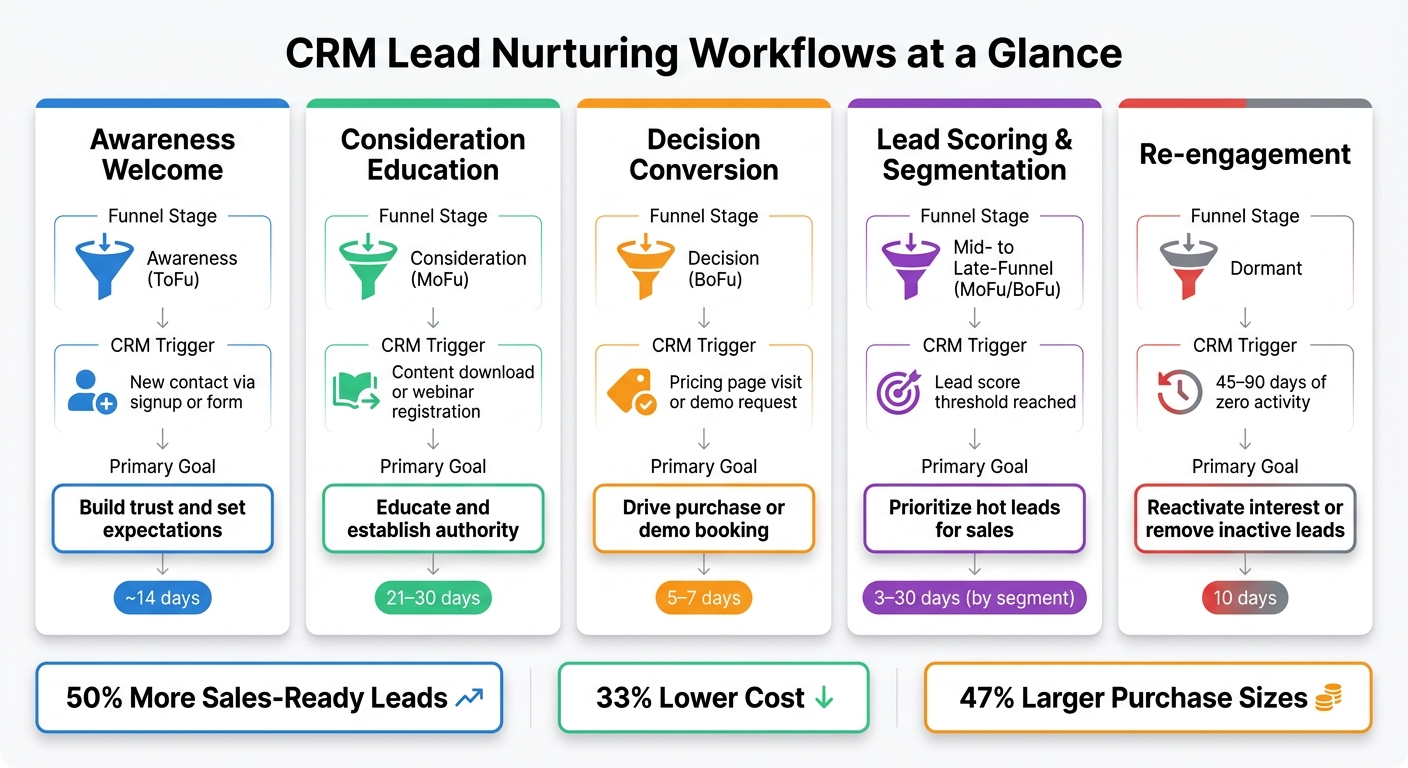
Use this table to align each CRM workflow with its funnel stage to build a profitable online business, trigger, and primary goal.
The key distinction between these workflows lies in the specific signal that activates them.
| Workflow | Funnel Stage | CRM Trigger | Primary Goal |
|---|---|---|---|
| 1. Awareness Welcome | Awareness (ToFu) | New contact created via signup or newsletter subscription | Build trust and set expectations |
| 2. Consideration Education | Consideration (MoFu) | Content download such as an ebook or webinar registration | Educate and establish authority |
| 3. Decision Conversion | Decision (BoFu) | High-intent web activity such as a pricing page visit or demo request | Drive purchase or demo booking |
| 4. Lead Scoring & Segmentation | Mid- to late-funnel (MoFu/BoFu) | Lead score threshold reached | Prioritize hot leads for sales |
| 5. Re-engagement | Dormant | 45–90 days of zero activity | Reactivate interest or remove inactive leads |
Workflows deeper in the funnel tend to be behavior-driven rather than based on timing. Notably, lead scoring is unique because it depends on cumulative engagement data, unlike the single-action triggers used in other workflows.
Conclusion
The five workflows discussed - welcome, education, conversion, lead scoring, and re-engagement - address key areas in lead nurturing. The results speak for themselves: businesses that excel at lead nurturing see 50% more sales-ready leads at a 33% lower cost, and nurtured leads tend to make purchases that are 47% larger than those from non-nurtured leads.
These outcomes are achieved by aligning each workflow with the lead's stage and intent. The success lies in delivering the right message at the right time. For instance, a lead who just visited your pricing page requires a different approach than someone who downloaded an educational resource weeks ago. CRM workflows handle this distinction seamlessly, ensuring relevance and timing without unnecessary complexity.
If you're looking for tools to build your funnel, the Marketing Funnels Directory is a great place to start.
FAQs
How do I choose the right workflow for each lead?
Start by breaking leads into groups based on their source, behavior, and where they are in the buyer's journey. For example, someone who filled out a contact form might be at a different stage than someone who simply opened an email.
Next, set clear entry triggers to kick off your workflows. These could include actions like a form submission, downloading a resource, or even opening a specific email. These triggers help ensure you're engaging leads at the right moment.
When it comes to content, match it to the lead's needs and stage in the journey. For early-stage leads, focus on educational content that builds awareness and trust. For those further along, provide proof-based materials like case studies or testimonials to help them make a decision.
Incorporate decision points in your workflows to adjust based on how engaged a lead is. For instance, if someone clicks on a link in an email, they might move to a more advanced stage of the workflow.
Finally, keep an eye on your workflow performance. Regular reviews will help you ensure your strategies remain relevant and effective, allowing you to make tweaks as needed to better meet your goals.
What actions should increase a lead score most?
When it comes to boosting lead scores, certain actions speak louder than others. For example, visiting high-intent pages such as pricing or case study pages can add 10 to 15 points to a lead’s score. Even more impactful? Submitting demo or trial request forms, which can add a hefty 25 points.
Other actions that show strong interest include downloading case studies (+12 points), completing ROI calculators (+20 points), attending webinars (+15 points), and engaging with email links (+5 points). Each of these activities signals a deeper level of engagement and a growing interest in what you have to offer.
When should automation stop and sales take over?
When automation is in place, it’s important to know when to pause it. Automation should stop when:
- A lead hits a handoff trigger or becomes an active sales opportunity.
- Someone unsubscribes from your emails.
- A lead responds to an email, showing engagement.
- They complete the sequence without converting.
These moments signal that it’s time for the sales team to step in and engage directly, ensuring the lead gets the personal attention they need.