Video SEO keyword research is all about identifying the exact terms people use on platforms like YouTube and Google to find videos. By targeting these terms, you can improve your video rankings, gain visibility, and attract more viewers. Here's what you need to know:
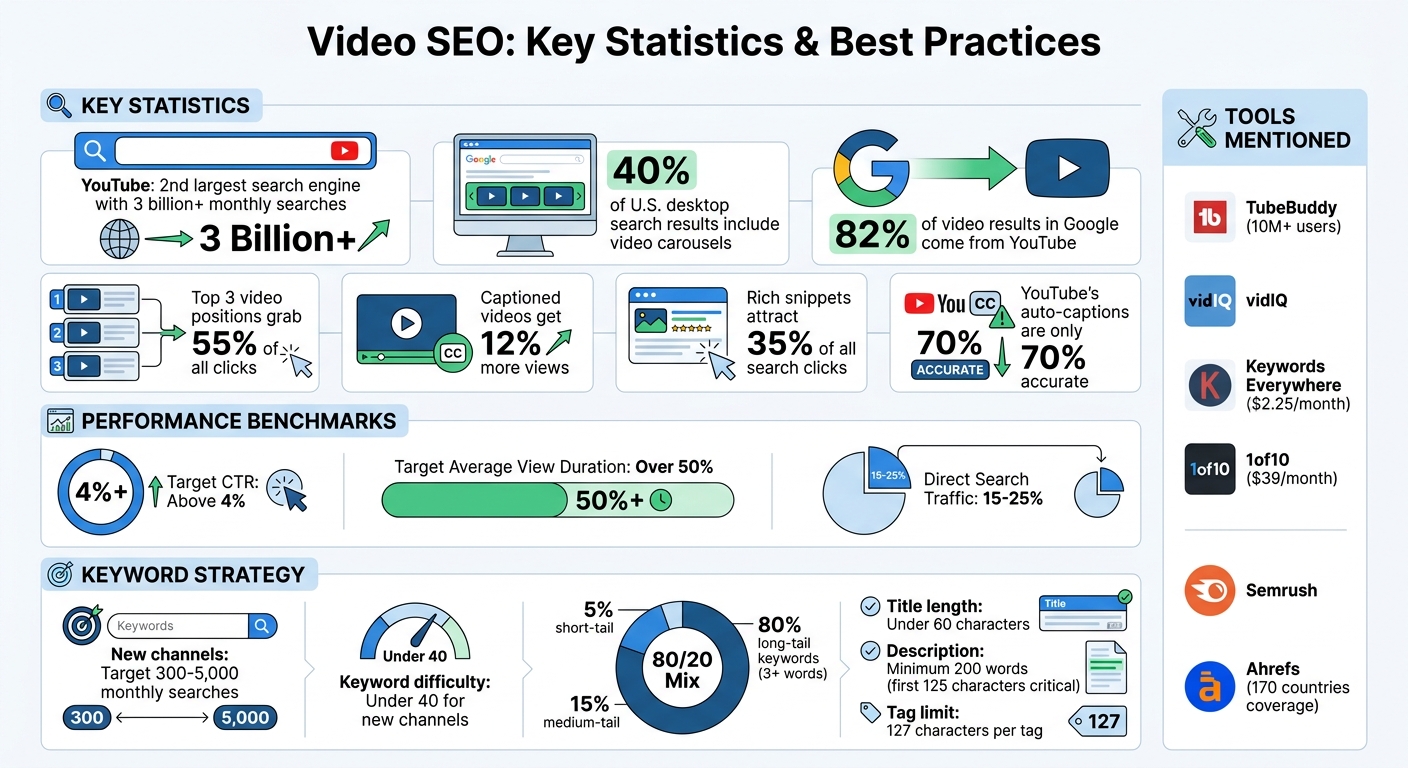
- YouTube is the second-largest search engine, with over 3 billion searches monthly.
- 40% of U.S. desktop search results include video carousels, making videos a key part of search strategies.
- Keyword research not only boosts rankings but also helps identify underserved topics with less competition.
- Tools like YouTube Autocomplete, TubeBuddy, and vidIQ simplify finding effective keywords.
- Optimizing video titles, descriptions, tags, and transcripts with relevant keywords ensures better visibility.
The goal is to align your content with what people are searching for, helping your videos rank higher on both YouTube and Google. From using autocomplete suggestions to analyzing Google Trends, these methods can guide your keyword strategy effectively.
Video SEO Statistics and Best Practices Overview
Full YouTube SEO Keyword Research Tutorial: How to Rank #1 on YouTube
sbb-itb-a84ebc4
Using YouTube Autocomplete for Keyword Ideas
YouTube's autocomplete feature is a goldmine for discovering what users are actually searching for. As you type into the search bar, the dropdown suggestions reflect real-time search demand - these are the exact phrases people are using, not just estimates from third-party tools. What's even better? Autocomplete prioritizes popular keywords and often reveals long-tail phrases (five or more words). These longer phrases are typically less competitive, making them ideal for newer channels to rank for. This makes Autocomplete a powerful tool for building detailed keyword lists.
"The great thing about Autocomplete is that it only suggests popular keywords. In other words, YouTube is literally telling you: 'these are terms that lots of potential viewers use to find videos on YouTube!'" – Backlinko
How to Generate Keyword Lists Using Autocomplete
Start with a general seed keyword that relates to your topic. Type it into YouTube's search bar and jot down the suggestions. For example, typing "personal finance" might bring up phrases like "personal finance tips for beginners" or "personal finance apps".
To dig deeper, try the Alphabet Soup Method. Add a space after your seed keyword and type each letter of the alphabet to uncover a range of variations. For instance, typing "CRM for small business a" might suggest "CRM for small business automation", while "CRM for small business b" could reveal "CRM for small business budget".
Another approach is question-based research. Use question words like "how", "what", "why", "when", or "where" before your keyword to uncover specific user pain points or tutorial ideas. This method is especially effective for aligning with voice search trends, which are becoming increasingly important.
If you're working manually, aim to record the top 8–10 suggestions for each query variation. This process may take around 20–30 minutes per seed keyword. Alternatively, tools like KeywordTool.io can automate the process, scraping hundreds of autocomplete suggestions in seconds.
Finding Niche Keywords Through Autocomplete
Autocomplete isn't just about creating lists - it can also help you uncover niche topics with untapped potential. This is especially useful for finding keywords that have decent search demand but low competition. For new channels, focus on keywords with estimated search volumes between 300 and 5,000 monthly searches.
Refine your search further by adding intent modifiers to your seed keyword. Words like "best", "vs", "alternatives to", "mistakes", "pricing", or "worth it" can help you target users closer to making a decision. For example, "best budget DSLR for travel" speaks directly to viewers with purchase intent.
Another technique is keyword stacking. Take a successful autocomplete suggestion and use it as a new seed keyword. This layered approach can reveal even more specific and targeted phrases with minimal competition.
Before you dive into creating content, validate your keyword ideas. Type the suggested keyword into YouTube and check the results. If fewer than 10,000 videos show up or if the top videos have under 50,000 views, you may have found an underserved niche. To double-check, use Google Trends to confirm that interest in the topic is steady or growing.
"Autocomplete suggestions are usually fairly long (5+ words). And because they're long-tail keywords, these terms tend not to be particularly competitive… which means they'll be easier to rank for." – Backlinko
Analyzing Google Search Results for Video-Optimized Topics
Not every keyword deserves a video. The best way to decide? Look at what Google prefers. By analyzing search engine results pages (SERPs), you can figure out if a keyword has video potential. If Google displays videos for a query, it’s a green light to consider creating one. Here’s how to identify these opportunities and validate their potential.
Identifying Video-Optimized Queries
The first step is to analyze the SERP. Type your target keyword into Google and check the results on the first page. Look for features like video carousels, featured videos, or timestamps (key moments) that let users skip to specific parts of a video.
"The secret to ranking your videos in Google is to target Video Keywords." – Brian Dean, Founder, Backlinko
If the page is filled with traditional blue links and no videos, the topic likely lacks video intent. Instead, focus on keywords where video results already rank in the top three positions - these spots grab 55% of all clicks. YouTube plays a massive role here, accounting for 82% of video results in Google.
To streamline this process, use keyword tools that highlight SERP video features. For instance, Semrush's Keyword Magic Tool allows you to filter for keywords with "Video", "Featured Video", or "Video Carousel" results. This helps you zero in on keywords with strong video potential.
Using Google Trends to Validate Keywords
After spotting video-friendly queries, turn to Google Trends to confirm their popularity. Switch the search type from "Web Search" to "YouTube Search" to focus on video-specific interest. The "interest over time" graph helps you determine if the keyword demand is steady, seasonal, or declining.
For emerging opportunities, check the "Rising" section under related queries. You can also use brand monitoring tools to track how these emerging topics are being discussed across the web. Keywords showing rapid growth here might have less competition and more potential. Compare variations of your keyword to pick the most reliable trend. If a keyword shows erratic spikes or a steady decline, it might not be worth pursuing. But if the trend is stable or growing, it’s likely a solid investment for long-term views.
Using Keyword Research Tools for Video SEO
Keyword research tools are a game-changer when it comes to optimizing videos for search. While manual research and SERP analysis are helpful, these tools go a step further by offering insights tailored specifically for video content. They provide YouTube-specific data like search volume, competition metrics that match your channel's size, and an understanding of what’s currently ranking. Unlike general SEO tools that focus on Google, video-focused platforms analyze keyword performance directly on YouTube, giving you a clearer path to refining your video SEO strategy.
Top Tools for Video Keyword Research
Different tools serve various aspects of video SEO. TubeBuddy and vidIQ are standout options for in-platform optimization. These browser extensions integrate seamlessly with YouTube, showing data directly within the interface. TubeBuddy, used by over 10 million creators, offers "weighted" competition scores, which are tailored to your channel’s unique ranking potential.
"TubeBuddy is a part of every video of mine... everything from ranking tags, saving time on video uploads, TubeBuddy is a powerhouse tool for growing a channel!" - Sauce Stache (633K subscribers)
For broader keyword discovery, tools like Semrush and Ahrefs are invaluable. They can identify keywords that trigger video carousels on Google Search, which is crucial since around 40% of desktop SERPs in the U.S. featured video results as of May 14, 2024. Ahrefs' YouTube Keyword Tool, for instance, uses clickstream data to provide search volume stats across 170 countries.
If you're working with a tighter budget, Keywords Everywhere is a great starting point. At just $2.25 per month, it displays YouTube metrics directly in search results. For those looking to dive deeper, 1of10 ($39/month) helps identify "outlier" videos - content that significantly outperformed a creator’s usual metrics - offering insights into high-potential topics within your niche.
A real-world success story? YouTuber Caren Magill grew her ADHD coaching channel to 116,000 subscribers and amassed 4.95 million lifetime views by 2025, thanks to strategic keyword optimization.
How to Filter Keywords for Video Intent
To zero in on the right keywords, use tools like Semrush's Keyword Magic Tool to filter for SERP features such as "Video", "Featured Video", or "Video Carousel." These tags help identify terms that can drive traffic from both Google and YouTube.
When filtering, consider your channel size. For newer channels, focus on long-tail keywords with 300–5,000 monthly searches and a difficulty score under 40. A good strategy is the 80/20 mix: target 80% long-tail keywords (phrases with three or more words), 15% medium-tail, and 5% short-tail high-volume terms. This approach builds a solid foundation before tackling more competitive keywords.
TubeBuddy’s "Weighted" score feature is especially useful for evaluating keyword competitiveness specific to your channel. Additionally, advanced tools like OutlierKit let you check if smaller channels (under 10,000 subscribers) are already ranking for a keyword. If they are, it’s a sign that the keyword might be within reach for you too.
Optimizing Video Content with Keywords
Once you’ve pinpointed the right keywords, the next step is weaving them naturally into your video content. The goal isn’t to cram keywords in but to use them thoughtfully, ensuring both viewers and search algorithms grasp the essence of your video.
Adding Keywords to Titles and Descriptions
Start with a strong title - place your primary keyword at the beginning of a concise, sub-60-character title. This not only signals relevance but also encourages clicks.
"If videos are audience-focused, branded appropriately, and optimized effectively... a new channel can appear at the top of the YouTube search results." - Kelly Ayres, Director of SEO at Jordan Digital Marketing
Your description is another key area. Write at least 200 words to provide context, but pay special attention to the first 125 characters. This snippet appears in search results, so make it compelling and include your primary keyword naturally.
Brian Dean, Founder of Backlinko, highlights the importance of detailed descriptions:
"Longer descriptions give YouTube a deeper understanding of your individual video's topic... this deeper understanding helps your video show up as a suggested video"
Descriptions are also a great place to add long-tail keywords and related phrases, especially those matching conversational or voice-based searches. Using timestamps with keyword-rich chapter titles can further boost your video’s visibility for specific subtopics.
Don’t overlook your spoken content, either. Dropping your primary keyword naturally into your dialogue once or twice can strengthen your video’s SEO. YouTube’s speech recognition technology identifies about 90% of spoken words, making verbal mentions a helpful secondary signal.
Optimizing Tags with Primary and Secondary Keywords
While tags play a smaller role than titles and descriptions, they still matter. Your first tag should always be your primary keyword since YouTube prioritizes it.
"YouTube heavily accounts for your video's first few tags when ranking content in the search results, especially the first tag. Make sure your first tag is the primary keyword you want to target." - PR Social, Boston University
After setting your primary tag, use secondary tags to expand your reach. These might include long-tail keywords, related terms, or phrases that align with different search intents. For instance, pair a broad term like "video marketing" with a more specific one like "video SEO for small businesses." Including your brand or channel name as a tag can also help with branded searches. Avoid irrelevant tags or keyword stuffing, as these can confuse the algorithm. Keep each tag under 127 characters and periodically update them to match current trends.
Using Transcripts and Captions for Keyword Indexing
Search engines rely on text to understand video content, which makes captions and transcripts essential. These elements provide the text layer that helps your video rank for detailed queries that might not be fully covered in the title or description.
Captioned videos tend to perform better, drawing 12% more views than those without captions. Accurate text also allows search engines to pull specific lines for rich snippets, which attract about 35% of all search clicks.
However, don’t rely on YouTube’s auto-generated captions - they’re only about 70% accurate. Poor-quality captions can hurt your SEO.
"Inaccurate captions don't meet Google's standards for quality... they could get a video marked as 'pure spam' for displaying 'automatically generated gibberish'." - 3Play Media
To maximize SEO, manually create or edit your transcripts for accuracy. Make sure to mention your primary keyword naturally within the first 15 seconds of your video. This approach helps YouTube quickly identify your video’s focus, strengthening your overall optimization strategy.
Conclusion
Video SEO keyword research lays the groundwork for boosting your video views from hundreds to thousands. Tapping into YouTube’s massive search demand is a game-changer. Without the right keywords, your content risks being overlooked by viewers actively searching for solutions.
Strategic keyword research draws in an audience that’s ready to engage and take action. By aligning your videos with what people are searching for, you can capture traffic on both YouTube and Google. Remember, about 40% of U.S. desktop search results include video content. This dual-platform visibility creates a steady flow of organic discovery - without needing constant promotion.
"YouTube SEO keyword research is the process of finding the search terms your target audience uses on YouTube, then creating videos that rank for those searches. Done correctly, it creates a steady stream of organic discovery that grows without ongoing promotion effort." – Admin, VidOrange
The strategies we’ve discussed - using YouTube autocomplete, analyzing competitor data, leveraging keyword tools, and optimizing metadata - are designed to help your videos reach the right audience. To stay competitive, aim for a click-through rate above 4% and an average view duration of over 50%. These metrics signal quality to the algorithm. Also, keep in mind that 15–25% of video traffic typically comes from direct search, underscoring the importance of keyword optimization for long-term success.
Organize your keywords to avoid overlap, address content gaps where viewers struggle to find answers, and optimize every detail - from file names to spoken dialogue. A data-driven approach eliminates guesswork, turning potential into real growth. By applying these strategies, you can elevate your video reach and grow your audience from hundreds to thousands.
FAQs
How do I pick a video keyword that’s winnable for my channel size?
To pick a video keyword you can rank for, aim for low-competition, high-volume keywords that suit your channel's size and reach. Tools like YouTube autocomplete can help uncover actual search terms people are using. Once you have a list, check the top-ranking videos for those keywords - if the creators have smaller audiences, it’s a good sign that the keyword is within reach. Focusing on long-tail keywords (phrases with 3-7 words) and highly specific topics can boost your chances of ranking while keeping your goals realistic.
How can I tell if Google wants a video for my target query?
You can figure out if Google favors video content for your query by looking at the search results. If you notice video snippets or thumbnails appearing prominently, it’s a clear sign that Google considers video content highly relevant for that particular search.
Which keyword placements matter most: title, description, tags, or captions?
When it comes to video SEO, the title and description are your top priorities. These two elements have the biggest impact on how well your video ranks in search results. They directly influence how search engines and viewers find your content.
While tags and captions are less critical, they still play a helpful supporting role. Tags can improve discoverability, and captions can enhance engagement by making your content accessible to a broader audience.
To get the best results, focus on crafting an optimized title and description first. Then, use tags and captions to give your video that extra boost in performance.