Understanding where your YouTube traffic comes from is key to growing your channel. By analyzing traffic sources - like YouTube Search, Suggested Videos, Browse Features, and external platforms - you can make informed decisions to improve visibility and engagement. Here's a quick summary of what you need to know:
- Access Traffic Data: Use YouTube Studio's Analytics under the Reach tab to explore traffic sources.
- Key Traffic Sources:
- YouTube Search: Traffic from viewers searching keywords.
- Suggested Videos: Views from YouTube recommendations.
- Browse Features: Traffic from Home, Subscriptions, and Trending.
- External: Views from websites, social media, and apps.
- Actionable Insights:
- Optimize keywords for better search traffic.
- Create content similar to videos driving Suggested traffic.
- Improve thumbnails and titles for Browse Features.
- Leverage external platforms sending consistent traffic.
Balancing these sources ensures your channel performs well across various audience pathways. Use the data to refine your strategy, attract more viewers, and grow sustainably.
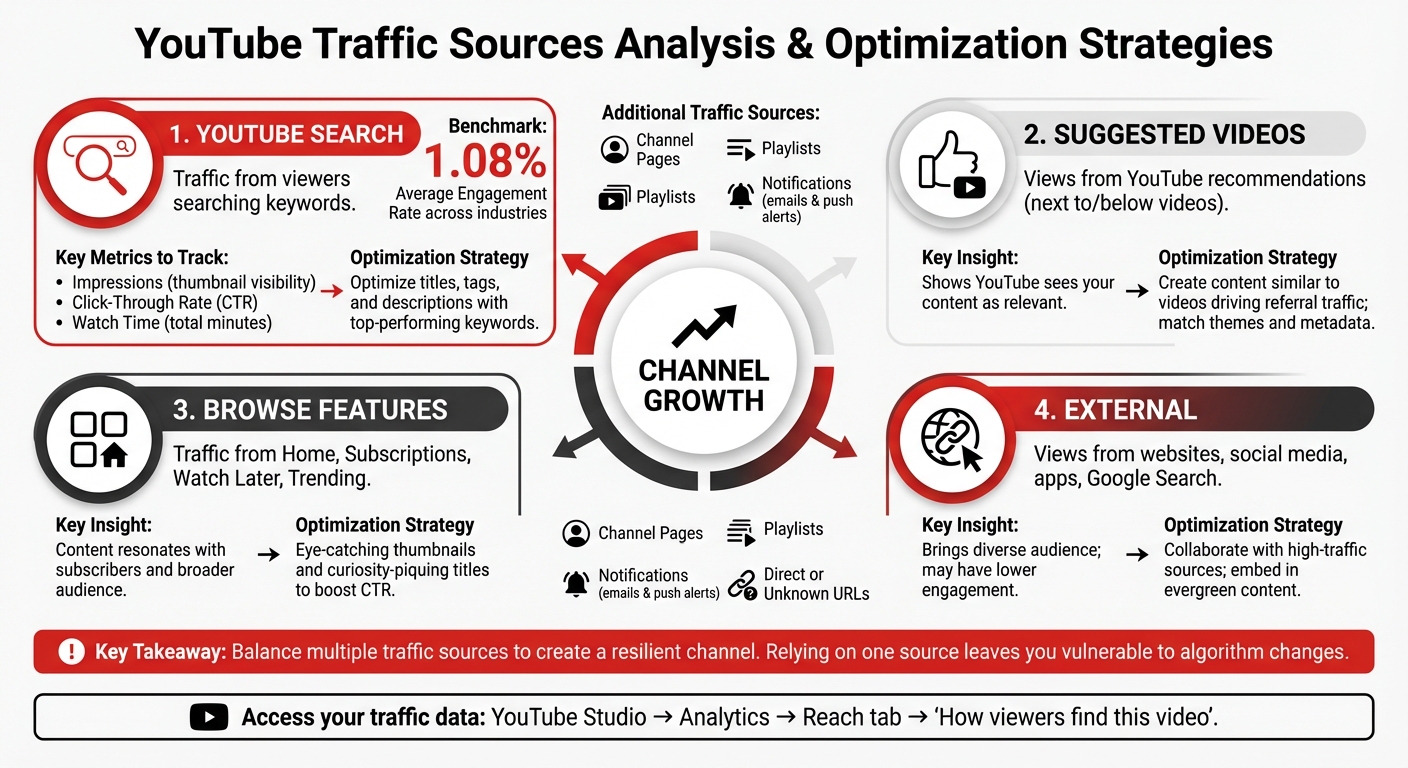
YouTube Traffic Sources Breakdown and Optimization Strategies
How to Access YouTube Traffic Source Data
Opening YouTube Analytics
Accessing your traffic source data is straightforward. On a desktop, log in to YouTube Studio, navigate to Content, select a video, click Analytics, and head to the Reach tab. There, you'll find the "How viewers find this video" card, which provides detailed insights.
If you're using the YouTube Studio app on mobile, the process is similar: tap Content, pick your video, tap Analytics, and then select Reach. For a quick look at your channel-level analytics in the regular YouTube app, tap your profile picture, choose View channel, and then tap Analytics.
For an overview of your channel's performance as a whole, open Analytics in YouTube Studio and go to the Content tab. This view is particularly useful for spotting trends in how your audience discovers your videos.
Once you've accessed your data, it's time to dive into the traffic source categories to better understand how viewers are finding your content.
Traffic Source Categories Explained
YouTube organizes traffic into specific categories to help you understand how viewers discover your videos. For instance, YouTube Search reflects viewers who found your content by typing keywords into the search bar. Meanwhile, Suggested Videos tracks views from recommendations, such as those appearing next to or below other videos, as well as links in video descriptions.
Browse Features covers traffic from the Home screen, Subscriptions feed, Watch Later, and Trending pages. External traffic captures views from outside YouTube, like Google Search, WhatsApp, or embedded links on other websites or apps. Additional categories include Channel Pages (traffic from your channel or other creators' pages), Playlists, Notifications (emails and push alerts), and Direct or Unknown (where viewers either typed your URL directly or the source couldn't be identified).
Here's an interesting detail: views from skippable ads longer than 10 seconds only count if the ad is watched for at least 30 seconds or until it finishes. Non-skippable ads, however, never count as views.
How to Analyze Each Traffic Source Category
Analyzing YouTube Search Traffic
Dive into the YouTube Search report within your Analytics dashboard. This report gives you a breakdown of the search terms people are using to find your videos. Pay close attention to three key metrics: Impressions (how often your thumbnail shows up in search results), Click-Through Rate (CTR) (the percentage of impressions that lead to clicks), and Watch Time (how many total minutes viewers spend watching your video).
These metrics tell you how visible and engaging your content is. For example, higher watch time indicates that viewers are genuinely interested in your videos. Use this data to identify top-performing keywords and create follow-up content that targets those terms. If your search traffic seems low, try tweaking your video titles, tags, and descriptions to better align with the keywords people are searching for.
CTR, on the other hand, reflects how attractive your thumbnails and titles are. YouTube’s average engagement rate across industries is about 1.08%. If your CTR is below this figure, test different thumbnail styles or title formats to find what grabs more attention.
Analyzing Suggested Videos and Browse Features
The Suggested Videos report is your go-to for understanding which videos are driving traffic to your content. If suggested video traffic is strong, it’s a sign that YouTube sees your content as relevant to what viewers are already watching. Look at the "Traffic source: Suggested videos" report to see which videos are referring viewers to your channel. Use these insights to create related content that appeals to this audience.
Browse Features traffic comes from areas like the Home screen, Subscriptions feed, Watch Later, or Trending pages. A strong performance here means your content resonates with both your subscribers and a broader audience. Check out the "What your audience watches" report to spot popular formats or themes on other channels. You can adapt these ideas to fit your content strategy and make data-driven decisions for your next uploads.
After this, it’s time to assess how external platforms and advertising channels contribute to your overall performance.
Analyzing External and Advertising Traffic
Once you’ve reviewed internal traffic sources, shift your focus to external and paid channels. External traffic includes views from websites and apps that link to or embed your videos, such as social media platforms, blogs, or forums. In your Analytics dashboard, explore the "External sites or app" section to see which sources are driving the most traffic. If a particular blog or forum consistently sends viewers your way, consider collaborating with them or tailoring content to better fit their audience.
Keep in mind that external traffic often brings in a more diverse audience, which can sometimes lead to lower engagement if the content doesn’t fully align with their interests. Embedding your videos into evergreen content on external sites can help improve viewer engagement and even boost conversion rates.
"We started combining our usual content marketing efforts with weekly YouTube videos in 2016 and it changed everything for us as an SEO agency. Better Google rankings, more brand searches, and a higher conversion rate." – Alexander Rus, Founder of Evergreen Media.
When it comes to advertising traffic, remember that views from skippable ads only count if the ad is watched for at least 30 seconds or until the end. Since ad-driven traffic typically has a low click-through rate (around 0.2%), you can improve engagement by adding a verbal call-to-action in your video. Encourage viewers to check out a link in the description for more resources or related content.
How to Use Traffic Data to Improve Your Channel
Balancing Different Traffic Sources
Relying too much on one traffic source can leave your channel vulnerable to sudden changes in algorithms. Healthy channels spread their traffic across multiple sources. If you’re overly dependent on search traffic, a tweak in YouTube’s search algorithm could cause a steep drop in views. The same risk applies to suggested videos - changes in recommendation systems can limit your reach.
Each traffic source brings unique viewers. Search traffic connects with people actively seeking solutions, while browse features and suggested videos attract those open to exploring fresh content. External traffic from platforms like social media or blogs introduces your channel to audiences who might never stumble upon it through YouTube alone. By combining search, suggested, browse, and external traffic, you create a more resilient and balanced channel.
Once you’ve assessed your traffic sources, the next step is to tailor your videos to match your strengths.
Tailoring Videos for Top Traffic Sources
Your approach to content should align with your most effective traffic sources. For search-driven traffic, dive into the "YouTube search terms" report. Identify the top-performing keywords and strategically incorporate them into your titles, tags, and descriptions.
If suggested videos are your main driver, use the "Content suggesting this video" report to see which videos are funneling viewers to you. Then, create follow-up content or videos with similar themes and metadata to maintain your presence in those recommendations. For traffic from the home screen or subscription feed, focus on eye-catching thumbnails and curiosity-piquing titles to boost your click-through rate. If external sites like Reddit or niche blogs are bringing in valuable traffic, adjust your tone and content to resonate with those specific communities.
Adjusting Your Content Strategy
After analyzing your traffic data and fine-tuning individual videos, it’s time to rethink your broader content strategy. Use reports like "Viewers across formats" to identify overlap between your Shorts, live streams, and long-form videos. For example, if a Short performs well, consider expanding it into a full tutorial or referencing a popular live stream topic in your next upload.
The "Top Videos by End Screen" report can also provide valuable insights. Look at which end screens keep viewers engaged and replicate their timing, placement, and design across other videos. If your demographic data shows younger viewers favor fast-paced edits while older audiences prefer in-depth explanations, tailor your editing style and delivery to suit these preferences. For external promotions, use UTM parameters to track which links are driving the best traffic and focus your efforts there.
sbb-itb-a84ebc4
YouTube Traffic Sources, Explained (What do they mean?)
Conclusion
Knowing where your viewers come from turns raw numbers into a clear path for growing your channel. By keeping tabs on your traffic sources - whether it's search, suggested videos, browse features, or external platforms - you'll have the insights needed to shape a smarter content strategy. Use this knowledge to take specific actions that can improve your channel's performance.
For example, refine your keywords to boost search traffic, create follow-up videos to keep suggested viewers engaged, and tweak your thumbnails to attract those browsing. If certain external websites or social platforms are driving meaningful traffic, prioritize your promotional efforts there for maximum impact.
As both YouTube's algorithm and audience habits shift over time, your strategy should evolve too. With over 500 hours of video uploaded every minute, staying visible means making data-driven decisions. Dedicate time each week to dive into your analytics, figure out what's working, and adjust accordingly.
The key to long-term success lies in consistently analyzing your traffic sources and using fresh data to guide your next steps. Start by focusing on one traffic source, study the numbers, and make one targeted improvement. Even a small change can set you on the road to steady growth.
Tap into these insights today, and check out additional tools to fine-tune your marketing funnel and elevate your channel’s performance by visiting the Marketing Funnels Directory.
FAQs
How can I use traffic source data to improve my YouTube channel?
To make the most of your YouTube channel, start by diving into the traffic source data found in the Reach tab of YouTube Studio. This handy tool reveals where your viewers are coming from - whether it's YouTube search, suggested videos, external websites, playlists, or direct links. Understanding which sources bring in the most views and watch time allows you to focus your energy where it counts.
For instance, if YouTube search drives a significant portion of your traffic, refine your video titles, tags, and descriptions with relevant keywords to boost discoverability. If suggested videos are performing well, work on increasing watch time by keeping your audience engaged and linking to related content. For external traffic, share your videos across platforms like social media, blogs, or newsletters to expand your reach. Additionally, creating playlists can encourage viewers to stay longer on your channel, increasing session length and promoting binge-watching.
By consistently reviewing your traffic data and tweaking your approach, you can expand your audience and keep them engaged. And if you're ready to take it up a notch, consider advanced strategies - like incorporating YouTube traffic into email campaigns. Tools like the Marketing Funnels Directory can help you turn views into leads and, ultimately, customers.
How can I boost my YouTube Search traffic?
To boost your YouTube Search traffic, the key is making your videos easy to find for both viewers and the algorithm. Start by doing keyword research through YouTube Analytics to uncover the search terms people are using to discover your content. Once you’ve got those keywords, strategically place them in your video title (aim for the first 40 characters), the opening lines of your description, and your video tags. Pair this with eye-catching thumbnails and concise, compelling titles that clearly showcase your video's value - this can significantly improve your click-through rates.
Another smart move is adding closed captions, transcripts, or timestamped chapters. These provide additional searchable text, giving YouTube more context to match your video with user searches. Early engagement is also critical - encourage likes, comments, and shares right after publishing, as these interactions signal relevance and can help your video rank higher. Organizing related videos into playlists is another way to keep viewers engaged longer, which YouTube rewards by promoting your content more.
Finally, keep an eye on your Search traffic data. Regularly monitoring this can help you spot trending terms to target in future videos. If you’re looking for extra tools to refine your strategy, check out the Marketing Funnels Directory for curated solutions to optimize your marketing game.
How do external platforms influence the growth of my YouTube channel?
External platforms like blogs, social media, and other websites can play a big role in growing your YouTube channel by directing traffic to your videos. In YouTube Analytics, you can find this information in the External sites or app report. This report highlights the specific URLs that are bringing viewers to your content. Platforms like Facebook, Twitter, Reddit, or even your own website can boost watch time and attract subscribers. This, in turn, signals to YouTube that your content is worth recommending to others.
However, the quality of traffic matters just as much as the quantity. For example, views from a niche forum where users watch your videos all the way through are far more impactful than a flood of uninterested clicks. By keeping an eye on your external traffic data, you can pinpoint the platforms that deliver the best results, adjust your sharing strategies, and focus on sources that lead to genuine engagement. Whether it’s embedding videos on your website, crafting shareable posts for social media, or teaming up with influencers, there are plenty of ways to make external referrals work in your favor and help your channel grow.